Power / Batteries & Chargers
DeWalt 2-Stage Battery Charging Addendum
This guide provides instructions for the DeWalt 2-stage battery charging process, including how to interpret indicator lights, charging steps, and troubleshooting for battery or charger issues.
Quick answers from the manual
Quick answer
- The 2-stage charging process charges the majority of the battery in Stage 1 and tops it off in Stage 2. The battery is fully charged when both Stage 1 and Stage 2 lights remain ON continuously. p. 1
Key actions
- Charge battery fully before first use. p. 1
First start
- Plug the charger into an outlet, then insert the battery pack until fully seated. p. 1
Problems and fixes
Charger light does not turn on
The charger will not charge a faulty battery. If no light appears, take the charger and battery to an authorized service center.
p. 1Where to find it in the PDF
- Charging Instructions p. 1
Table of contents
Important Information from the Manual
This document serves as an addendum to your standard cordless tool manual. It details the specific 2-stage charging process for DeWalt lithium-ion battery packs. Please keep this addendum with your original instruction manual for future reference.
Charging Procedure
To ensure maximum performance and longevity of your lithium-ion battery packs, charge them fully before their first use.
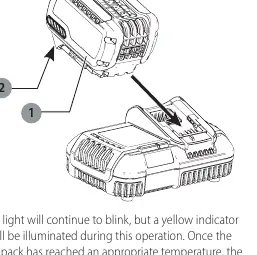
- Plug the charger into an appropriate electrical outlet before inserting the battery pack.
- Insert the battery pack into the charger, ensuring it is fully seated. The red (charging) light will blink repeatedly to indicate that the charging process has started.
- The charger will proceed through two stages:
- Stage 1 Charging: The blink indicator represents the process that charges the majority of the battery's capacity.
- Stage 2 Charging: The blink indicator represents the remainder, or "top off" charge process, to reach full capacity.
- The battery is fully charged when both Stage 1 and Stage 2 charging lights remain ON continuously. You may remove the battery and use it, or leave it in the charger.
Note: To remove the battery pack, some chargers require you to press the battery release button.
Understanding Indicator Lights
The charger uses specific light patterns to indicate the status of the battery:
- Stage 1 Charging: Blinking light.
- Stage 2 Charging: Blinking light.
- Fully Charged: Both lights remain ON continuously.
- Hot/Cold Pack Delay: If the battery is too hot or too cold, the red light will continue to blink, but a yellow indicator light will illuminate. The charger will automatically resume the charging procedure once the battery reaches an appropriate temperature.
Troubleshooting
If the charger does not light up, it may indicate a faulty battery pack or a problem with the charger itself. Compatible chargers will not charge a faulty battery. If the charger indicates a problem, take both the charger and the battery pack to an authorized service center for testing.
Safety Warnings
- Read the tool instruction manual before using any accessory.
- Failure to heed warnings may result in serious personal injury and damage to the tool and accessory.
- Use of any other battery packs may create a risk of injury and fire.
Manufacturer information
DEWALT
Practical help
Common problems
Charger light does not turn on
The charger may not be charging a faulty battery, or there is a problem with the charger itself. Take both to an authorized service center.
Yellow light is on
The battery is too hot or too cold. Wait for it to reach an appropriate temperature; the charger will resume automatically.
Before use
- Ensure the charger is plugged into an appropriate outlet.
- Ensure the battery pack is fully seated in the charger.
- Charge the battery fully before first use.
Specs in practice
- Stage 1 Charging
- Charges the majority of the battery's capacity.
- Stage 2 Charging
- Charges the remainder to reach full capacity.
Images and diagrams
- Fig. A illustrates the battery pack (1) being inserted into the charger and the location of the battery release button (2).
Model compatibility
- Compatible chargers will not charge a faulty battery pack.

Manual page author
Michael Turner
Technical manual editor
Reviews PDF manuals for structure, safety notes, and practical product details so readers can find the right information quickly.