Power / Batteries & Chargers
User Manual for DEWALT 20V MAX* Lithium-Ion Battery
Quick guide for the DEWALT 20V MAX* Lithium-Ion Battery. Learn about installation, charging, LED indicators, safety precautions, maintenance, and troubleshooting.
Quick answers from the manual
Quick answer
- The DEWALT 20V MAX* battery is compatible with all DEWALT 20V MAX* tools. To charge, use a compatible DEWALT charger; the battery can remain in the charger after completion as it enters maintenance mode. p. 1, 3
Key actions
- Install battery by aligning with guide rails and pushing until it clicks. p. 2
- Check power level by pressing the button on top of the battery. p. 2
First start
- Fully charge the battery before first use to activate cell performance. p. 3
Problems and fixes
Battery fails to charge
Clean interface, use compatible charger, or send for inspection.
p. 5Maintenance and reset
- Charge to 40%-60% for long-term storage; clean contacts regularly. p. 5
Technical specifications
| Parameter | Value | Meaning | Pages |
|---|---|---|---|
| Rated Voltage | 20V MAX* (18V Nominal) | Maximum initial voltage vs nominal working voltage. | p. 1 |
Where to find it in the PDF
- Product Overview and Specs p. 1
- Usage and Installation p. 2
- Charging Instructions p. 3, 4
- Safety and Maintenance p. 4, 5
- Troubleshooting and Warranty p. 5, 6
Table of contents
Quick guide from the manual
This document provides essential operating instructions for the DEWALT 20V MAX* Lithium-Ion Battery series. Key takeaways include:
- Compatibility: Designed for all DEWALT 20V MAX* cordless power tools. Not compatible with 12V series tools or chargers.
- Charging: Always use official DEWALT chargers. Fully charge before first use.
- Safety: Do not short-circuit terminals, expose to fire, or disassemble.
- Storage: Store in a cool, dry environment (10°C-25°C). Charge to 40%-60% for long-term storage.
Product Overview
The DEWALT 20V MAX* Lithium-Ion Battery is a high-performance power solution featuring advanced lithium-ion cell technology. It includes an intelligent electronic protection system to prevent overload, overheating, and deep discharge. Note that "20V MAX*" refers to the maximum initial voltage under no-load conditions, with a nominal working voltage of 18V.
Battery Installation and Removal
Installation: Align the battery with the guide rails of the tool's battery interface and push firmly until a "click" sound is heard to confirm it is locked.
Removal: Press the release button on the side of the battery and pull it outwards simultaneously. Do not pull forcefully.
Safety Tip: Ensure the tool switch is in the OFF position before installing or removing the battery to prevent accidental startup.
Power Level Check
Press the power check button on the top of the battery to view the remaining power via the LED indicators:
- 3 lights on: 80%-100% power remaining.
- 2 lights on: 40%-79% power remaining.
- 1 light on: 10%-39% power remaining.
- 1 light flashing: Less than 10% power remaining; charge immediately.
Charging Instructions
Preparation: Use only DEWALT specified chargers (e.g., DCB107, DCB112, DCB118). Ensure interfaces are clean and dry.
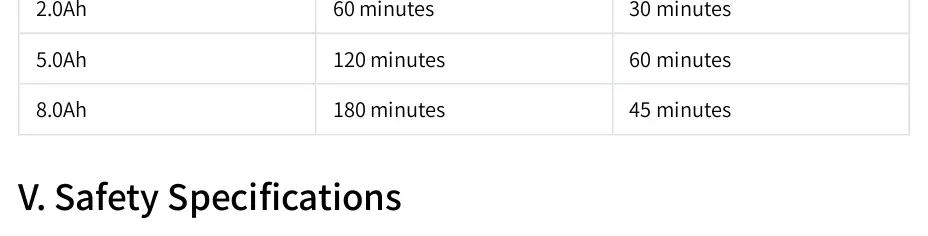
Steps:
- Connect the charger to a power outlet.
- Insert the battery into the charger slot. The indicator will flash to show charging has started.
- Once complete, the indicator will turn solid. The battery can be removed or left in the charger, as it will switch to maintenance mode.
Safety Specifications
Prohibited Behaviors:
- Do not short-circuit positive and negative terminals.
- Do not throw into fire or expose to temperatures above 265°F (130°C).
- Do not disassemble, modify, or puncture the battery case.
- Do not mix DEWALT batteries of different capacities or models.
Maintenance and Care
- Storage: Charge to 40%-60% before long-term storage. Avoid storing fully charged or completely discharged.
- Cleaning: Regularly clean metal contacts with a dry, soft cloth.
- Usage: Avoid prolonged deep discharge; charge promptly after the tool shuts down automatically.
- Charger Care: Keep charger air vents unobstructed.
Troubleshooting
If the battery fails to charge, ensure you are using a compatible DEWALT charger and that the interface is clean. If the battery overheats or shows abnormal behavior (smoke, odor), stop use immediately and contact an authorized service center.
Manufacturer information
DEWALT
Practical help
Common problems
Battery fails to charge
Check for incompatible charger, contaminated interface, or battery malfunction. Clean interface or replace with a dedicated DEWALT 20V charger.
Abnormally slow charging
Battery temperature may be too high/low. Allow to return to room temperature or use a fast charger.
Tool shuts down automatically
Electronic protection system activated (overload/overheat). Stop operation to cool the equipment and retry with reduced load.
No indicator light display
Poor contact or completely discharged. Reinstall battery and charge for 10 minutes.
Before use
- Ensure the tool switch is in the OFF position.
- Verify the charger is a compatible DEWALT 20V MAX* model.
- Check that battery and charger interfaces are clean and free of debris.
- Fully charge the battery before first use.
Specs in practice
- Rated Voltage
- 20V MAX* (Maximum initial voltage), 18V Nominal.
- Charging Temperature
- 50°F - 86°F (10°C - 30°C).
- Storage Temperature
- -4°F - 122°F (-20°C - 50°C).
Images and diagrams
- LED indicators on the battery show remaining charge levels from 10% to 100%.
- Charging indicators on the charger show status (flashing for charging, solid for complete).
Model compatibility
- Compatible with all DEWALT 20V MAX* platform tools.
- Not compatible with 12V series tools or chargers.

Manual page author
David Miller
Documentation analyst
Organizes user manual content into clear summaries, with attention to model details, product context, and everyday usability.