Tools / Power Tools
Dexter 150MD2.52 Mini Drill User Manual
Quick guide for the Dexter 150MD2.52 mini drill. Includes setup, accessory installation, operation, maintenance, and troubleshooting tips.
Quick answers from the manual
Quick answer
- The Dexter 150MD2.52 is a mini drill designed for grinding, sanding, polishing, and cutting metal, glass, wood, and ceramics using appropriate accessories. p. 163
Key actions
- Installing accessories p. 172
- Installing flex shaft p. 173
- Adjusting variable speed p. 173
First start
- Power supply check p. 173
- Switching on/off p. 173
Problems and fixes
Product does not start
Connect to power supply; check by a specialist technician.
p. 175
Product does not reach full power
Use a proper extension cord; connect to another power source; clean the air vents.
p. 175
Unsatisfactory result
Replace with new accessory; use proper accessory.
p. 175Technical specifications
| Parameter | Value | Meaning | Pages |
|---|---|---|---|
| Rated voltage | 220-230V~50Hz | Operating voltage | p. 171 |
| Rated power input | 150W | Power consumption | p. 171 |
| Rated speed | 10000-35000/min | Rotational speed range | p. 171 |
| Max. collet capacity | Ø3.2mm | Maximum accessory shank diameter | p. 171 |
| Max. diameter of the grinder disc | Ø35mm | Maximum disc size | p. 171 |
Where to find it in the PDF
- Intended use p. 163
- Safety instructions p. 163, 164, 165, 166
- Technical data p. 171, 172
- Operation p. 173, 174
- Maintenance p. 174
- Troubleshooting p. 175
- Warranty p. 176
- Detailed view p. 177
Table of contents
Manual images
Click an image to enlargeQuick guide from the manual
This mini drill is designed for grinding, sanding, polishing, and cutting metal, glass, wood, and ceramics using appropriate accessories. Always ensure the power supply matches the tool's specifications before use. Wear appropriate personal protective equipment, including eye protection and a dust mask, during operation.
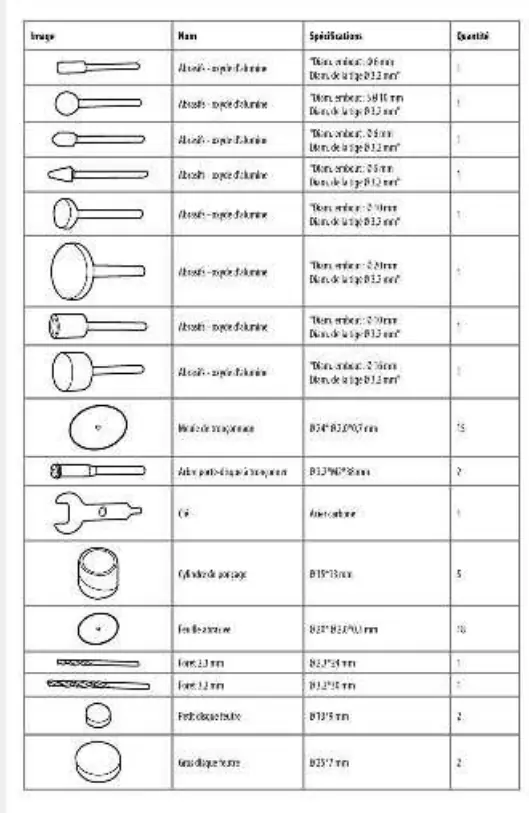
Description
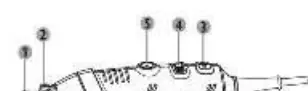
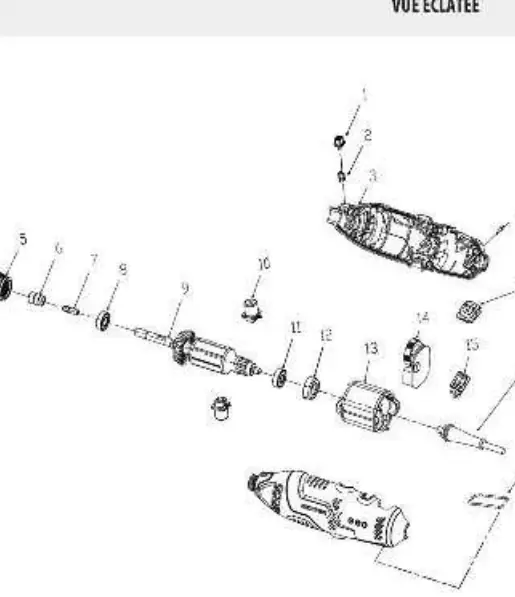
The tool features a spindle lock button for changing accessories, a variable speed dial to adjust performance, and a collet nut to secure bits. Refer to the exploded view diagram for a detailed breakdown of internal components.
Technical data
- Rated power input: 150W
- Rated speed: 10000-19000/min
- Max. collet capacity: 3.2 mm
- Max. diameter of grinding disc: 25 mm
Before use
Installing accessories:
- Press the spindle lock button and rotate the spindle until it locks.
- Keep the button pressed and loosen the collet nut.
- Insert the accessory into the collet.
- Tighten the collet nut securely.
Installing the flex shaft:
- Press the spindle lock button and loosen the collet nut.
- Insert the drive shaft into the collet and tighten the nut.
- Insert the end of the flex shaft into the tool head and tighten.
Operation
Variable speed: Use the speed dial to select the speed best suited for your application. Turn the dial to the left to increase speed and to the right to decrease it.
Switching on/off: Ensure the power supply matches the tool's nameplate. Use the switch to turn the tool on (I) or off (0).
Maintenance
Always disconnect the tool from the power supply before performing adjustments or maintenance. Keep the tool clean and dry. If the carbon brushes need replacement, have this done by a qualified technician. Regularly inspect accessories for cracks or surface defects and replace them if worn.
Troubleshooting
If the tool does not start, check the power supply connection. If it does not reach full power, check the extension cord or power source voltage. If results are unsatisfactory, ensure the accessory is not worn and is appropriate for the material being worked on.
Manufacturer information
Dexter
Practical help
Common problems
Tool does not start
Check if the tool is connected to the power supply.
Tool does not reach full power
Check the extension cord or try a different power source; clean ventilation vents.
Unsatisfactory results
Replace worn accessories or use an accessory appropriate for the material.
Before use
- Ensure the power supply voltage matches the tool's rating.
- Check that accessories are in good condition (no cracks or chips).
- Ensure the collet nut is securely tightened.
- Wear eye protection and a dust mask.
- Ensure the work area is clean and well-lit.
Specs in practice
- Rated power input
- 150W
- Max. collet capacity
- 3.2 mm
Images and diagrams
- 1. Spindle lock button: Used to lock the spindle when changing accessories.
- 4. Variable speed dial: Adjusts the rotation speed of the tool.
Model compatibility
- Max. recommended diameter for mounted wheels/cones: 25 mm.
- Max. recommended diameter for sanding accessories: 25 mm.
- Metal pole length of accessories must be 20-50 mm.

Manual page author
Michael Turner
Technical manual editor
Reviews PDF manuals for structure, safety notes, and practical product details so readers can find the right information quickly.