Home Appliances / Vacuum Cleaners
User Manual for Dexter 20VIW2-350.1 Cordless Impact Wrench
Quick guide for the Dexter 20VIW2-350.1 Cordless Impact Wrench. Learn how to assemble, operate, control speed, and charge the battery.
Quick answers from the manual
Quick answer
- The Dexter 20VIW2-350.1 is a cordless impact wrench. It is operated by inserting a battery, selecting the rotation direction, and using the variable speed trigger. p. 1, 6, 7
Key actions
- Attach socket p. 5
- Insert battery p. 6
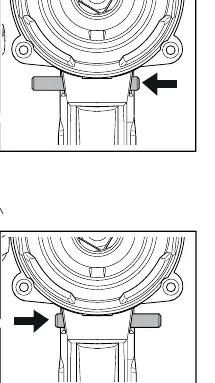
- Set direction p. 7
First start
- Charge the battery fully before first use. p. 9
Where to find it in the PDF
- Assembly p. 5
- Operation p. 6, 7
- Charging p. 9
Table of contents
Manual images
Click an image to enlargeQuick guide from the manual
This manual provides instructions for the Dexter 20VIW2-350.1 Cordless Impact Wrench. It covers assembly, operation, and battery maintenance. Always ensure the battery is charged before use and the tool is handled safely.
Assembly
To attach a socket to the impact wrench:
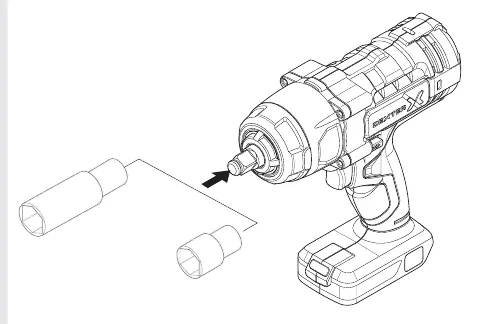
- Align the socket with the anvil of the tool.
- Push the socket firmly onto the anvil until it is securely seated.
Operation
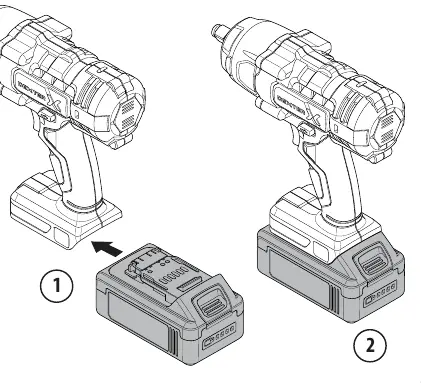
Battery Installation
Slide the battery pack into the base of the tool until it clicks into place. Ensure it is fully engaged.
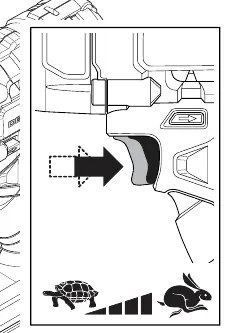
Speed Control
The trigger is pressure-sensitive. Pressing the trigger lightly provides lower speed, while pressing it fully provides maximum speed.
Direction Control
Use the switch located above the trigger to select the rotation direction:
- Forward/Reverse: Push the switch to the left or right to change the rotation direction.
- Lock: Set the switch to the center position to lock the trigger and prevent accidental activation.
Charging
To charge the battery:
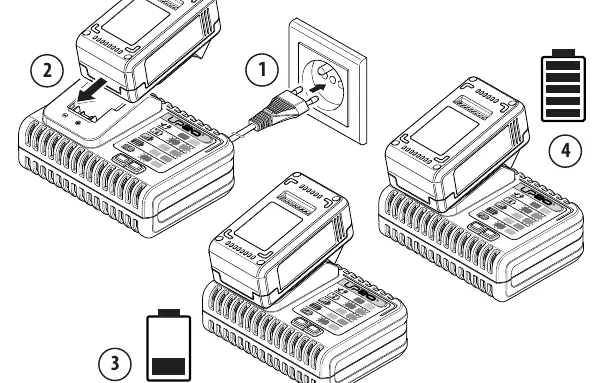
- Connect the charger to a power outlet.
- Slide the battery pack into the charger.
- Observe the indicator lights on the charger to determine the charging status.
Recycling
This product is recyclable. If it can no longer be used, please take it to a waste recycling center.
Manufacturer information
Dexter
Practical help
Common problems
Tool does not start
Check if the battery is fully charged and correctly inserted. Ensure the direction switch is not in the center (locked) position.
Socket falls off
Ensure the socket is properly seated on the anvil.
Before use
- Ensure the battery is charged.
- Select the correct socket size for the fastener.
- Check that the direction switch is set to the desired rotation.
- Ensure the work area is clear.
Images and diagrams
- Page 5: Socket attachment
- Page 6: Battery insertion and speed trigger
- Page 7: Forward/Reverse/Lock switch
- Page 9: Battery charging process
Model compatibility
- Compatible with Dexter battery system.

Manual page author
Michael Turner
Technical manual editor
Reviews PDF manuals for structure, safety notes, and practical product details so readers can find the right information quickly.