Tools / Impact Wrenches
User Manual for Dexter DWD 20 Wet & Dry Vacuum Cleaner
Comprehensive user guide for the Dexter DWD 20 wet and dry vacuum cleaner. Includes assembly, operation, maintenance, safety instructions, and troubleshooting.
Quick answers from the manual
Quick answer
- The Dexter DWD 20 is a 20L wet and dry vacuum cleaner intended for household use on floors, carpets, furniture, and vehicles. It can also be used as a blower. p. 99
Key actions
- Emptying the container p. 106
- Installing the filter p. 105
First start
- Unpack, assemble castors, install the appropriate filter, and connect the hose. p. 104, 105
Problems and fixes
Product does not work
Check power plug connection.
p. 109
Reduced suction power
Empty container or clear blockages.
p. 109Technical specifications
| Parameter | Value | Meaning | Pages |
|---|---|---|---|
| Rated input power | 1300 W | Power consumption | p. 103 |
Where to find it in the PDF
- Technical Data p. 103
- Troubleshooting p. 109
Table of contents
Manual images
Click an image to enlargeQuick guide from the manual
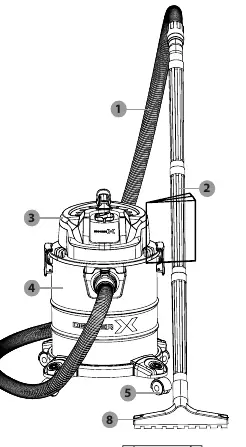
The Dexter DWD 20 is a household wet and dry vacuum cleaner designed for cleaning floors, carpets, furniture, mattresses, cars, and garages. It can also function as a blower. Important: Never vacuum explosive or flammable gases, liquids, reactive dust, strong acids/bases, organic solvents, soot, glowing embers, or hot ash.
Assembly
Before first use, unpack all parts and ensure the delivery is complete. Assembly steps:
- Castors: Turn the metal container upside down and insert the metal shaft of each swivel castor into the plastic holder until it stops.
- Hose: Align the hose coupler with the vacuum connector and push until the clip lock clicks.
- Filters: Always ensure a filter is installed before use. Use the cloth filter bag or dust bag for dry vacuuming. Use the foam filter for wet vacuuming.
Operation
Switching on/off: Ensure all parts are connected and the container lid is locked. Connect to a suitable power outlet and press the switch to position I to start, or 0 to stop.
Emptying the container: Always switch off and unplug the device before emptying. Unlock the latches, remove the container lid, and empty the metal container.
Maintenance and Cleaning
Regular maintenance ensures safe operation and extends product life.
- Cleaning: Keep the product clean, dry, and free from oil or grease. Use a dry cloth and a soft brush for hard-to-reach areas. Do not use aggressive chemical or abrasive detergents.
- Storage: Store in a cool, dry, frost-free, and well-ventilated place, inaccessible to children.
- Transport: Secure the product to prevent slipping or falling during transport.
Troubleshooting
If the product does not work, check if the power plug is connected. If suction power is reduced, the container may be full, or the air path (hose, nozzle, or container) may be blocked. If dust escapes, ensure the container lid is installed correctly.
Manufacturer information
Dexter
Practical help
Common problems
Product does not work
Check if the power plug is connected to the power supply.
Reduced suction power
Empty the metal container and check for blockages in the hose, nozzle, or container.
Dust escaping from the product
Ensure the container lid is installed and locked correctly.
Before use
- Check all parts are connected securely
- Ensure container lid is locked in place
- Ensure the correct filter is installed (foam for wet, bags for dry)
- Check power supply matches the rating label
- Ensure the device is switched off before plugging in
Specs in practice
- Rated input power
- 1300 W
- Protection Class
- II (double insulation)
- Ingress Protection
- IP24 (protected against solid objects over 12.5mm and splashing water)
Images and diagrams
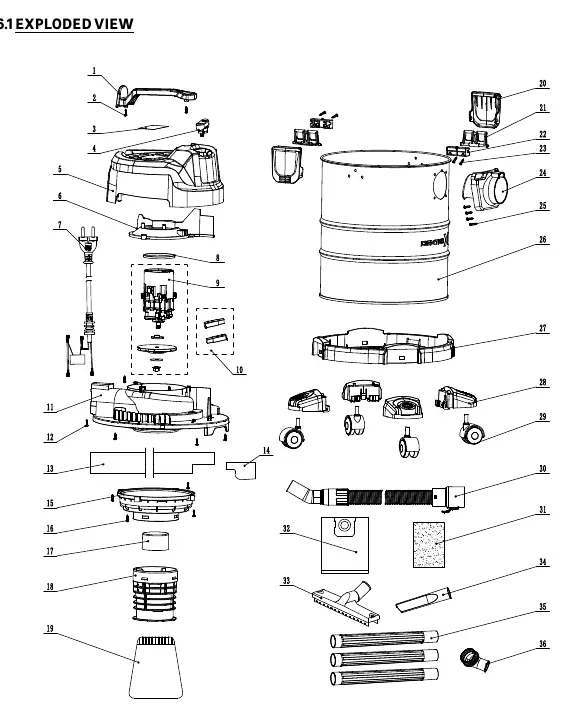
- The exploded view diagram (page 108) illustrates all components for assembly and maintenance reference.
Model compatibility
- Cloth filter bag and dust bag are for dry vacuuming only.
- Foam filter is for wet vacuuming only.

Manual page author
Michael Turner
Technical manual editor
Reviews PDF manuals for structure, safety notes, and practical product details so readers can find the right information quickly.