Tools / Saws
Bauer 20V Dual-Port Charger 2108C-B Owner's Manual
Quick guide for the Bauer 20V Dual-Port Charger (2108C-B). Includes charging instructions, LED status indicators, USB charging, safety warnings, and maintenance tips.
Quick answers from the manual
Quick answer
- The Bauer 2108C-B is a dual-port charger for 20V Lithium-ion batteries. It features two charging slots and USB charging ports for mobile devices. p. 5
Key actions
- Charging batteries p. 6
- Charging USB devices p. 7
First start
- Plug the charger into a grounded 120VAC, 60Hz receptacle and slide the battery pack onto the charger until it clicks. p. 6
Show 4 more answers Show less
Problems and fixes
Red LED blinks
Battery/Charger temperature issue or problem. Allow to cool/warm.
p. 6
Green and Red LEDs blink
Battery or charger may be damaged. Have inspected by a technician.
p. 6Maintenance and reset
- Wipe external surfaces with a clean cloth after use. p. 7
Technical specifications
| Parameter | Value | Meaning | Pages |
|---|---|---|---|
| Input Rating | 120VAC, 60Hz | Power requirements | p. 5 |
| Output | 20VDC / 4A | Charging output | p. 5 |
| USB Output | 2A Max | USB charging capacity | p. 5 |
Where to find it in the PDF
- Safety Information p. 2, 3
- Specifications and Functions p. 5
- Operating Instructions p. 6
- USB Charging and Maintenance p. 7
Table of contents
Manual images
Click an image to enlargeQuick guide from the manual
The Bauer 20V Dual-Port Charger is designed to charge Bauer 20V Lithium-ion battery packs. It features two charging slots and USB charging ports for mobile devices. Always inspect the charger and battery before use, and ensure the charging area is well-ventilated and fireproof.
Safety Information
- Fire Hazard: The charger generates heat. Do not place it on flammable surfaces like carpets or rugs. Keep it at least 1 foot away from flammable objects.
- Battery Handling: Do not charge damaged, cracked, or leaking battery packs. Keep batteries away from metal objects (paperclips, coins, keys) to prevent shorting.
- Environment: Charge indoors only. Do not expose the charger to rain or wet conditions.
- Extension Cords: Extension cords must not be used with this charger.
Operating Instructions
Follow these steps to charge your battery packs:
- Place the battery pack on a dry, fireproof surface in a room with a temperature between 50–104°F.
- Ensure the battery pack is undamaged and is a 20V Lithium-ion type.
- Plug the charger into a grounded 120VAC, 60Hz receptacle.
- Slide the battery pack onto the charger until it clicks. Two battery packs can be charged simultaneously.
- Monitor the LED indicators to determine the charging status.
- Once charged, unplug the charger and disconnect the battery.
LED Status Indicators
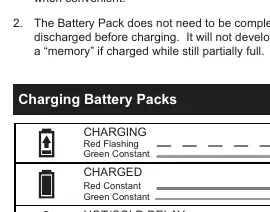
- Charging: Red flashing, Green constant.
- Charged: Red constant, Green constant.
- Hot/Cold Delay: Red flashing, Green off.
- Problem Pack or Charger: Red flashing, Green flashing.
Charging USB Devices
You can charge USB devices (such as cell phones or tablets) simultaneously while charging battery packs:
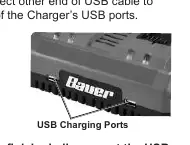
- Connect one end of a USB cable to your device.
- Connect the other end to one of the charger's USB ports.
- Disconnect the cable when finished.
Maintenance and Servicing
- Before Each Use: Inspect the charger for loose hardware, cracked parts, or damaged wiring.
- After Use: Wipe external surfaces with a clean cloth.
- Storage: Store in a dry, indoor area out of reach of children and away from metal objects.
- Servicing: Do not open the charger. All repairs must be performed by a qualified technician.
Manufacturer information
Harbor Freight Tools
Practical help
Common problems
Red LED blinks only
The battery or charger is not within the correct charging temperature range, or there is a problem. Allow them to reach proper temperature.
Green and Red LEDs both blink
The battery pack or charger may be damaged. Have them inspected by a qualified technician.
Battery does not fit
Do not force the battery into the charger. Check terminals for obstructions.
Before use
- Inspect charger for loose hardware or damaged wiring.
- Ensure the outlet is properly grounded.
- Verify the battery pack is not damaged or leaking.
- Ensure the ambient temperature is between 50–104°F.
- Clear the area of flammable objects.
Show more Show less
Specs in practice
- Input Rating
- 120VAC, 60Hz power source required.
Images and diagrams
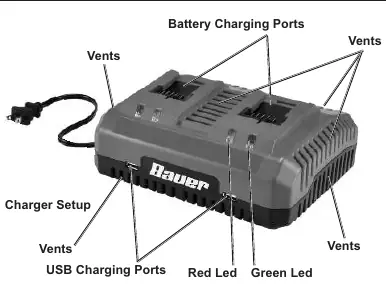
- Battery Charging Ports: Top slots for inserting Bauer batteries.
- Vents: Located on the sides; must remain unobstructed for cooling.
- LED Indicators: Red and Green lights provide status updates.
Model compatibility
- Compatible only with Bauer 20V Lithium-ion battery packs.
- Extension cords are not permitted.

Manual page author
Michael Turner
Technical manual editor