Home / Pet Supplies
Dogtra ARC Handsfree 1-Dog System User Manual
User manual for the Dogtra ARC Handsfree 1-Dog System. Includes setup, training tips, maintenance, charging, and troubleshooting.
Table of contents
Manual images
Click an image to enlargeQuick Guide
The Dogtra ARC Handsfree 1-Dog System is a training e-collar designed for dogs as small as 15 pounds. Before first use, ensure the unit is fully charged for 2 hours. The system features a handheld transmitter, a receiver, and a handsfree remote controller. Always start training at the lowest stimulation level and adjust based on your dog's temperament.
Overview
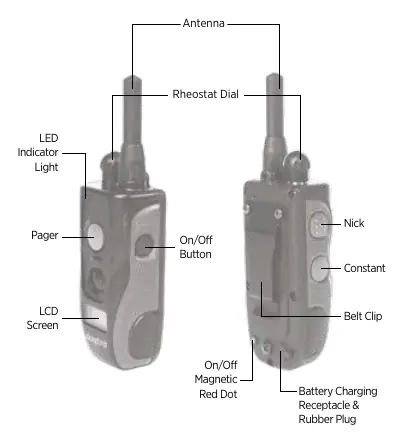
The transmitter features a Rheostat Dial (0-127 levels), Nick and Constant stimulation buttons, a Pager (vibration) button, and an On/Off button. The receiver includes contact points, an LED indicator, and a magnetic On/Off switch.
Turning the System On and Off
To turn the transmitter on, hold the blue button on the right side until the LCD illuminates. To turn it off, hold the same button until the screen displays OFF. To turn the receiver on or off, place the red dot on the back of the transmitter against the red dot on the receiver until the LED light activates.
Handsfree Remote Controller
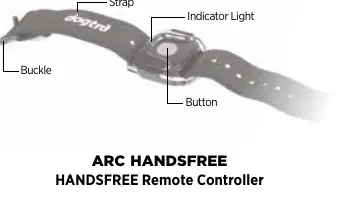
The Handsfree Remote Controller allows for discreet, remote operation of the Nick, Constant, or Pager functions. It must be within 33 feet of the transmitter to function. To change the stimulation mode (default is Constant):
- Ensure the transmitter is off.
- Hold the On/Off button and the desired function button (Nick, Constant, or Pager) on the transmitter until the light blinks rapidly.
- Release the buttons.
- Hold the Handsfree Remote Controller button until both the transmitter and controller show a solid light.
Receiver Fitting
The receiver must be fitted so the stainless steel contact points press firmly against the dog's skin. You should be able to fit two fingers underneath the collar strap. The best location is on either side of the dog's windpipe. Do not leave the receiver on for more than 8 hours at a time to prevent skin irritation.
Stimulation and Training
The system offers two stimulation types: Nick (single pulse) and Constant (continuous stimulation for up to 12 seconds). The Rheostat Dial allows for gradual intensity adjustments. Always begin training with basic obedience commands on a leash before introducing the e-collar.
Charging the Battery
The system uses lithium polymer batteries. To charge:
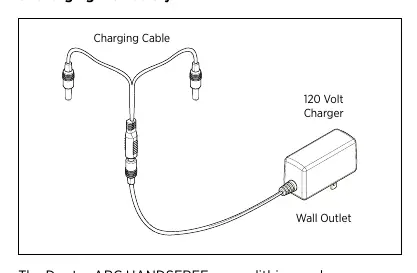
- Open the rubber plugs on the charging receptacles.
- Plug in the charging cable and connect to a power source.
- The unit is fully charged when the indicator light turns green (approx. 2 hours).
- Replace the rubber plugs after charging.
Maintenance and Troubleshooting
Regularly inspect the unit for damage and ensure the charging cap is secure. If the unit is not working, check the following:
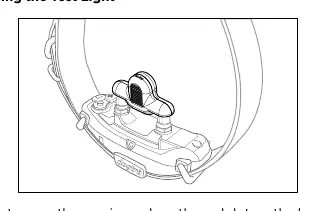
- Ensure both transmitter and receiver are turned on.
- Verify the collar strap is tight enough for contact.
- Check the battery level using the LED indicator.
- If the test light works but you feel no stimulation, your tolerance may be higher than the level tested.
- If the range is poor, ensure the antenna is not covered and you are away from electrical conductors.
Manufacturer information
Dogtra
Practical help
Common problems
Dog is not reacting to the system
Ensure the receiver and transmitter are on, the collar is tight enough for contact, and the stimulation level is high enough.
Test light works, but no stimulation felt
Your tolerance may be higher than the level tested; try increasing the level or check the battery.
No range or stimulation is weak
Ensure the antenna is not covered by your body or objects. Operate away from electrical conductors like cars or metal structures.
Unit is not holding a charge
Clean the charging port with a cotton swab and rubbing alcohol. Ensure the charging pin is not damaged.
Before use
- Charge the unit for 2 hours before first use.
- Ensure the receiver is fitted properly (two fingers under the strap).
- Test the stimulation using the included test light.
- Ensure the transmitter antenna is clear and not covered.
- Check the LED indicator for battery status (Green=Full, Amber=Medium, Red=Needs charge).
Specs in practice
- Rheostat Dial
- Adjusts stimulation intensity from 0 to 127.
Images and diagrams
- Transmitter: Shows buttons, dial, antenna, and LCD screen.
- Receiver: Shows contact points, strap, and charging port.
- Handsfree Controller: Shows the button and strap for remote operation.
Model compatibility
- For dogs as small as 15 pounds.
- Handsfree controller range is 33 feet from the transmitter.
- System range is 3/4-mile in flat terrain.

Manual page author
Michael Turner
Technical manual editor
Reviews PDF manuals for structure, safety notes, and practical product details so readers can find the right information quickly.