Home / Pet Supplies
User Manual for Dogtra ARC 1200S Remote Dog Training Collar
Quick guide for the Dogtra ARC 1200S remote dog training collar. Learn how to operate the transmitter, adjust stimulation levels, charge the device, and troubleshoot common issues.
Table of contents
Manual images
Click an image to enlargeQuick Guide
The Dogtra ARC 1200S is a remote training collar designed to assist in dog training. Before use, ensure the device is fully charged and the collar is fitted correctly. The system features Nick (short pulse), Constant (continuous pulse), and Pager (vibration) modes. Always start with the lowest stimulation level and increase gradually based on your dog's reaction.
Safety Warnings
- Aggressive Dogs: Consult a professional trainer before using this device on aggressive dogs.
- Skin Irritation: Do not leave the collar on for extended periods. Check the dog's neck regularly for irritation. If irritation occurs, consult a veterinarian.
- Accidental Activation: The device has a safety feature that stops stimulation if the button is held for more than 12 seconds.
- Interference: Keep away from other electronic devices. If you use a medical device, consult your doctor before using this collar.
Device Overview
The system consists of a transmitter and a receiver collar. The transmitter features a rheostat dial for stimulation levels (0-127), a pager button, and mode selection buttons (Nick/Constant).

Operation
Turning On/Off: Press the blue button on the side of the transmitter to turn it on or off. For the receiver, press the blue button until the LED indicator lights up.
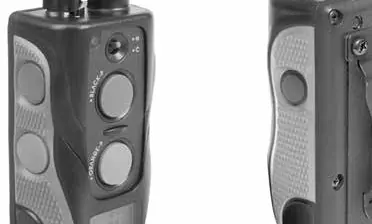
Stimulation Modes:
- Nick: Delivers a single, rapid electrostatic pulse.
- Constant: Delivers a continuous pulse as long as the button is pressed (up to 12 seconds).
- Pager: Delivers a vibration without electrostatic stimulation.
Adjusting Levels: Use the rheostat dial on the transmitter to set the intensity from 0 to 127. Always start at the lowest level.
Charging
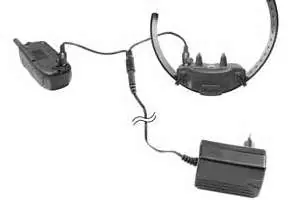
The device uses lithium-polymer batteries. Charge fully before the first use. A full charge takes approximately 2 hours. The LED indicator shows battery status: Green (Full), Yellow (Half), Red (Needs charging). Always close the rubber charging port covers after charging.
Maintenance and Troubleshooting
If the device is not working correctly, check the following:
- Ensure the receiver is turned on.
- Check that the collar is tight enough for the contact points to touch the skin.
- If the dog does not respond, try trimming the hair in the contact area or using longer contact points.
- Test the stimulation on your own hand (touching both contact points) to verify the device is working.
- If the range is poor, avoid touching the antenna and hold the transmitter high.
Manufacturer information
Dogtra
Practical help
Common problems
Dog not responding to stimulation
Ensure the receiver is on, the collar is tight enough for contact points to touch the skin, and the battery is charged. Consider using longer contact points if the dog has thick fur.
No stimulation felt
Test the device on your own fingers or wrist. You must touch both contact points simultaneously to feel the stimulation.
Short range
Do not touch the antenna while using the transmitter. Hold the transmitter vertically above your head or move to higher ground.
LED flashing red
The battery is low and needs to be charged immediately.
Before use
- Charge the device fully for 2 hours.
- Ensure the receiver is turned on.
- Fit the collar so that contact points touch the skin (one finger space).
- Test the stimulation level on yourself first.
- Check that the rubber charging port covers are closed.
Images and diagrams
- Transmitter button layout for Nick, Constant, and Pager modes.
- Charging port location on the receiver and transmitter.
- Correct collar fitment showing contact points against the skin.
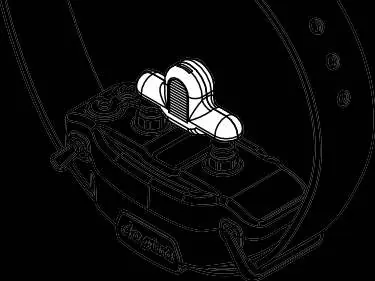
- Using the test light to verify stimulation output.
Model compatibility
- ARC 1200S is designed for one dog.
- ARC 1202S is designed for two dogs.

Manual page author
Michael Turner
Technical manual editor
Reviews PDF manuals for structure, safety notes, and practical product details so readers can find the right information quickly.