Automotive / RV Appliances
Dometic REF-FANKIT Installation Guide for 10-Series Absorption Refrigerators
Installation guide for the Dometic REF-FANKIT, designed for 10-Series absorption refrigerators. Includes wiring diagrams, mounting instructions, and safety requirements for professional installation.
Table of contents
Manual images
Click an image to enlargeQuick guide from the manual
The Dometic REF-FANKIT is an accessory kit designed for 10-Series absorption refrigerators. This document provides the necessary steps for mounting the fan and connecting the electrical wiring. Important: Electrical installation and repairs must only be performed by a qualified specialist in accordance with applicable regulations and standards.
Safety and installation requirements
Before beginning the installation, ensure the refrigerator is disconnected from all power sources (12V and 230V). The installation must be carried out by a professional to ensure safety and compliance with local regulations. Verify that your refrigerator model is part of the 10-Series (e.g., RMD, RML, RM(S), or RMDT) before proceeding.
Mounting the fan
The fan unit is mounted to the rear of the refrigerator cooling unit. Follow the specific diagram for your model:
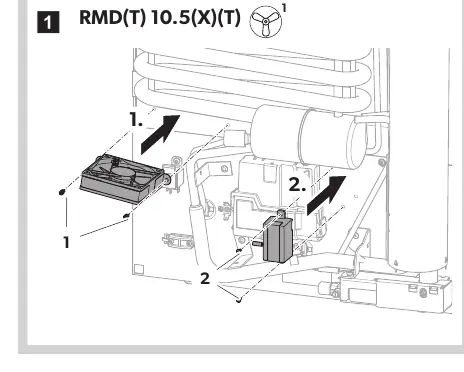
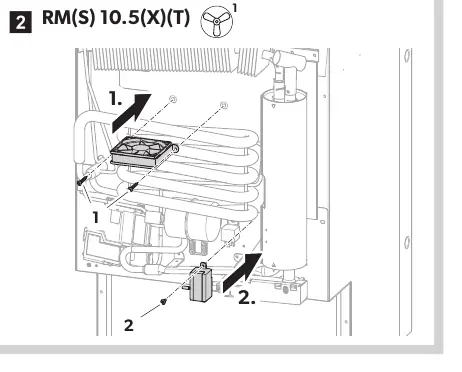
- Identify the mounting location on the cooling unit as shown in the diagrams for your specific model (RMD, RML, or RM(S)).
- Secure the fan unit using the provided mounting points.
- Ensure the fan is positioned correctly to allow for proper airflow across the cooling fins.
Wiring connections
The electrical connection involves connecting the fan to the refrigerator's Options Module. Follow these steps:
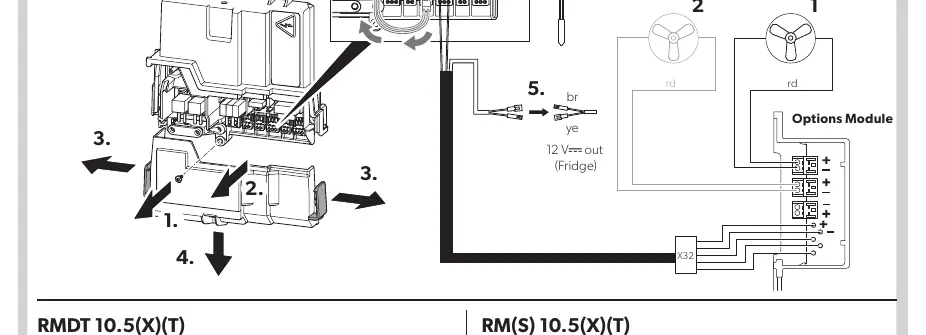
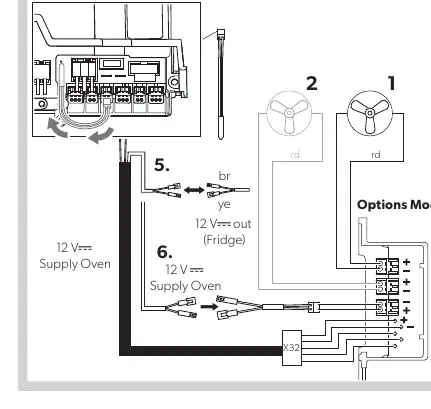
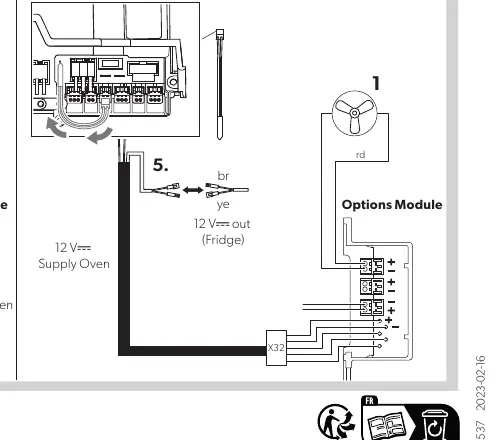
- Locate the Options Module on the back of the refrigerator.
- Connect the fan wiring to the designated ports on the Options Module.
- Ensure the wiring is routed correctly and secured to prevent interference with other components.
- For specific models like the RMDT 10.5(X)(T), ensure the 12V supply for the oven is connected according to the provided wiring diagram.
- Verify all connections are tight and secure before restoring power.
Manufacturer information
Dometic
Practical help
Common problems
Fan not operating after installation
Verify that the wiring connections to the Options Module are secure and that the 12V power supply is active.
Incorrect wiring configuration
Consult the specific wiring diagram for your model (RMD, RML, RM(S), or RMDT) to ensure the 'br' (brown) and 'ye' (yellow) wires are connected to the correct terminals.
Before use
- Ensure the refrigerator is disconnected from all power sources (12V and 230V).
- Verify the refrigerator model is a 10-Series unit.
- Confirm that a qualified specialist is performing the installation.
- Check that all necessary tools are available.
- Ensure the fan unit is securely mounted to the cooling fins.
Specs in practice
- Options Module
- The control board on the refrigerator where the fan must be connected.
Images and diagrams
- Mounting diagrams show the physical placement of the fan on the cooling unit.
- Wiring diagrams illustrate the connection points between the fan and the Options Module.
- Specific diagrams are provided for RMD, RML, RM(S), and RMDT model variants.
Model compatibility
- Compatible with Dometic 10-Series absorption refrigerators.
- Specific wiring configurations apply to RMD 10.5(X)(T), RML 10.4(S)(T), RM(S) 10.5(X)(T), and RMDT 10.5(X)(T) models.

Manual page author
Emily Carter
User documentation editor
Prepares concise manual descriptions and highlights the most useful setup, operation, and maintenance information for readers.