Tools / Power Tools
Draper 24703 5V & 12V Injector Tester
Quick guide for the Draper 24703 5V & 12V Injector Tester. Learn how to connect, select injector types (EFI/GDI), choose pulse modes, and perform fuel delivery fault testing safely.
Table of contents
Manual images
Click an image to enlargeQuick guide from the manual
The Draper 24703 Injector Tester is designed to electronically operate fuel injectors individually to diagnose issues like blockages, sticking, or leaks. It supports both 12V EFI and 5V GDI systems. Always ensure the vehicle engine is switched off before use and wear eye protection.
Intended Use
This device is suitable for enthusiasts and tradespersons. It is designed for electronic fuel injection (EFI) and gasoline direct injection (GDI) systems. It is not suitable for diesel or other fuel systems. The tester features four selectable modes (Short, Medium, Long, Continuous) and includes extension leads for restricted engine bays.
Safety Information
- Always switch off the engine before using the tester.
- Use in a well-ventilated area; do not smoke or use near flames.
- Do not spill fuel on a hot engine.
- Use only a 12V DC vehicle battery. Do not use 24V or other voltages.
- Do not exceed the maximum current: 1A for 12V and 2A for 5V.
- Do not use the device if the tester or leads are damaged.
- The device contains no user-serviceable parts; do not attempt repairs.
Operation
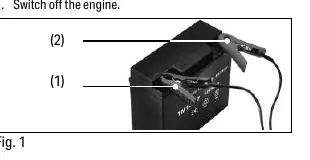
- Connect to Battery: Connect the black (-) clip to the negative terminal and the red (+) clip to the positive terminal of the vehicle battery.
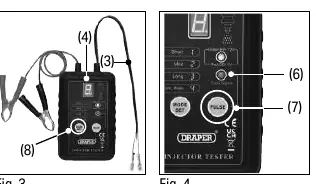
- Select Injector Type: Press and hold the 'Mode/Injector Type Setting' button (8). The indicator will show Red for GDI (Gasoline Direct Injection) or Green for EFI (Electronic Fuel Injection).
- Connect to Injector: Disconnect the injector connector from the vehicle and connect the 'Output signal connector' (3) to the injector.
- Select Mode: Press the 'Mode/Injector Type Setting' button to cycle through Short, Medium, Long, and Continuous modes. The mode number will appear on the screen.
- Generate Pulse: Press the 'Pulse' button (7) to start. The 'Pulse indicator' (6) will flash. Press the button again to stop.
Pulse Modes
The tester provides different pulse counts and widths depending on the injector type selected:
- GDI Injector Test: Modes range from 1 pulse (100ms) to 50 pulses every 2500ms (20ms width).
- EFI Injector Test: Modes range from 1 pulse (250ms) to 50 pulses every 1500ms (8ms width).
Maintenance
Wipe the case with a damp cloth and a mild detergent. Do not use solvents or abrasives. Dispose of the product responsibly at the end of its working life; do not dispose of it with domestic waste.
Manufacturer information
Draper Tools
Practical help
Common problems
Tester does not power on or function
Ensure the battery clips are securely connected to a 12V DC vehicle battery (Red to +, Black to -).
Injector not activating
Verify the correct injector type (EFI or GDI) is selected using the Mode/Injector Type Setting button. Check that the output signal connector is properly attached.
Damaged leads
Do not use the device if the tester or leads are damaged in any way.
Before use
- Wear eye protection.
- Switch off the vehicle engine.
- Ensure the work area is well-ventilated.
- Verify the injector type (EFI or GDI).
- Confirm the battery is 12V DC.
Specs in practice
- Max Current (12V)
- 1A.
- Max Current (5V)
- 2A.
Images and diagrams
- Fig 1: Battery connection procedure.
- Fig 2: Mode/Injector Type Setting button location.
- Fig 3: Connecting the output signal connector to the injector.
- Fig 4: Pulse indicator operation.
Model compatibility
- Only for EFI and GDI systems.
- Not suitable for diesel systems.
- Requires 12V DC vehicle battery.

Manual page author
David Miller
Documentation analyst
Organizes user manual content into clear summaries, with attention to model details, product context, and everyday usability.