Tools / Power Tools
User Manual for Draper 10.8V Oscillating Multi-Tool 08953
Quick guide for the Draper 10.8V Oscillating Multi-Tool (08953). Learn how to operate, change accessories, adjust speed, and maintain your tool safely.
Table of contents
Manual images
Click an image to enlargeQuick guide from the manual
The Draper 10.8V Oscillating Multi-Tool (08953) is designed for sawing, cutting, scraping, and sanding. It is compatible with the Draper 10.8V Interchangeable Battery System. Before use, ensure the tool is switched off and the battery is removed when changing accessories. Always wear appropriate personal protective equipment (PPE) including safety glasses, a face mask, and gloves.
Product description
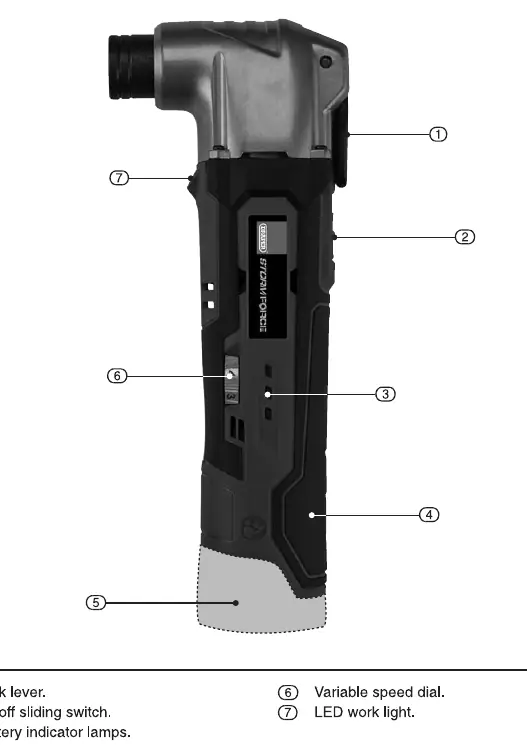
The tool features a lock lever for accessory changes, an on/off sliding switch, a variable speed dial (6 settings), an LED work light, and battery indicator lamps. The battery pack is sold separately.
Unpacking and checking
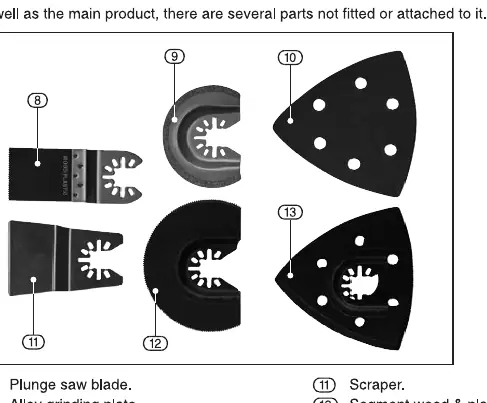
Upon unpacking, check the contents against the manual. The box typically includes the multi-tool, a plunge saw blade, an alloy grinding plate, sanding papers, a scraper, a segment wood & plastic saw blade, and a sanding pad. Retain packaging until the warranty period expires.
Preparing the multi-tool
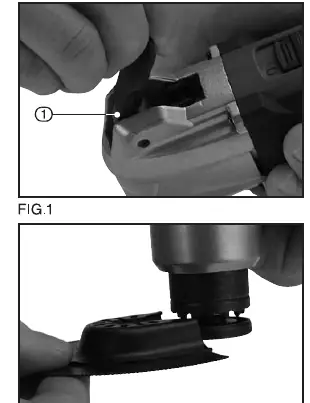
Fitting accessories: Ensure the tool is switched off and the battery is removed. Open the lock lever fully, place the accessory onto the tool flange ensuring protrusions fit the holes, and return the lock lever to its original position to lock.
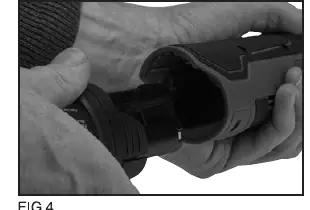
Fitting a battery: Align the battery cartridge with the grooves of the tool and slide it into place until it locks with a click.
Operation
On/Off Switch: Slide the switch up to the 'I' (on) position to start and down to the 'O' (off) position to stop.
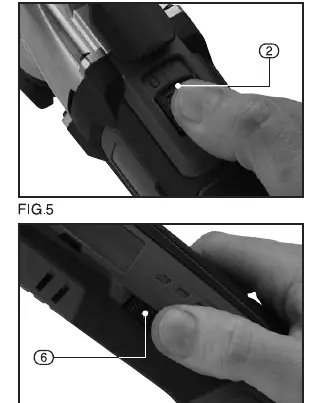
Variable Speed Dial: Use the dial to select one of 6 speeds. Do not force the dial directly from 1 to 6; move it through intermediate numbers.
LED Work Light: Illuminates automatically when the tool is switched on.
Battery Power Indicators: Lights illuminate for 5 seconds upon starting. 3 lights indicate fully charged, 2 lights indicate 30-60% capacity, and 1 light indicates 10-30% capacity.
Maintenance and troubleshooting
Regularly clean the ventilation slots to prevent motor overheating. If the motor does not start, check if the battery is charged or faulty. If the motor runs slowly, check the battery charge. If the battery does not charge, check the charger fuse or the charger itself.
Safety information
Always keep the work area tidy. Do not overload the tool. Wear appropriate PPE. Do not operate near flammable materials. Ensure the tool has come to a complete stop before setting it down. Do not use water on the workpiece surface.
Manufacturer information
Draper Tools
Practical help
Common problems
Motor does not start
Re-charge the battery or replace it if faulty.
Motor runs slowly or loses power
Re-charge the battery or replace it if faulty.
Battery pack does not charge
Check for a blown fuse in the charger plug or replace the charger.
Before use
- Inspect the tool for any damage from shipping.
- Ensure the tool is switched off before installing the battery.
- Remove the battery before changing accessories.
- Check that the sanding pad is free of cracks or breakage.
- Wear safety glasses, face mask, and protective gloves.
- Ensure the workpiece is securely clamped.
Specs in practice
- Speed (no load)
- 5,000 - 16,000 rpm, adjustable via 6 settings.
Images and diagrams
- Fig 6.1: Identification of parts including lock lever, switch, and speed dial.
- Fig 7.3: Identification of included accessories like blades and sanding pad.
- Fig 1-3: Procedure for fitting accessories using the lock lever.
- Fig 4: Procedure for fitting the battery pack.
- Fig 5-8: Operation of the switch, speed dial, LED light, and battery indicators.
Model compatibility
- Compatible with Draper 10.8V Interchangeable Battery System.

Manual page author
Michael Turner
Technical manual editor
Reviews PDF manuals for structure, safety notes, and practical product details so readers can find the right information quickly.