Automotive / Car Audio
User Manual for DS18 PRO-CFX 2-Way Passive Crossover
Quick guide for the DS18 PRO-CFX 2-Way Passive Crossover. Includes wiring diagrams, technical specifications, and tweeter attenuation settings.
Quick answers from the manual
Quick answer
- The DS18 PRO-CFX is a 2-way passive crossover that splits audio signals at 3.5kHz. It handles up to 300W and features adjustable tweeter attenuation terminals (-3dB and -6dB). p. 2
Key actions
- Connect amplifier to IN terminals, woofer to W terminals, and tweeter to the desired attenuation terminal. p. 3
Problems and fixes
Tweeter output level adjustment
Use the specific terminals labeled 0dB, -3dB, or -6dB to adjust the tweeter volume.
p. 3Technical specifications
| Parameter | Value | Meaning | Pages |
|---|---|---|---|
| Power Handling | 300 Watts | Maximum power capacity | p. 2 |
| Crossover Point | 3.5kHz | Frequency split point | p. 2 |
Where to find it in the PDF
- Specifications p. 2
- Wiring Diagram p. 3
Table of contents
Manual images
Click an image to enlargeQuick guide from the manual
The DS18 PRO-CFX is a 2-way passive crossover designed to split audio signals into high and low frequencies for your speaker system. This manual provides the necessary wiring configurations and technical specifications to ensure proper installation and performance.
Technical Specifications
- Crossover Type: 2-Way (High and Low Frequency)
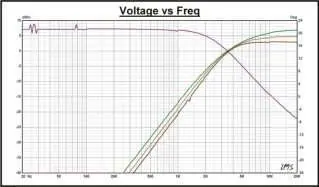
- Crossover Point: 3.5kHz (@ 4 Ohms)
- Power Handling: Up to 300 Watts
- Cut-Off Slope: 12 dB/oct
- Tweeter Attenuation: -3 dB / -6 dB
- Dimensions: 6.3" x 3.5" x 1.5" (160mm x 88mm x 38mm)
Wiring and Connections
Proper connection is essential for the correct operation of the crossover. Ensure all connections are secure and polarity is observed.
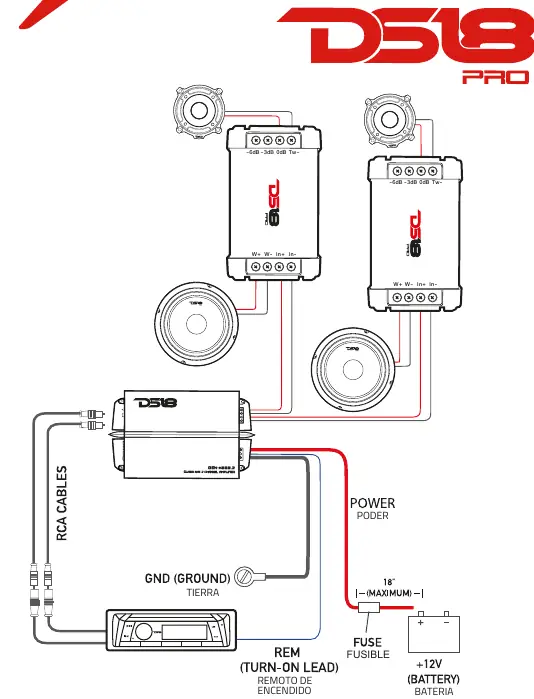
- IN+ / IN-: Connect these terminals to the output of your amplifier.
- W+ / W-: Connect these terminals to your woofer speaker.
- Tweeter Terminals: Connect your tweeter to the desired attenuation terminal:
- TW- (Negative): Common negative for the tweeter.
- 0dB (Positive): Full output level.
- -3dB (Positive): Attenuated output level (-3dB).
- -6dB (Positive): Attenuated output level (-6dB).
Tweeter Attenuation
The PRO-CFX allows you to adjust the tweeter output level to match your system's sound profile. By selecting the 0dB, -3dB, or -6dB terminal, you can reduce the tweeter's volume relative to the woofer without needing external components.
Manufacturer information
DS18
Practical help
Common problems
Tweeter is too loud compared to the woofer
Connect the tweeter positive wire to the -3dB or -6dB terminal instead of the 0dB terminal.
No sound from speakers
Verify that the amplifier is connected to the IN terminals and that the speaker wires are connected to the W terminals with correct polarity.
Before use
- Verify amplifier impedance is compatible (designed for 4 Ohms).
- Ensure power handling of the system does not exceed 300 Watts.
- Identify the correct terminals for Tweeter (TW), Woofer (W), and Input (IN).
- Determine desired tweeter attenuation level (0dB, -3dB, or -6dB).
Specs in practice
- 3.5kHz Crossover Point
- The frequency at which the signal is split between the woofer and tweeter.
- 12 dB/oct Slope
- The rate at which the signal is attenuated outside the crossover frequency range.
Model compatibility
- Designed for 4 Ohm systems.
- Maximum power handling is 300 Watts.

Manual page author
David Miller
Documentation analyst
Organizes user manual content into clear summaries, with attention to model details, product context, and everyday usability.