Garden / Outdoor
East Oak 072622DB Deck Box Lock User Guide
Quick guide for the East Oak 072622DB Deck Box Lock, covering default combination, unlocking procedures, and how to set a new custom combination.
Table of contents
Manual images
Jump to the sectionQuick guide from the manual
This document provides instructions for operating the East Oak Deck Box Lock. The default factory combination is 0-0-0-0. Ensure you align the code with the indicator line on the front side of the lock for proper operation.
To open the lock
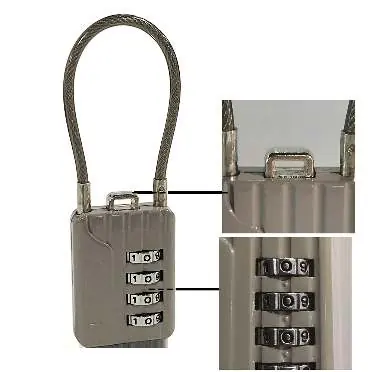
- Ensure the combination is set to the correct code (default is 0-0-0-0).
- Align the code with the indicator line on the front side.
- Press the button located on the top of the lock to release the shackle.
Create a new combination
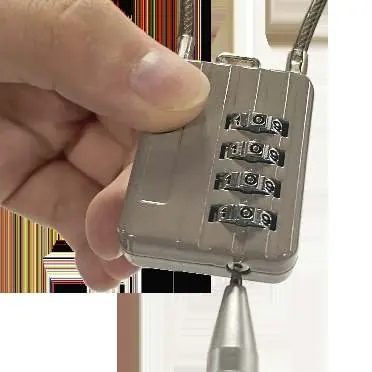
- Set the current combination to 0-0-0-0 on the front side.
- Open the lock by pressing the top button.
- While the lock is open, insert a metal rod or thin stick into the small keyhole located at the bottom of the lock body.
- While maintaining pressure on the bottom keyhole with the rod, rotate the number dials to your desired new combination.
- Once the new combination is set, remove the metal rod from the keyhole. Your new code is now active.
Support
If you have any questions or concerns regarding the quality of your product, you can contact the team at [email protected] or call 1-833-327-8625 (USA). The team aims to reply within 24 hours.
Practical help
Common problems
Lock will not open
Ensure the combination is correctly aligned with the indicator line on the front side and that you are using the correct code (default is 0-0-0-0).
Before use
- Verify the lock is set to the default 0-0-0-0 combination.
- Locate the indicator line on the front side of the lock.
- Have a thin metal rod or stick ready for the combination change process.
Images and diagrams
- The front side features the number dials and the indicator line for code alignment.
- The top button is used to release the lock shackle.
- The bottom keyhole is used exclusively for setting a new combination.

Manual page author
Emily Carter
User documentation editor
Prepares concise manual descriptions and highlights the most useful setup, operation, and maintenance information for readers.