Automotive / Electrical Accessories
Kids Watch 1HPLOTG0W Quick Start Guide
A quick start guide for the Kids Watch 1HPLOTG0W. Learn how to install a 2G SIM card, connect to the network, obtain the registration code, and bind the device to the SeTracker2 app.
Quick answers from the manual
Quick answer
- To set up the watch, insert a 2G SIM card, turn on the device, wait for the network arrows to appear, and use the 'Register code' option in the 'Device info' menu to bind it to the SeTracker2 app. p. 1
Key actions
- Insert SIM card and turn on the watch. p. 1
- Bind the watch using the SeTracker2 app. p. 1
First start
- Wait 5 to 10 minutes after turning on the watch for it to connect to the network. p. 1
Show 2 more answers Show less
Problems and fixes
Only signal is visible, no registration code.
The watch is not connected to the 2G network. Move to a wide-open outdoor area.
p. 1Where to find it in the PDF
- Quick Start Guide p. 1
Table of contents
Quick Start Guide
Follow these steps to obtain the registration code for your Kids Watch:
- Turn off the watch before proceeding.
- Insert a SIM card that supports a 2G network.
- Turn on the watch.
- Wait 5 to 10 minutes for the device to initialize.
- Verify network connection: Ensure the watch screen displays both signal bars and arrows pointing up and down.
- Navigate to Device info on the watch menu.
- Select Register code.
- Open the SeTracker2 app on your smartphone and log in.
- Scan the registration code displayed on the watch screen.
- Bind the watch with the app.
Troubleshooting Connectivity
If you are having trouble generating the registration code, check the status icons on the watch screen:
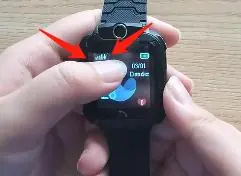
- Signal only: The watch can make and receive calls, but it is not connected to the 2G network required to generate the registration code.
- Signal with arrows (up and down): The watch is successfully connected to the local 2G network and should be able to generate the registration code.
Network Tips
If the 2G network signal is weak, which often occurs indoors, the watch may fail to connect. In this case, move to a wide-open outdoor area and repeat the setup steps. When the network is strong, connection typically takes 2 to 3 minutes; otherwise, it may take 5 to 10 minutes.
Practical help
Common problems
No registration code generated
Ensure the watch shows both signal bars and up/down arrows. If only signal is visible, move to an outdoor area with better 2G coverage.
Watch cannot connect to network
Ensure the SIM card supports 2G networks and try the setup in a wide-open outdoor area.
Before use
- Turn off the watch before inserting the SIM card.
- Verify the SIM card supports 2G networks.
- Ensure you are in an area with good 2G network coverage.
- Download the SeTracker2 app.
Show more Show less
Images and diagrams
- The watch screen displays signal strength and network activity arrows.
- Arrows pointing up and down indicate an active 2G network connection.
Model compatibility
- Requires a SIM card that supports 2G networks.

Manual page author
Michael Turner
Technical manual editor