Wearables / Fitness Trackers
User Manual for Timex 09L095000 Digital Activity Tracker
Quick guide for the Timex 09L095000 Digital Activity Tracker. Learn how to set time, use alarms, track steps, and operate the stopwatch.
Table of contents
Manual images
Click an image to enlargeQuick guide from the manual
The Timex Digital Activity Tracker is a versatile timepiece featuring step counting, stopwatch functionality, dual alarms, and an Indiglo backlight. It is water-resistant to 3ATM. The device operates using four pushers (A, B, C, D) to navigate modes and adjust settings.
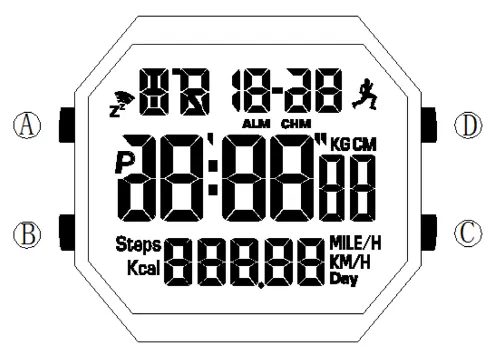
Button functions
- Pusher A: Short press to turn on the backlight. Long press for 3 seconds in function modes to enter setting state.
- Pusher B: Switch between basic function modes. In setting state, press to select the value to be adjusted. Long press in Normal Time Mode for 3 seconds to delete current motion data.
- Pusher C: In Normal Time Mode, long press for 3 seconds to toggle step counting on or off. In History Mode, view 7-day data. In Stopwatch Mode, reset the timer.
- Pusher D: In Normal Time Mode, view steps, calories, distance, and speed. In Stopwatch Mode, start or pause timing. In setting state, adjust values upward.
Operating modes
Press Pusher B once to toggle between the three main modes:
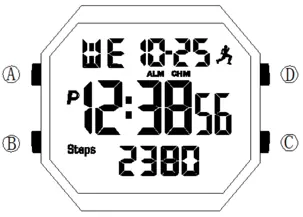
- Normal Time Mode: Displays time, date, and step data.
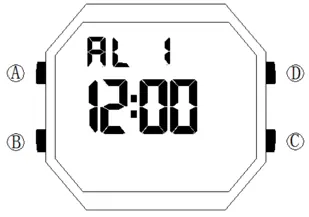
- Alarm Mode: Manage Alarm 1 and Alarm 2.
- Stopwatch Mode: Measure time with a range of up to 23 hours, 59 minutes, and 59 seconds.
Step counting
To enable or disable step counting, long press Pusher C for 3 seconds in Normal Time Mode. When the Pedometer Icon is on, the watch saves step data. Note that the watch requires at least 15 steps before the display updates. If the watch is at rest for more than 3 minutes, it enters power-saving status.
Time, date and alarm settings
To adjust time, date, or alarm settings, press and hold Pusher A for 3 seconds to enter the setting state. The selected value will flash. Use Pusher D to adjust the value incrementally (hold for rapid adjustment). Press Pusher B to select the next value. Press Pusher A or wait 60 seconds to confirm and return to Normal Time Mode.
Battery replacement
If the display dims or becomes blank, replace the battery with a CR2032 or equivalent lithium battery.
Manufacturer information
Timex Group USA, Inc.
Practical help
Common problems
Display is dim or blank
Replace the battery with a CR2032 or equivalent.
Step count not updating on display
The watch requires at least 15 steps to be taken before the display updates.
Watch enters power saving mode
This occurs automatically if the watch is at rest for longer than 3 minutes.
Before use
- Ensure the battery is installed correctly.
- Set the current time and date using the setting mode.
- Enable the pedometer function if you wish to track activity.
- Verify the alarm settings if you intend to use the alarm feature.
Specs in practice
- 12/24 hours system
- The watch supports both 12-hour and 24-hour time display formats.
Images and diagrams
- Pusher A: Backlight and setting mode entry.
- Pusher B: Mode switching and value selection.
- Pusher C: Step counting toggle and stopwatch reset.
- Pusher D: Data viewing and value adjustment.
Model compatibility
- Step counting data is saved for up to 7 days.
- Stopwatch maximum range is 23 hours, 59 minutes, 59 seconds.

Manual page author
David Miller
Documentation analyst
Organizes user manual content into clear summaries, with attention to model details, product context, and everyday usability.