Lighting / Smart Lighting
User Guide for Ecosmart 12A19060WRGBWH1 Smart Bulb
Quick guide for the Ecosmart 12A19060WRGBWH1 A19 Smart Bulb. Includes setup instructions, Hubspace app configuration, troubleshooting, and technical specifications.
Table of contents
Quick guide from the manual
This smart bulb is designed for use with the Hubspace app. To ensure successful setup, please note the following requirements:
- Network: Requires a 2.4GHz Wi-Fi network.
- App: Download the Hubspace app from the App Store or Google Play Store.
- Setup: You must scan the QR code located on the bulb housing or the Quick Start Guide from within the Hubspace app.
- Compatibility: Do not use with standard incandescent dimmers or in totally enclosed fixtures.
Safety Information
Please adhere to the following safety warnings to ensure proper operation and longevity of the bulb:
- Indoor Use Only: Do not use where directly exposed to water.
- Dimmers: This lamp will not operate properly when connected to a standard incandescent dimmer or dimming control.
- Enclosed Fixtures: Not for use in totally enclosed fixtures.
- Emergency Exits: This device is not intended for use with emergency exits.
- Maintenance: Turn off power before inspection, installation, or removal. Do not open; there are no user-serviceable parts inside.
Operation
Follow these steps to set up your smart bulb:
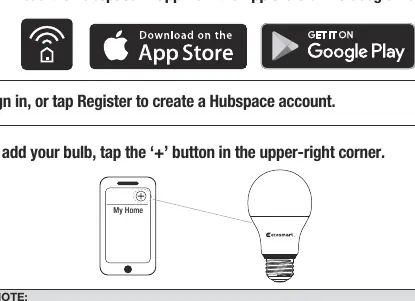
- Download the Hubspace app and sign in or register for an account.
- Power on the bulb.
- In the Hubspace app, tap the '+' button in the upper-right corner to add a device.
- Scan the QR code printed on the bulb or the Quick Start Guide.
- If you cannot scan the QR code, you can enter the code manually or use the search function in the app to find the device.
- Follow the on-screen instructions to connect the bulb to your 2.4GHz Wi-Fi network.
Control and Features
Once connected, you can manage your lighting through the Hubspace app:
- Dimming: Adjust brightness levels directly in the app.
- Colors: Select from shades of white or the full color spectrum.
- Groups: Organize bulbs into groups or rooms for simultaneous control.
- Schedules: Program the bulbs to turn on and off automatically.
- Voice Assistants: Connect your bulb to Google Assistant or Alexa via the Hubspace app.
Troubleshooting
If you encounter issues, check the following:
- Wi-Fi Connection: Ensure the bulb is powered and your 2.4GHz Wi-Fi network is active and within range.
- QR Code Issues: If the code is damaged or unreadable, use the manual entry option or the search function in the app.
- Offline Status: If the bulb is frequently offline, check your Wi-Fi signal strength or consider using a mesh Wi-Fi system or extender.
Bulb Specifications
- Model: 12A19060WRGBWH1
- Input: 120V AC, 60Hz
- Power: 8.5W
- Brightness: 800 Lumens
- Efficacy: 94 LM/W
- CRI: 90
For further assistance, contact Hubspace Customer Service at 1-877-592-5233 or visit HOMEDEPOT.COM/Hubspace.
Official resources from the manual
Manufacturer information
EcoSmart
Practical help
Common problems
Not connecting to Wi-Fi
Ensure the bulb is powered, you have a 2.4GHz Wi-Fi network, and the bulb is within range of your router.
Cannot find the QR code
The QR code is printed on the bulb housing. A copy is also included in the product documentation.
QR code will not scan
Ensure you are scanning from inside the Hubspace app. If it fails, use the manual setup option or enter the code numbers manually.
Product is offline
Check your Wi-Fi signal strength. You may need to move your router closer or use a Wi-Fi extender.
Before use
- Ensure you have a 2.4GHz Wi-Fi network available.
- Download the Hubspace app.
- Create a Hubspace account.
- Verify the fixture is not totally enclosed.
- Ensure no standard dimmer switch is connected to the fixture.
Images and diagrams
- The QR code is located on the bulb housing.
- The Hubspace app interface uses a '+' button in the upper-right corner to add new devices.
Model compatibility
- Requires 2.4GHz Wi-Fi network.
- Not for use in totally enclosed fixtures.
- Not compatible with standard incandescent dimmers.
- Compatible with Google Assistant and Alexa.

Manual page author
Emily Carter
User documentation editor
Prepares concise manual descriptions and highlights the most useful setup, operation, and maintenance information for readers.