Lighting / Smart Lighting
User Manual for EcoSmart 11BR3065WRGBWH1 Smart Bulb
Quick guide for the EcoSmart 11BR3065WRGBWH1 Smart Bulb. Learn how to install, connect to the Hubspace app, troubleshoot Wi-Fi issues, and understand bulb specifications.
Table of contents
Quick Guide
To set up your EcoSmart Smart Bulb, download the Hubspace app, create an account, and ensure your phone is connected to a 2.4GHz Wi-Fi network. Power on the bulb, tap the '+' button in the app, and scan the QR code located on the bulb or the Quick Start Guide. If the QR code is damaged or unreadable, you can enter the numbers found under the code manually.
Safety Information
- Indoor Use Only: Do not use where directly exposed to water.
- Dimmer Compatibility: This lamp will not operate properly when connected to a standard incandescent dimmer or dimming control.
- Enclosed Fixtures: Not for use in totally enclosed fixtures.
- Emergency Exits: Not intended for use with emergency exits.
- Electrical Safety: Turn off power before inspection, installation, or removal. Do not open; there are no user-serviceable parts inside.
Bulb Specifications
- Model: 11BR3065WRGBWH1
- Input Voltage: 120V AC
- Input Frequency: 60Hz
- Input Watts: 7.8W
- Lumens: 650 LM
- Efficacy: 83 LM/W
- CRI: 90
Operation and Setup
- Download the Hubspace app from the App Store or Google Play Store.
- Create an account or log in if you already have one.
- Tap the '+' button in the upper right corner of the app to add your bulb.
- Scan the QR code on the bulb or the Quick Start Guide.
- Connect your bulb to power and follow the on-screen instructions in the app.
- Use the Hubspace app to control lighting, including dimming, color changing, scheduling, and grouping.
- You can connect your smart bulb to Google Home and Alexa via the Hubspace app.
Troubleshooting
If you encounter issues, check the following:
- Wi-Fi Connection: Ensure the device is connected to power and you have a 2.4GHz Wi-Fi network within range.
- QR Code Issues: If the QR code cannot be scanned, enter the numbers manually. If the code is damaged, use the copy included in the device documentation.
- Device on Another Account: Scan the QR code to transfer the device to your account.
- Offline Device: Ensure Wi-Fi signal strength is sufficient. Consider moving your router or using a mesh Wi-Fi system/extender.
Warranty
This product includes a five-year limited warranty based on 3 hours of use per day. If the bulb fails due to defects in materials or workmanship within 5 years, bring the bulb and receipt to any Home Depot store for a replacement or store credit.
Customer Support
For questions or missing parts, contact Hubspace Customer Service at 1-877-592-5233. Hours are Monday-Friday, 8 a.m. - 7 p.m. EST, and Saturday, 9 a.m. - 6 p.m. EST.
Manufacturer information
EcoSmart
Practical help
Common problems
Device not connecting to Wi-Fi
Ensure the device is powered, check your internet connection, and verify you are using a 2.4GHz Wi-Fi network within range.
Cannot find or scan QR code
Enter the numbers located under the QR code manually in the app. If the code is damaged, use the copy provided in the device documentation.
Device is on another account
Scan the QR code to transfer the device to your current account.
Device is offline frequently
Check Wi-Fi signal strength. You may need to move your router, use a mesh Wi-Fi system, or add a Wi-Fi extender.
Before use
- Ensure you have a 2.4GHz Wi-Fi network.
- Download the Hubspace app.
- Turn off power before installation.
- Verify the fixture is not an enclosed type.
- Do not use with standard incandescent dimmers.
Specs in practice
- Input Voltage
- 120V AC
Images and diagrams
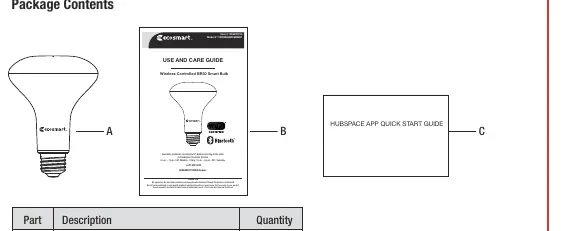
- The package includes the BR30 LED bulb, the user guide, and the quick start guide.
Model compatibility
- Requires 2.4GHz Wi-Fi network.
- Not for use in totally enclosed fixtures.
- Not compatible with standard incandescent dimmers.

Manual page author
David Miller
Documentation analyst
Organizes user manual content into clear summaries, with attention to model details, product context, and everyday usability.