Lighting / Fixtures
User Guide for Ecosmart Adjustable White A21 Motion Sensor Bulb
Quick guide for the Ecosmart Adjustable White A21 Motion Sensor Bulb. Learn how to install, adjust color temperature, operate the motion sensor, and troubleshoot common issues.
Table of contents
Quick guide from the manual
This Ecosmart A21 bulb features an integrated microwave motion sensor and adjustable color temperature. It is designed for indoor use only. For optimal performance, install the bulb facing downwards at a height between 9ft and 16ft. Note that the microwave sensor may detect motion through thin walls or glass.
Safety Information
- For indoor use only. Do not use where directly exposed to water.
- This device is not intended for use with emergency exits.
- Turn off power before inspection, installation, or removal.
- Do not open the bulb; there are no user-serviceable parts inside.
Operation
Color Temperature Adjustment: Before installing, use the switch on the bulb to select the desired color temperature:
- 2700K Soft White: Recommended for relaxing environments like bedrooms.
- 3000K Bright White: Direct replacement for halogen bulbs.
- 3500K True White: Brighter than 2700K/3000K, suitable for any setting.
- 4000K: Recommended for task lighting.
- 5000K Bright Light: Mimics daylight, ideal for bathrooms, kitchens, and garages.
- 6500K: Brightest, slightly blue tint, recommended for task areas.
Motion Sensor Logic: Once installed and powered on, the bulb will turn on for 5 seconds, then be controlled by the sensor. It will turn on when motion is detected and stay on for 2 minutes after motion ceases.
Turning off the motion sensor
If you wish to use the bulb as a regular light without motion detection, follow this sequence:
- Turn the bulb on and wait for 5 seconds.
- Turn the bulb on and off quickly 10 times.
- Wait 20 seconds.
- The bulb will remain on, and the motion sensor is now disabled.
You can re-enable the sensor by repeating the same steps.
Troubleshooting
- Bulb is intermittently blinking: The sensor may be detecting motion through thin walls, glass, or moving plants/trees. Ensure the bulb is at least 2ft away from other motion sensor bulbs.
- Bulb never turns on: If installed facing upwards, the detection range is significantly reduced.
- Bulb turns on during the day: This is normal operation; the bulb detects motion regardless of the time of day unless the sensor is disabled.
Specifications
- Input Voltage: 120V AC
- Frequency: 60Hz
- Power: 15W
- Brightness: 1600 Lumens
- CRI: 90
Manufacturer information
EcoSmart
Practical help
Common problems
Bulb is intermittently blinking
The sensor may be detecting motion through thin walls, glass, or moving plants. Ensure the bulb is at least 2ft away from other motion sensor bulbs.
Bulb never turns on
If the bulb is installed facing upwards, the detection range is greatly reduced. Try installing it facing downwards.
Bulb turns on during the day
The bulb is working as designed. It detects motion regardless of the time of day. Use the manual override sequence to disable the sensor if needed.
Before use
- Turn off power to the fixture before installation.
- Select the desired color temperature using the switch on the bulb base.
- Ensure the installation height is between 9ft and 16ft.
- Keep the bulb at least 2ft away from other motion sensor bulbs.
- Verify the fixture is not a motion-sensing fixture (not compatible).
Images and diagrams
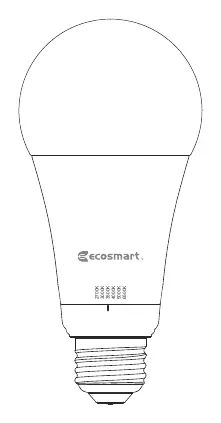
- The bulb base contains a physical switch to toggle between 2700K, 3000K, 3500K, 4000K, 5000K, and 6500K color temperatures.
Model compatibility
- Not compatible with other motion sensing fixtures.
- Compatible with most LED rated dimmers.
- Microwave sensor may detect motion through walls.

Manual page author
Emily Carter
User documentation editor
Prepares concise manual descriptions and highlights the most useful setup, operation, and maintenance information for readers.