Lighting / Smart Lighting
User Manual for Ecosmart 16.4ft RGBWIC Dynamic Color 360° Outdoor Rope Light
Quick guide for the Ecosmart 16.4ft RGBWIC Outdoor Rope Light. Includes installation steps, mounting instructions, app setup, and troubleshooting tips.
Table of contents
Manual images
Click an image to enlargeQuick guide from the manual
This document provides essential instructions for the Ecosmart 16.4ft RGBWIC Dynamic Color 360° Outdoor Rope Light. Before installation, ensure you have a GFCI-protected outlet. Do not bend the rope light at a radius of less than 60 degrees. The system requires a 2.4GHz Wi-Fi network for app connectivity.
Package Contents
- 16.4ft Neon Rope Light
- Inline Controller
- Plug-in Power Adapter
- 10 Mounting Clips
- 10 Screws
Installation
Layout Considerations
Determine the required length and ensure you have adequate room for the controller and power adapter. Ensure the power adapter can reach a GFCI-protected outlet.
Mounting
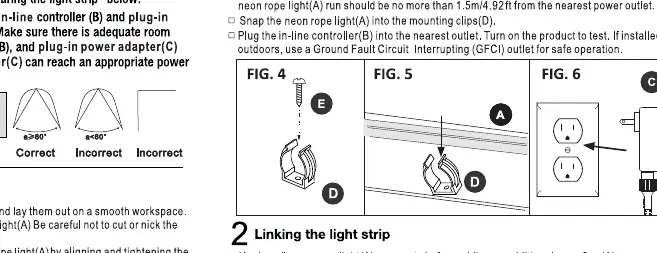
Attach mounting clips to a sturdy surface. Clips should be spaced at a maximum of 0.9m (2.95ft) apart. Ensure the rope light is secured properly without twisting.
Linking Segments
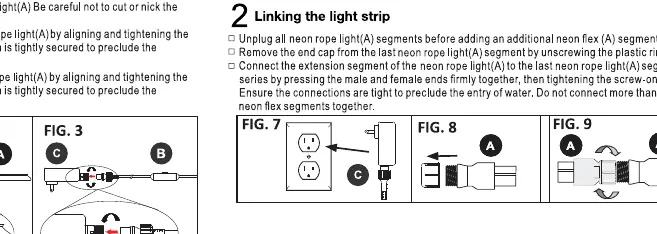
To link additional segments, unplug the rope light. Remove the end cap from the existing rope light by unscrewing the plastic ring. Connect the new segment by aligning the threads and tightening the connection securely to ensure water resistance.
Operation
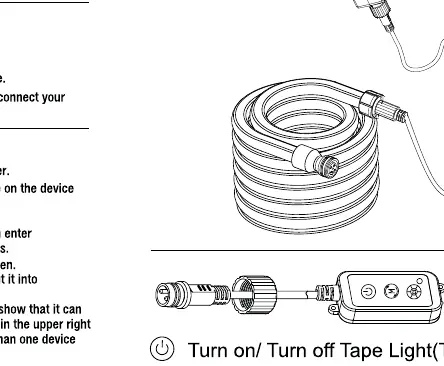
The device is controlled via the Hubspace app. Ensure your smartphone is connected to a 2.4GHz Wi-Fi network. In the app, add the device by scanning the QR code or following the manual setup instructions. The controller remembers the last setting when powered on.
Troubleshooting
If the light does not turn on, check that the power adapter is plugged into a live GFCI outlet and that all connections are secure. If you cannot connect to Wi-Fi, ensure you are using a 2.4GHz network. To reset the device, switch the power off and on 5 times.
Care and Maintenance
Before cleaning, always unplug the device from the power outlet. Use a clean, dry, or slightly damp cloth. Do not use chemical cleaners, solvents, or abrasive materials.
Manufacturer information
EcoSmart
Practical help
Common problems
Light does not turn on
Check that the adapter is plugged into a live GFCI outlet and all connections are secure.
Cannot connect to Wi-Fi
Ensure your router is broadcasting a 2.4GHz network and your phone is connected to it.
Device not found in app
Reset the device by switching the power off and on 5 times.
Before use
- Ensure the power outlet is GFCI protected.
- Verify 2.4GHz Wi-Fi network availability.
- Check that all connections are secure and tightened.
- Download the Hubspace app.
- Ensure the mounting surface is sturdy.
Images and diagrams
- Installation diagrams show the correct bending radius (60 degrees) and clip spacing.
- Linking diagrams illustrate how to remove end caps and secure the threaded connections.
Model compatibility
- Requires 2.4GHz Wi-Fi network.
- Compatible with Hubspace app.
- Must be connected to a GFCI-protected outlet for outdoor use.

Manual page author
David Miller
Documentation analyst
Organizes user manual content into clear summaries, with attention to model details, product context, and everyday usability.