Lighting / LED Lamps
User Manual for Ecosmart 15BR3065WCCTM01 Adjustable White BR30 LED Bulb
Quick guide for the Ecosmart 15BR3065WCCTM01 Adjustable White BR30 LED Bulb. Learn how to install, select color temperatures, configure motion sensor settings, and optimize performance.
Table of contents
Manual images
Click an image to enlargeQuick Guide from the Manual
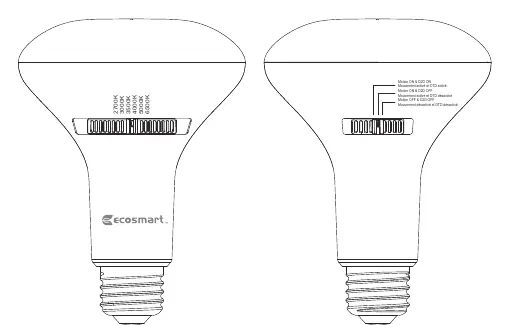
The Ecosmart 15BR3065WCCTM01 is an adjustable white BR30 LED bulb equipped with a motion sensor and a dusk-to-dawn (D2D) sensor. Before installation, ensure the power to the fixture is turned off. The bulb features switches to customize color temperature and motion sensor behavior. For optimal performance, install the bulb facing downwards in a fixture at a height of approximately 9 feet. Note that this bulb uses a microwave sensor and may detect motion through walls.
Safety Information
- For indoor or covered outdoor use only. Do not use where directly exposed to water.
- Not intended for use with emergency exits.
- Risk of shock: Turn off power before inspection, installation, or removal. Do not open the bulb; there are no user-serviceable parts inside.
- Do not use in metal fixtures, as this may impact motion sensor performance.
Operation
The bulb features two switches to control its functionality. Please select your desired settings while the power is off.
Color Temperature Selection
Adjust the switch on the bulb to select the desired color temperature:
- 2700K Soft White: Recommended for relaxing environments like bedrooms.
- 3000K Bright White: Recommended for relaxing environments; matches halogen color temperature.
- 3500K True White: Recommended for any setting.
- 4000K: Recommended for task lighting.
- 5000K: Mimics daylight; recommended for bathrooms, kitchens, and garages.
- 6500K: Brightest, slightly blue tint; recommended for task areas.
Motion Sensor Settings
- Motion ON & D2D OFF: The motion sensor turns the light on anytime it senses motion.
- Motion ON & D2D ON: The motion sensor only detects motion and turns on in the dark. This is the recommended setting to prevent the light from turning on during the day.
- Motion OFF & D2D OFF: Disables sensors. The bulb operates as a standard light bulb.
Tips for Best Performance
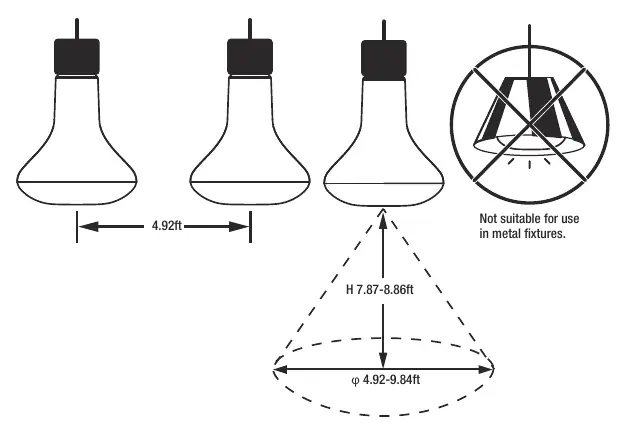
- Install the bulb facing downwards in a fixture at a height of 9 feet for best results.
- The bulb can be installed on its side, but detection range may vary.
- Compatible with most LED-rated dimmers.
- Power must always be supplied to the fixture for the bulb to work properly.
Manufacturer information
EcoSmart
Practical help
Common problems
The light turns on during the day.
Switch the motion sensor setting to 'Motion ON & D2D ON' so it only activates in the dark.
Motion sensor is not detecting motion correctly.
Ensure the bulb is not installed in a metal fixture, as this interferes with the sensor. Check that the installation height is approximately 9 feet.
Light stays on permanently.
Check if the setting is on 'Motion OFF & D2D OFF', which disables the sensors and keeps the light on.
Before use
- Turn off power to the fixture before installation.
- Ensure the fixture is not a metal enclosure.
- Select the desired color temperature using the switch on the bulb.
- Select the desired motion sensor mode using the switch on the bulb.
- Verify the installation height is suitable (recommended 9ft).
Specs in practice
- Microwave Sensor
- The technology used for motion detection; it can detect motion through walls.
Images and diagrams
- The bulb features two switches: one for color temperature (2700K-6500K) and one for motion/D2D sensor modes.
- Installation diagram shows a recommended height of 7.87-8.86ft and a detection range of 4.92-9.84ft.
- A warning symbol indicates the bulb is not suitable for use in metal fixtures.
Model compatibility
- Compatible with most LED-rated dimmers.
- Indoor/covered outdoor use only.
- Not for use with emergency exits.

Manual page author
Michael Turner
Technical manual editor
Reviews PDF manuals for structure, safety notes, and practical product details so readers can find the right information quickly.