Lighting / Fixtures
WiZ PORTRAIT Smart Desk Lamp
Quick guide for the WiZ PORTRAIT smart desk lamp. Learn how to assemble, connect, adjust the light angle, and use the touch controls for brightness and video call lighting.
Table of contents
Manual images
Click an image to enlargeQuick guide from the manual
This guide provides essential instructions for setting up and operating your WiZ PORTRAIT smart desk lamp. Ensure you have a 5V 2A power source available for operation.
Product Overview
- 1. Brightness sensor
- 2. Video call light
- 3. Task light
- 4. Power off / dim down button
- 5. Power on / bright up button
- 6. USB-C port
- 7. USB-A to USB-C cable (150 cm)
Assembly and Power Connection
Follow these steps to prepare your lamp for use:
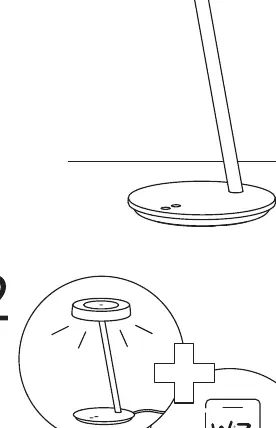
- Assembly: Connect the lamp head assembly to the base stand as shown in the diagram.
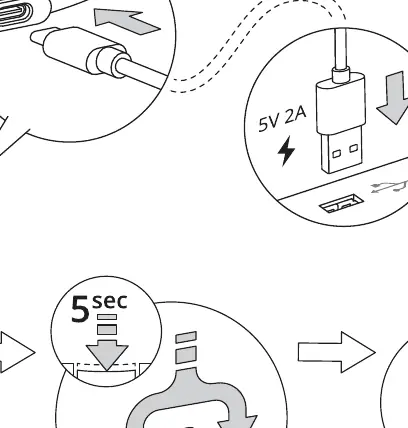
- Power: Connect the provided USB-C cable to the USB-C port on the lamp base. Connect the other end to a power adapter (5V 2A).
Adjustments and Operation
The WiZ PORTRAIT lamp is designed for flexibility and smart lighting control:
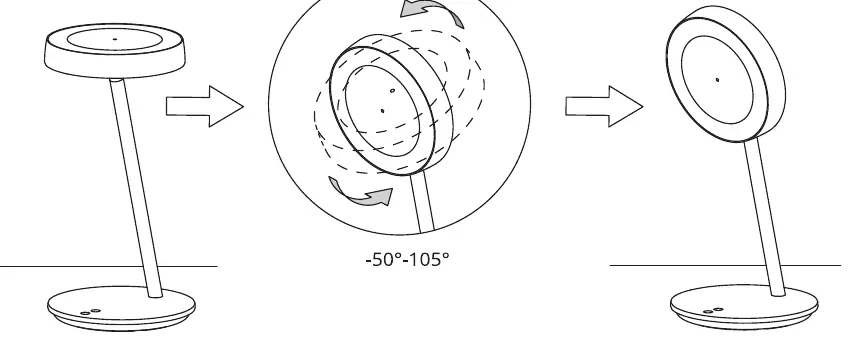
- Tilt Adjustment: The lamp head can be tilted between -50° and 105° to direct light as needed for tasks or video calls.
- Smart Features: Use the WiZ app to configure smart lighting modes and settings.
Controls
The lamp features touch-sensitive controls on the base:
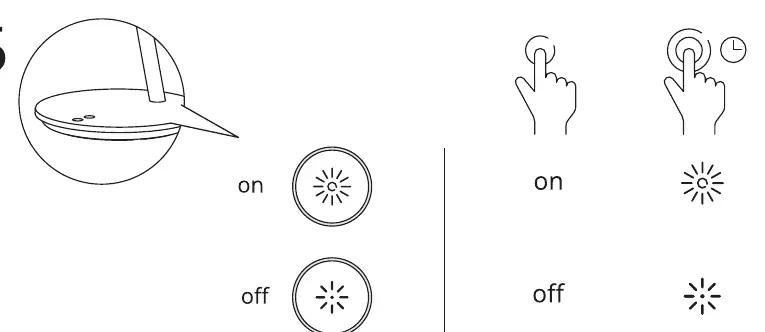
- Power On / Bright Up: Tap the button to turn the lamp on or increase brightness.
- Power Off / Dim Down: Tap the button to turn the lamp off or decrease brightness.
- Timer/Advanced: Long press or specific gestures may trigger additional smart features via the app.
Practical help
Common problems
Lamp does not turn on
Ensure the USB-C cable is securely connected to both the lamp and a power adapter providing at least 5V 2A.
Light intensity does not change
Ensure you are using the correct touch-sensitive buttons on the base and that the lamp is powered correctly.
Before use
- Verify all parts are present: lamp head, stand, and USB-C cable.
- Ensure you have a 5V 2A power adapter (not always included).
- Place the lamp on a stable, flat surface.
- Download the WiZ app to enable smart features.
Images and diagrams
- Step 1: Assembly of the lamp stand.
- Step 2: Connecting the USB-C power cable.
- Step 3: Adjusting the tilt angle of the lamp head.
- Step 5: Using touch controls for power and brightness adjustment.
Model compatibility
- Requires a 5V 2A power source.
- Smart features require the WiZ app.

Manual page author
Emily Carter
User documentation editor
Prepares concise manual descriptions and highlights the most useful setup, operation, and maintenance information for readers.