Home Appliances / Space Heaters
User Manual for Ecostrad Artis iQ Electric Panel Heater
Quick guide for the Ecostrad Artis iQ Electric Panel Heater. Learn how to install, operate, set heating programs, connect to the Smart Life app, and maintain your heater.
Table of contents
Manual images
Click an image to enlargeQuick guide from the manual
The Ecostrad Artis iQ is an electric panel heater designed for convection heating. This guide covers essential operation, app connectivity, and maintenance. Always ensure the heater is installed in an upright, fixed position on a stable surface. Keep the heater at least 1m away from objects and do not cover it to prevent fire hazards.
Control Panel and Operation
The heater features a digital control screen with touch buttons. Key modes include:
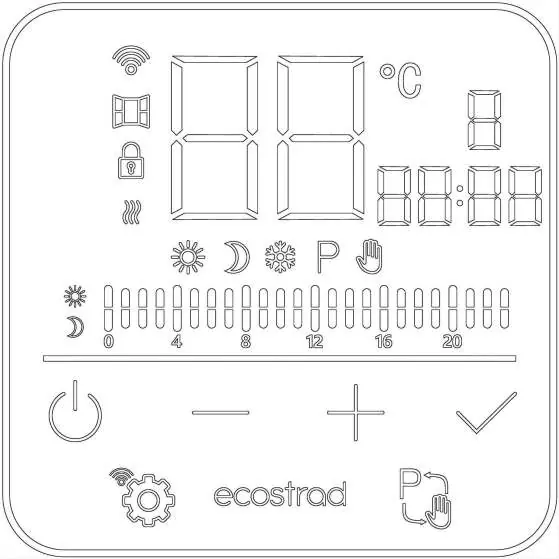
- Standby mode: The heater does not heat. Only the standby key and WiFi symbol are visible.
- Manual mode: The heater heats continuously to a set temperature. Indicated by a hand icon.
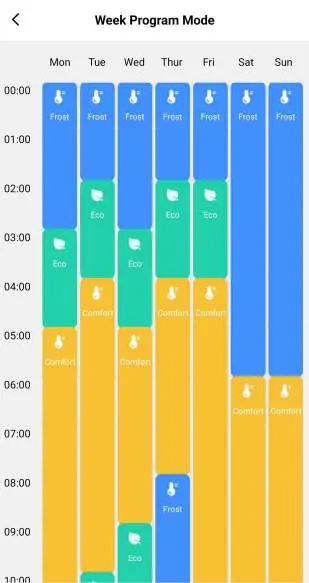
- Program mode: The heater follows a user-defined schedule. Indicated by a P icon and pre-set icons (Comfort, Eco, Anti-frost).
To adjust settings, use the '+' and '-' keys. Use the mode change key to switch between modes. A keypad lock can be enabled by holding '-' and '+' simultaneously for 5 seconds.
App Connectivity
The heater is compatible with the Smart Life app for remote control and scheduling. To connect:
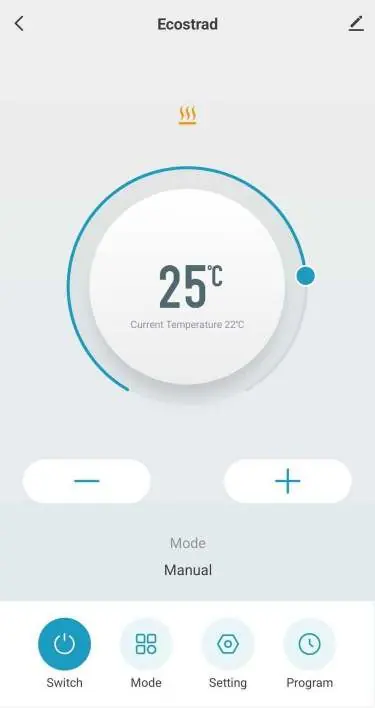
- Ensure Bluetooth is enabled on your smartphone.
- Hold the settings key on the heater for 5 seconds to enter pairing mode (WiFi icon will flash).
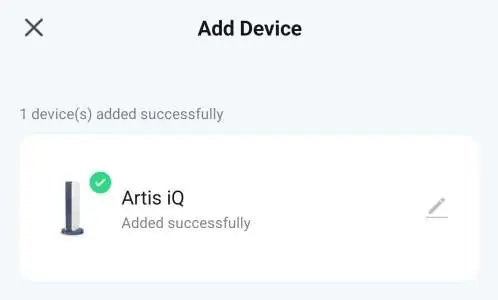
- Open the Smart Life app, press '+' or 'Add device', and follow the on-screen instructions.
The app allows for easy weekly programming, temperature adjustments, and voice integration with Amazon Alexa and Google Home.
Settings and Customization
Access the settings menu by pressing the settings key. Available settings include:
- Program mode temperatures: Set specific temperatures for Comfort, Eco, and Anti-frost modes.
- Open window detection: Automatically stops heating if a sudden temperature drop is detected.
- Sound: Enable or disable button beeps.
- Temperature compensation: Adjust the sensor reading by -5°C to +5°C to account for environmental factors.
Cleaning and Maintenance
Regularly clean the heater to ensure fault-free operation. Disconnect the power and allow the unit to cool completely before cleaning. Use a vacuum cleaner to remove dust from the grilles and a damp cloth for the exterior. Never immerse the unit in water or use abrasive cleaners. For long-term storage, pack the heater in its original packaging and store in a dry, ventilated place.
Practical help
Common problems
Heater not connecting to the app
Ensure your phone is connected to a 2.4GHz WiFi network, Bluetooth is enabled, and you complete the pairing process within 2 minutes of activating pairing mode on the heater.
Heater not heating
Check if the heater is in Standby mode, if Open Window Detection has been triggered, or if the current program schedule is set to a low temperature (e.g., Anti-frost).
Keypad unresponsive
The keypad lock is likely enabled. Press and hold the '-' and '+' keys simultaneously for 5 seconds to disable it.
Before use
- Ensure the heater is installed in an upright, fixed position.
- Check that the power cable is fully unwound and not damaged.
- Verify the voltage on the rating plate matches your power outlet.
- Ensure the heater is at least 1m away from curtains, furniture, or other objects.
- Download the Smart Life app if you intend to use WiFi features.
Specs in practice
- Open Window Detection
- Stops heating if a 5°C drop is detected within 30 minutes to save energy.
- Temperature Compensation
- Allows calibration of the thermostat if the heater reading differs from actual room temperature.
Images and diagrams
- The control panel features a digital display for temperature, time, and status icons.
- The program timeline at the bottom of the screen shows the heating schedule.
- The Smart Life app interface provides a visual representation of the heater's status and settings.
Model compatibility
- The heater is for indoor use only.
- Not suitable for bathroom use.
- Requires a 2.4GHz WiFi connection for app features.
- Compatible with Amazon Alexa and Google Home.

Manual page author
David Miller
Documentation analyst
Organizes user manual content into clear summaries, with attention to model details, product context, and everyday usability.