HVAC / Heat Pumps
User Manual for Dimplex 1.5kW & 2kW DC Fan Heater
Quick guide for the Dimplex 1.5kW & 2kW DC Fan Heater (DHCERA15M & DHCERA20M). Learn how to operate, clean, and maintain your heater safely.
Table of contents
Manual images
Click an image to enlargeQuick guide from the manual
This Dimplex DC Fan Heater is designed for indoor residential use. To begin, place the unit on a stable, horizontal surface, plug it into a power outlet, and use the control dial to select your desired setting. Ensure the unit is not covered and kept away from flammable materials like curtains or furniture. If the unit fails to operate, check if it has been tipped over or if the overheat protection has triggered.
Safety Instructions
- Do not use in bathrooms or in the immediate surroundings of a bath, shower, or swimming pool.
- Do not cover the appliance or place garments/materials on it, as this creates a fire risk.
- Keep textiles, curtains, and flammable materials at least 1 meter away from the air outlet.
- Do not use the heater if it has been dropped or shows visible signs of damage.
- Ensure the power cord is not routed under furniture or carpets and is kept away from the front of the appliance.
- Do not use the heater in small rooms occupied by persons not capable of leaving the room on their own, unless supervised.
Parts and Components
The heater consists of the following main parts:
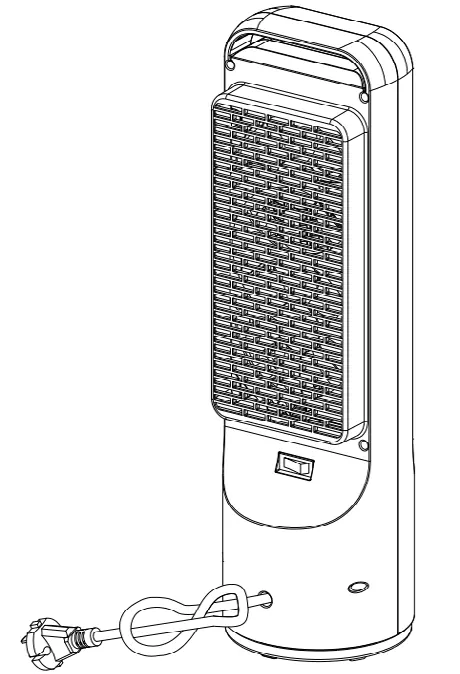
- Carry handle: Located at the top for easy transport.
- Air outlet: Front grille where heat is emitted.
- Control panel: Dial for power and thermostat settings.
- Air inlet: Rear intake for air circulation.
- Oscillation switch: Located at the back to toggle the 45-degree rotation.
Operation
The heater is operated using the control dial on the front panel:
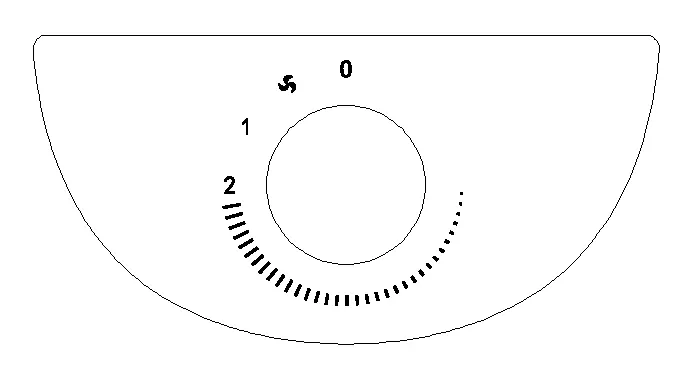
- Fan Only: Turn the dial one click anti-clockwise. This setting produces no heat.
- Low Power: Turn the dial to the '1' position.
- High Power: Turn the dial to the '2' position.
- Thermostat: Turn the dial to the desired setting to maintain a specific temperature. The unit will cycle on and off automatically.
- Oscillation: Use the switch on the back of the unit to turn oscillation 'I OSC' on or 'O' off.
Safety Features
- Tilt Switch: Automatically stops the heater if it is tipped over. If this happens, disconnect power, allow it to cool, stand it upright, and reconnect.
- Overheat Protection: A temperature limiter turns the heater off if it overheats. It will resume normal operation once the cause of overheating is resolved.
Cleaning and Storage
It is recommended to clean the unit at least once a month:
- Turn the unit OFF and disconnect from the power supply.
- Remove dust build-up using a soft brush.
- Wipe the surface with a soft damp cloth. Do not use water or liquids on the control panel.
- For storage, ensure the switch is OFF, unplug the unit, and store it upright in a location away from direct sunlight to prevent discoloration.
Maintenance and Support
If the unit fails to operate or is broken, unplug it and contact the Customer Care Centre. In Australia, call 1300 556 816. In New Zealand, call 0800 666 2824.
Manufacturer information
Dimplex
Practical help
Common problems
Heater does not turn on
Check if the unit has been tipped over (tilt switch) or if it has overheated. Ensure it is plugged in correctly.
Heater turns off automatically
The overheat protection may have triggered, or the thermostat has reached the set temperature. Allow the unit to cool down.
Before use
- Place on a horizontal and stable surface.
- Ensure the plug is accessible.
- Keep curtains and flammable materials at least 1m away from the air outlet.
- Ensure the power cord is not damaged or routed under furniture.
- Do not place immediately below a fixed socket outlet.
Images and diagrams
- Control Dial: Indicates positions for Fan Only, Low Power (1), High Power (2), and Thermostat settings.
- Oscillation Switch: Located on the back of the unit to enable or disable rotation.
Model compatibility
- For indoor residential use only.
- Not suitable for use in bathrooms.

Manual page author
Emily Carter
User documentation editor
Prepares concise manual descriptions and highlights the most useful setup, operation, and maintenance information for readers.