Electronics / Video Transmission
User Manual for StarTech.com VSEDIDHD EDID Emulator
Quick guide for the StarTech.com VSEDIDHD EDID Emulator. Learn how to solve HDMI video communication issues, configure EDID settings, and optimize display compatibility for resolutions up to 1080p.
Table of contents
Quick guide from the manual
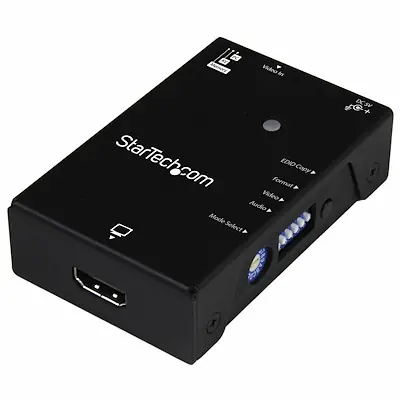
The StarTech.com VSEDIDHD EDID Emulator is designed to resolve video communication issues between an HDMI video source and a display. It is particularly useful when using third-party devices like video extenders, switches, or KVMs that may block EDID (Extended Display Identification Data) communication, preventing the source from outputting the display's native resolution.
How it works
The emulator supports two primary methods to ensure proper communication:
- EDID Copy: The device saves the EDID settings from your display and transmits them to the video source. This is ideal for resolving issues caused by video switches or extenders.
- EDID Ghosting: The device emulates generic EDID settings to provide common data to the source or display. This is useful for older equipment or analog-to-digital video adapters that do not output EDID.
The device features a rotary switch that allows you to configure these settings in a single step.
Package contents
- 1 x EDID Emulator
- 1 x USB power cable
- 1 x Screwdriver
- 4 x Feet
- 1 x Quick start guide
Technical specifications
- Max Resolution: 1920 x 1080 (1080p) at 60Hz
- AV Input/Output: HDMI
- Power: USB-powered
- Housing: Steel
- Operating Temperature: 0°C to 40°C (32°F to 104°F)
- Storage Temperature: -20°C to 60°C (-4°F to 140°F)
- Humidity: 0 to 80% relative humidity
Operating environment
The device is designed for indoor use within the specified temperature and humidity ranges. It stores EDID settings even when the device is not connected to a power source.
Official resources from the manual
Practical help
Common problems
Video source cannot output the native resolution of the display.
Use the EDID emulator to copy the display's EDID data, ensuring the source receives the correct resolution information.
Video communication issues when using switches or extenders.
These devices often block EDID data. Connect the emulator to pass the necessary EDID information through the chain.
Before use
- Ensure the HDMI source and display are connected to the emulator.
- Connect the included USB power cable to provide power to the emulator.
- Use the included screwdriver to adjust the rotary switch for the desired EDID mode.
- Verify the status LED is active.
Specs in practice
- Max Resolution
- Supports up to 1920x1080 (1080p) at 60Hz.
- Power Source
- The device is USB-powered; ensure a USB port is available.
Images and diagrams
- The device features a rotary switch for mode selection.
- A status LED indicates the operational state of the emulator.
- HDMI ports are clearly marked for input and output.
Model compatibility
- Supports HDMI displays.
- Supports resolutions up to 1080p.
- Not compatible with resolutions exceeding 1080p.

Manual page author
David Miller
Documentation analyst
Organizes user manual content into clear summaries, with attention to model details, product context, and everyday usability.