General / Other Manuals
User Guide for SIIG 04-136A HDMI Over IP Extender
Quick setup and configuration guide for the SIIG 04-136A HDMI Over IP Extender. Learn how to connect, configure matrix settings, manage device IDs, and use the control software.
Table of contents
Manual images
Jump to the sectionQuick guide from the manual
The SIIG 04-136A HDMI Over IP Extender is designed for long-distance HDMI transmission. For optimal performance and reliability, it is strongly recommended to use dedicated IGMP Gigabit Ethernet switches and 100% copper CAT5e/6 cabling following the IEEE-568B wiring standard. The default IP address for the Transmitter is 192.168.1.238, and for the Receiver, it is 192.168.1.239. If the devices are not detected on your network, ensure you have reset the units and configured a dedicated VLAN if necessary.
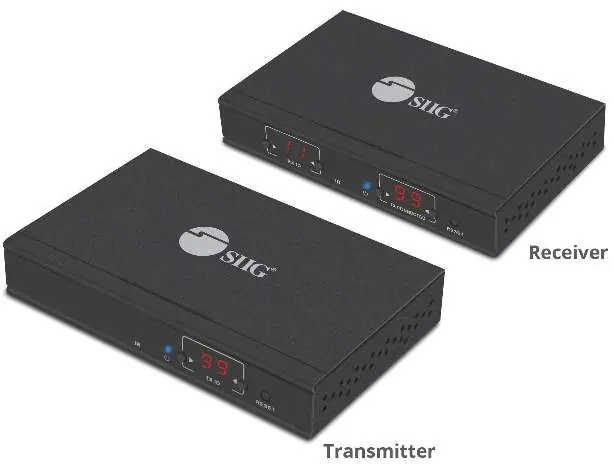
Product Features
- Supports resolutions up to 1080p 60Hz Full HD.
- Transmission distance up to 120 meters using CAT6 cable.
- Includes IR pass-back function to control source devices from the receiver location.
- Supports scalable matrix configuration (up to 100 inputs to infinite outputs).
- Compatible with computer control software for source selection.
Package Contents
- Transmitter unit and Receiver unit
- IR blaster and receiver extension cables
- Two DC5V/2A power adapters
- Remote control
- Two 3-pin phoenix connectors
- Wall-mount kit
Device Layout
Transmitter Unit: Features an IR window, Power LED, TX ID display, Reset button, Power jack, Data LED, RJ45 output, Link LED, IR output, HDMI output (local), HDMI input, and RS232 port.
Receiver Unit: Features an RX ID display, IR window, Power LED, TX Connected display, Reset button, Power jack, Data LED, RJ45 input, Link LED, IR input, HDMI output, and RS232 port.
Application and Configuration
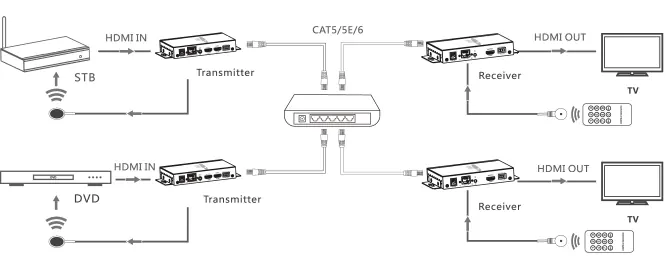
The system supports point-to-point connections or complex matrix configurations. When connecting to an existing network, it is recommended to configure a dedicated VLAN to avoid traffic collisions. If your network has DHCP enabled, the units will be assigned IP addresses automatically. If you need to reset to default IP addresses, disconnect the unit from the network, press the Reset button, and power cycle the device.
Computer and Wireless Control
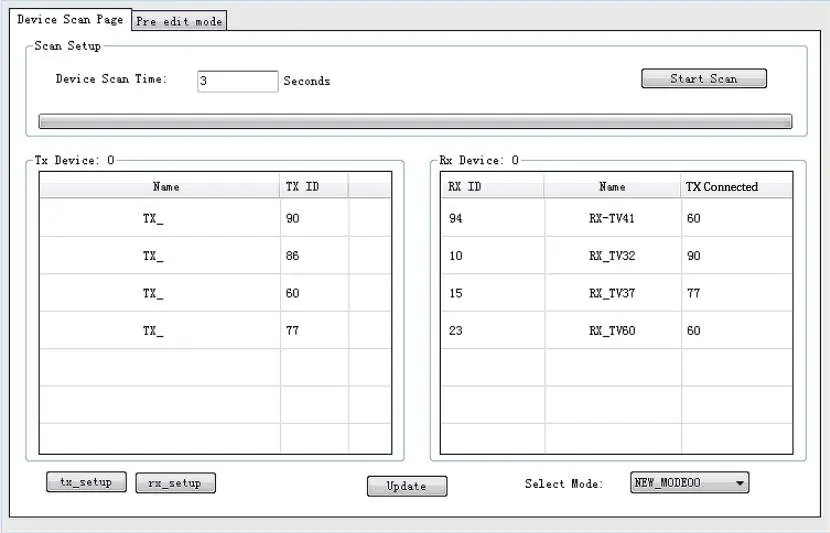
The HDBitT E-Matrix Control Center application is compatible with Windows. Connect your computer to the Ethernet network, ensure it is on the same subnet as the TX/RX units, and open the application to scan for devices. You can change device names, update IP settings, and manage operating modes (groups of input/output devices) through this interface. A wireless control app, Matrix Control Lite, is also available for Android and Apple devices.
Manufacturer information
SIIG, Inc.
Practical help
Common problems
Device not detected on network
Press the Reset button on the unit, ensure it is connected to the network, and try scanning again. If using a DHCP network, ensure the unit has been assigned an IP.
No signal or connection issues
Verify that you are using 100% copper CAT5e/6 cables with the IEEE-568B standard. Ensure you are using an IGMP-enabled Gigabit Ethernet switch.
IP address conflict or need to reset
Disconnect the TX or RX unit from the network, quickly press the Reset button, wait several seconds, and power cycle the unit to restore default IP settings (192.168.1.238 for TX, 192.168.1.239 for RX).
Before use
- Use dedicated IGMP Gigabit Ethernet switches.
- Use 100% copper CAT5e/6 cabling.
- Follow the IEEE-568B wiring standard.
- Ensure Transmitter and Receiver are not mixed up before installation.
- Set unique channels for Transmitters to avoid system breakdown.
- For computer control, ensure the PC is on the same subnet as the devices.
Specs in practice
- Transmission Distance
- Up to 120 meters using CAT6 cable.
- Matrix Capacity
- Supports up to 100 transmitters and infinite receivers.
Images and diagrams
- Point-to-point: Direct connection between one transmitter and one receiver.
- Matrix configuration: Multiple transmitters and receivers connected via an Ethernet switch.
Model compatibility
- Control software (HDBitT E-Matrix Control Center) is compatible with Windows only.
- Wireless app (Matrix Control Lite) is available for Android and Apple.

Manual page author
David Miller
Documentation analyst
Organizes user manual content into clear summaries, with attention to model details, product context, and everyday usability.