Computers / Storage
EG4 18KPV Remote Battery Update Guide
A step-by-step guide for performing a remote firmware update on EG4 PowerPro or LL V2 batteries using the EG4 18KPV inverter portal.
Table of contents
Manual images
Jump to the sectionQuick guide from the manual
This guide provides instructions for remotely updating the firmware of EG4 PowerPro 280Ah or EG4 LL V2 100Ah batteries connected to an EG4 18KPV inverter. Ensure you have access to the online monitoring portal and that the battery is visible on the correct inverter station before beginning.
Preparation and Configuration
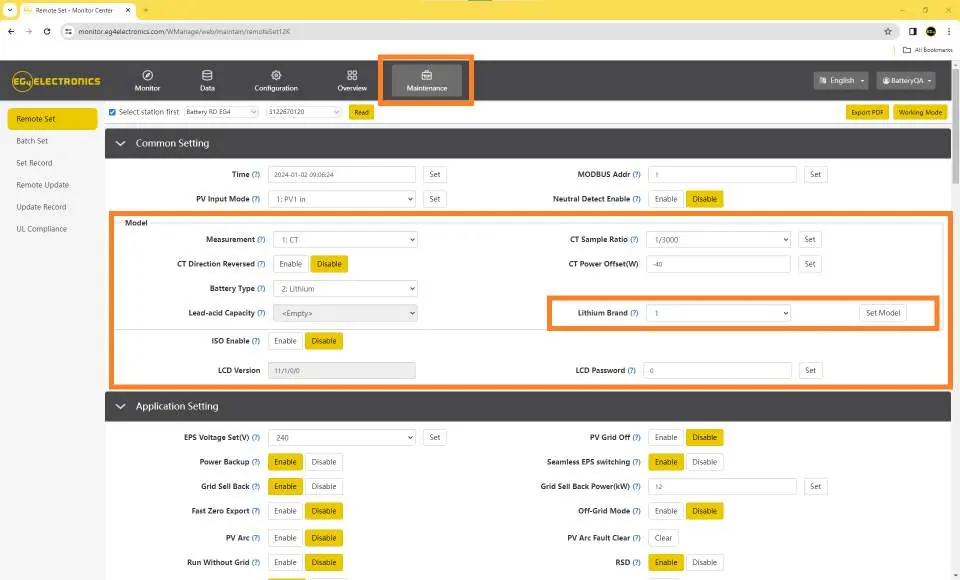
Log in to the official monitoring website at www.monitor.eg4electronics.com. Verify that the battery you intend to update is visible in the portal and that you are connected to the correct inverter station. Navigate to the Maintenance tab and click Read. Ensure the Lithium Brand setting is configured to Lithium-1 to enable remote updates.
Performing the Remote Update
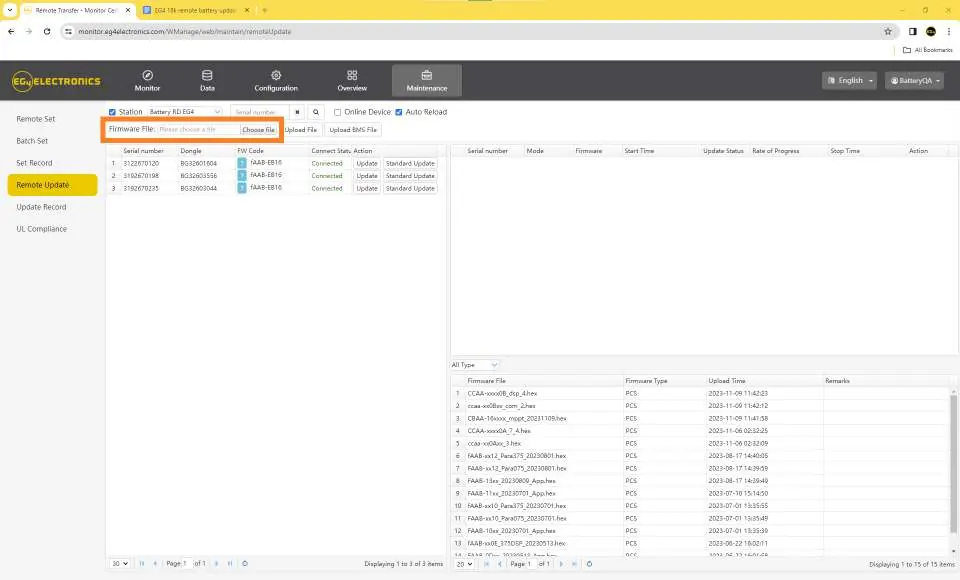
- Navigate to the Remote Update section under the Maintenance tab.
- Confirm you are on the correct station.
- Click Choose File next to the Firmware File field.
- Select the correct firmware file (e.g., EG4 18k to PowerPro.bin) from your computer.
- Click Upload File to transfer the firmware to the portal.
- Verify the correct file has been uploaded to prevent potential BMS issues.
- Click Update under the Action tab.
Monitoring the Update Process
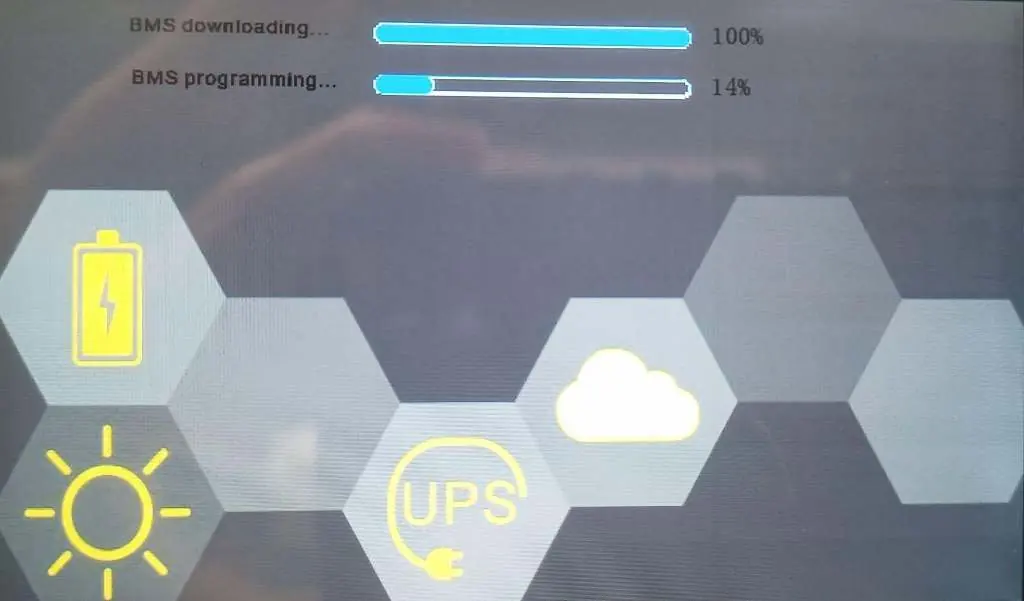
A progress bar will appear, indicating the download status to the inverter (0% to 100%). Once the status shows Success, the actual battery programming will begin. Important: Do not cancel or power off the inverter or battery during this phase. You can monitor the progress on the inverter screen, which will display BMS downloading and BMS programming status bars. The battery will automatically restart once the update is complete.
Safety and Troubleshooting
Failure to upload the correct firmware file can result in a soft-bricked BMS. If an incorrect file is uploaded, a manual RS485 update using a Windows computer is required to restore the BMS.
Official resources from the manual
Manufacturer information
EG4 Electronics
Practical help
Common problems
Incorrect firmware file uploaded
The BMS may become soft-bricked. You must perform a manual RS485 update using a Windows computer to unbrick it.
Update status bar reaches 100% but update is not finished
The 100% status bar only indicates the file download to the inverter is complete. The actual battery programming follows; do not power off the system.
Before use
- Ensure you have an active account on www.monitor.eg4electronics.com
- Confirm the battery is visible in the online portal
- Verify you are connected to the correct inverter station
- Set Lithium Brand to Lithium-1 in the Maintenance tab
- Ensure you have the correct .BIN firmware file downloaded to your computer
Specs in practice
- Lithium Brand
- Must be set to Lithium-1 to allow the remote update functionality.
- Rate of Progress
- Indicates the percentage of the firmware file downloaded to the inverter, not the battery programming status.
Images and diagrams
- The portal interface shows the Maintenance tab where the Read button and Lithium Brand settings are located.
- The Remote Update section displays the list of connected stations and the status of the firmware upload.
- The inverter screen provides real-time feedback on BMS downloading and BMS programming progress.
Model compatibility
- Compatible with EG4 PowerPro 280Ah and EG4 LL V2 100Ah batteries.
- Requires an EG4 18KPV inverter station for the remote update process.

Manual page author
David Miller
Documentation analyst
Organizes user manual content into clear summaries, with attention to model details, product context, and everyday usability.