Tools / Power Tools
User Manual for Einhell TE-CI 18/1 Li Cordless Impact Driver
Quick guide for the Einhell TE-CI 18/1 Li Cordless Impact Driver. Includes setup, operation, battery charging, maintenance, and troubleshooting.
Table of contents
Manual images
Click an image to enlargeQuick guide from the manual
The Einhell TE-CI 18/1 Li is a cordless impact driver designed for tightening and loosening screws. Before using the tool, ensure the battery is fully charged using the provided charger. Always check walls for concealed electrical, gas, or water lines before screwing into them. When not in use, set the rotation switch to the center position to lock the trigger.
Device description
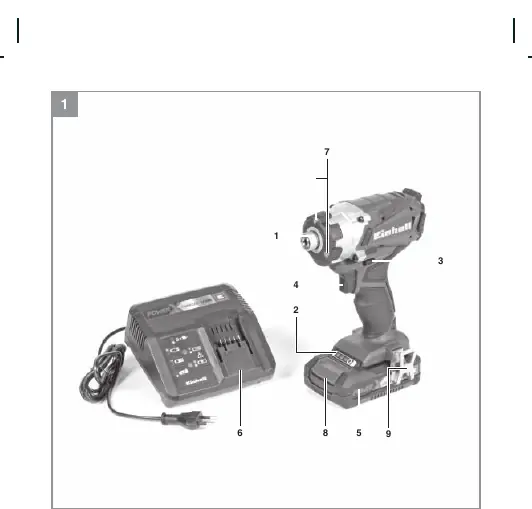
The tool features a 1/4 inch bit mount, a battery capacity indicator, a rotation direction switch, an on/off trigger, an LED light for illuminating the work area, and a removable belt clip.
Operation
Charging the battery
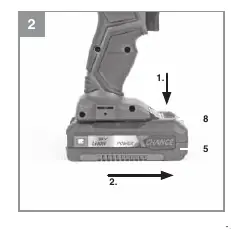
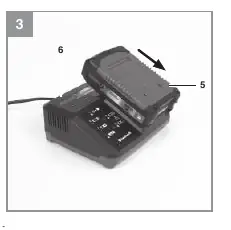
Remove the battery pack from the handle by pressing the pushlock button. Check that your mains voltage matches the rating on the charger. Insert the charger plug into the socket; the green LED will flash. Slide the battery onto the charger. Refer to the charger indicator table for status details.
Bit change
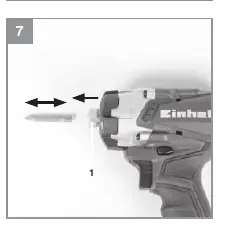
To insert a bit, pull the sleeve on the bit mount forward, insert the bit until it stops, and release the sleeve. Ensure the bit is securely seated. To remove, pull the sleeve forward and pull the bit out.
Rotation and speed
Use the slide switch above the trigger to set the rotation direction (clockwise/counter-clockwise) or to lock the trigger. The trigger allows for infinitely variable speed control; the further you press it, the higher the speed.
Cleaning and maintenance
Keep safety devices, air vents, and the motor housing free of dust and dirt. Wipe the tool with a clean cloth or blow it with low-pressure compressed air. Clean the tool regularly with a moist cloth and a little soft soap. Do not use cleaning agents or solvents as they may damage the plastic parts. Ensure no water enters the device.
Charger indicator
The charger uses LED signals to indicate status:
- Ready for use: Green LED flashing.
- Charging: Green LED on (quick charge).
- Charged: Green LED on (ready for use).
- Adapted charging: Green LED flashing (gentle charging mode).
- Fault: Red and Green LEDs flashing (charging not possible).
- Temperature fault: Red and Green LEDs on (battery too hot or too cold).
Technical data
- Motor power supply: 18 V DC
- Idling speed: 0-2300 min-1
- Blow rate: 0-2900 min-1
- Bit mount: 1/4 inch (6.35 mm)
- Weight: 1.4 kg
- Max. screw diameter: 8 mm
Manufacturer information
Einhell
Practical help
Common problems
Battery fails to charge
Check if the power socket has voltage and ensure good contact at the charging terminals.
Battery temperature fault
Remove the battery and keep it at room temperature for one day.
Battery defective
If the fault reoccurs, the battery is defective. Do not use or charge it.
Before use
- Charge the battery pack fully.
- Check for concealed electric, gas, or water lines in walls.
- Use only suitable and faultless screwdriver bits.
- Set the rotation switch to the center position when not in use.
Specs in practice
- Idling speed
- 0-2300 min-1, variable speed control.
Images and diagrams
- Fig 1: Overview of the tool components including bit mount, battery, and switches.
- Fig 2-3: Battery removal and charging procedure.
- Fig 7: Bit insertion and removal process.
Model compatibility
- Designed for tightening and undoing screws.
- Not intended for commercial, trade, or industrial applications.

Manual page author
David Miller
Documentation analyst
Organizes user manual content into clear summaries, with attention to model details, product context, and everyday usability.