Electronics / Monitors
Ernitec 0070-24132-PVMIP PVM Monitor User Manual
Quick guide for the Ernitec 0070-24132-PVMIP PVM monitor. Includes setup, connection options, OSD menu navigation, troubleshooting, and maintenance instructions.
Table of contents
Manual images
Click an image to enlargeQuick guide from the manual
This document provides essential operating instructions for the Ernitec 0070-24132-PVMIP PVM monitor. Users should read all safety instructions before operation. Key operational requirements include keeping the monitor away from water, moisture, and significant heat sources. Ensure all cables are properly stowed and not pinched. For repairs, contact Safety Vision Technical Support.
Controls
The monitor features a simplified control panel with the following buttons:
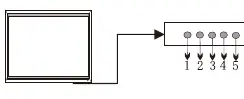
- AUTO: Selects the input source and makes menu selections.
- -: Lowers audio volume.
- +: Increases audio volume.
- MENU: Opens and exits the configuration menu.
- POWER: Turns the monitor on and off.
Connection Options
The monitor supports multiple input types located on the rear panel:
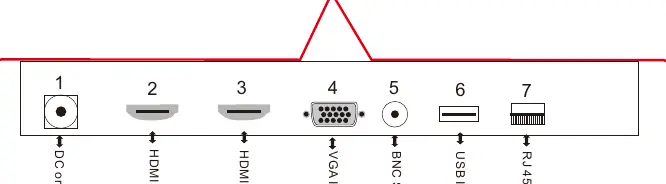
- DC or AC input
- HDMI Input (x2)
- VGA Input
- BNC Signal output
- USB Input
- RJ 45 PoE Input
OSD Menu Setup
The On-Screen Display (OSD) menu allows for detailed configuration of the monitor:
- PICTURE: Adjusts Picture Mode, Color Mode, Aspect Ratio, Noise Reduction, VGA settings, DLC, and Gamma.
- SOUND: Adjusts Sound Mode, Balance, Auto Volume, and Surround Sound.
- TIME: Configures Sleep Timer and Auto Sleep functions.
- OPTION: Sets OSD Language, Color Range, Prevent Blir, and restores factory defaults.
Maintenance
Always ensure power is removed before performing maintenance. Clean the screen with a soft, damp, lint-free cloth and allow it to dry before powering on. Clean the cabinet with a soft, dry, lint-free cloth. Do not use abrasive cleaners or wet cloths on the cabinet.
Manufacturer information
Ernitec
Practical help
Common problems
No sound picture
Check that the power connection is secure, press the POWER button, and adjust picture quality settings.
Normal picture but no sound
Check the volume setting and ensure the audio connection is secure.
Power is suddenly turned off
Ensure the sleep timer is not set and check that power and input connections are secure.
Signal out of range (VGA mode)
Adjust resolution, horizontal frequency, or vertical frequency; check if the signal cable is connected or loose.
Before use
- Read all safety instructions carefully.
- Do not install near significant heat sources.
- Keep away from water and wet environments.
- Ensure all cables are properly stowed and not pinched.
- Use only attachments and accessories specified by Safety Vision.
- Disconnect power if the monitor will not be used for long periods.
Images and diagrams
- The control panel is located on the monitor and includes buttons for Auto, Volume adjustment, Menu, and Power.
- The connection panel includes ports for DC/AC power, HDMI, VGA, BNC, USB, and RJ45 PoE.
Model compatibility
- VGA mode issues may require adjusting resolution, clock, phase, or H/V position.
- The monitor may flicker momentarily when turned on while cold; this is normal.

Manual page author
David Miller
Documentation analyst
Organizes user manual content into clear summaries, with attention to model details, product context, and everyday usability.