Tools / Welding Equipment
Owner's Manual for ESAB Rogue ES Series Welding Power Source
Quick guide for the ESAB Rogue ES series welding power source. Includes specifications, features, control panel overview, and accessory information for models 151iP, 181iP, 181iP PRO, and 201iP PRO.
Quick answers from the manual
Quick answer
- The ESAB Rogue ES series are portable DC welding power sources for professional MMA and 'Live TIG' welding. Models include 151iP, 181iP, 181iP PRO, and 201iP PRO, with PRO models supporting dual voltage (120V/230V). p. 1
Key actions
- Adjusting arc parameters p. 1
Technical specifications
| Parameter | Value | Meaning | Pages |
|---|---|---|---|
| Max Output (201iP PRO) | 200 A | Maximum welding current | p. 2 |
| Weight (201iP PRO) | 8.4 kg | Machine weight | p. 2 |
| Enclosure Class | IP23S | Protection rating | p. 2 |
Where to find it in the PDF
- Product Overview and Features p. 1
- Specifications and Accessories p. 2
Table of contents
Quick guide from the manual
The ESAB Rogue ES series are portable DC welding power sources designed for professional use. These units support MMA (Manual Metal Arc) and 'Live TIG' welding. The PRO models offer dual voltage input (120V/230V), while standard models operate on 230V. Ensure you verify your specific model's voltage requirements before connection.
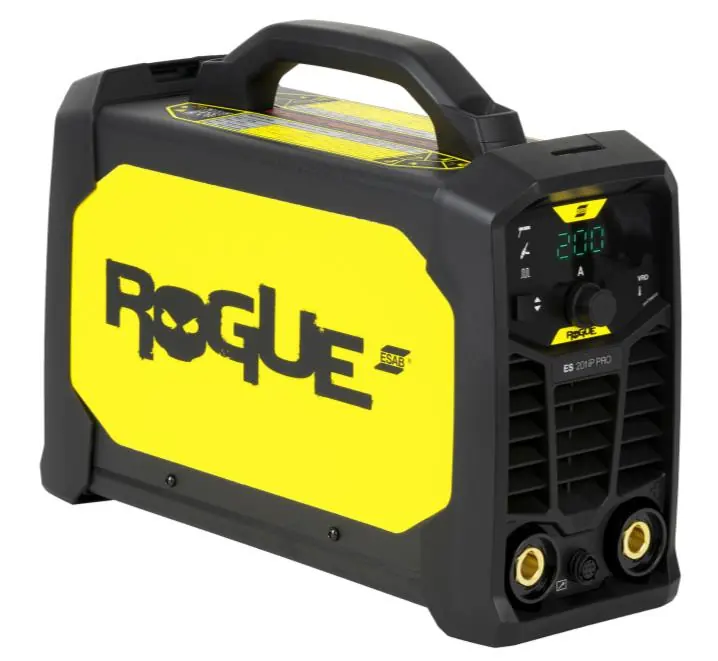
Product Overview
The Rogue ES series is built for durability and performance, utilizing digital control for precise arc stability. Key applications include repair and maintenance, civil construction, agricultural equipment, and industrial fabrication.
Key Features
- Pulse MMA Functionality: Enhances heat input control, minimizes distortion on thin materials, and reduces spatter.
- Live TIG: Allows for TIG welding of mild steel or stainless steel.
- Dual Voltage (PRO models only): Flexibility to use on 120V or 230V outlets.
- Portability: Lightweight design with a carrying handle.
- Robust Design: IP23S enclosure class suitable for shop or site applications.
- PFC (PRO models only): Ensures stable arc and resistance to power fluctuations on long extension cables up to 100m.
Control Panel
The control panel features a digital display for current (A) and indicators for VRD (Voltage Reduction Device) and thermal protection. Users can adjust arc parameters, including Arc Force and Hot Start settings, to customize the welding experience.
Technical Specifications
The series supports electrodes up to 4.0mm (201iP PRO) or 3.2mm (151iP). Operating temperature range is -10 to +40 °C. All models feature an IP23S enclosure class.
Accessories
Available accessories include a shoulder strap, plastic case, remote current control, various electrode holders, return cable kits, TIG torches, and a TIG foot control.
Manufacturer information
ESAB
Practical help
Common problems
Power fluctuations or unstable arc on long cables
Ensure you are using a PRO model (181iP PRO or 201iP PRO) which features PFC (Power Factor Correction) designed to handle long extension cables up to 100m.
Voltage incompatibility
Check the model specifications. PRO models support 120V/230V, while standard models are 230V only. Do not connect to unsupported voltage.
Before use
- Verify input voltage matches your specific model (120V/230V for PRO, 230V for standard).
- Ensure the electrode size is within the machine's capacity (max 3.2mm for 151iP, 4.0mm for others).
- Connect the return cable and clamp securely.
- Check that the environment is suitable for IP23S rated equipment.
- If using a generator, ensure it meets the recommended 7 kW output.
Images and diagrams
- The control panel displays the current output in Amperes (A).
- Indicators are provided for VRD (Voltage Reduction Device) status and thermal overload.
Model compatibility
- PRO models (181iP PRO, 201iP PRO) support dual voltage (120V/230V).
- Standard models (151iP, 181iP) are 230V only.
- Generator use is supported with a recommended 7 kW output.

Manual page author
Emily Carter
User documentation editor
Prepares concise manual descriptions and highlights the most useful setup, operation, and maintenance information for readers.