Music / Instruments
Fame Voltor 8 Rechargeable Pedalboard Power Supply
Quick guide for the Fame Voltor 8 rechargeable pedalboard power supply. Learn how to charge, connect your effects pedals, use the Y-split cable for 18V, and troubleshoot common power issues.
Table of contents
Quick guide from the manual
The Fame Voltor 8 is a rechargeable, isolated power supply designed for guitar effects pedals. Before first use, it is essential to charge the unit for 12 hours. Always connect your pedals to the power supply before switching the unit on. If you need to power an 18V pedal, you can use the included Y-split cable to combine two 9V outputs. Ensure you always verify the voltage and polarity requirements of your pedals before connection.
Device description
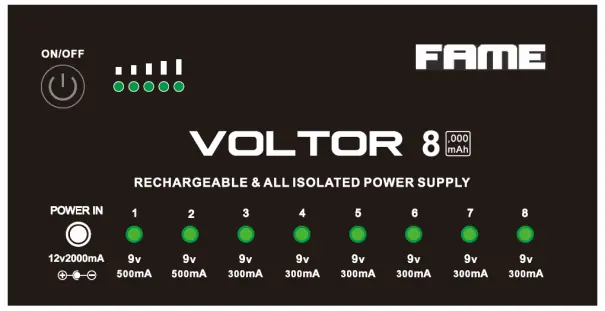
The Voltor 8 features 8 isolated DC outputs, a rechargeable 8000mAh battery, and USB connectivity for charging mobile devices. The front panel includes an ON/OFF button, a power status LED, and individual LEDs for each output to indicate proper operation or faults.
Installation
Before using the device, inspect it for any damage. Use the original packaging or suitable transport cases to protect the unit from dust and moisture when not in use. Ensure the device is placed in a well-ventilated area away from flammable materials or liquids.
Charging and operation
To charge the device, use the supplied AC adapter or a suitable USB cable connected to a power source. The initial charge takes 12 hours, while subsequent charges take 5-7 hours. The power level display will blink during the charging process. To operate, connect your 9V effects pedals to the 8 DC outputs using the provided cables, then press the ON/OFF button.
Safety instructions
This device is intended for indoor use only. Observe the following safety precautions:
- Do not open the device housing; there are no user-serviceable parts inside.
- Keep the device away from rain, moisture, direct heat, and dust.
- The maximum allowed ambient temperature is 40°C.
- Ensure the device is always well-ventilated; do not block ventilation openings.
- If the device is not used for an extended period, disconnect it from the power source.
- In case of a damaged power cable, replace it immediately with an original part.
Troubleshooting
If the device fails to function, check the charge level of the battery. If connected effects pedals are not receiving power, verify that all cable connections between the Voltor 8 and the pedals are secure. If you are unsure about a fault, contact the manufacturer or a qualified technician; do not attempt to open the device yourself.
Technical specifications
Power input: 12V DC 2000mA or 5V 1A/2A via Micro USBPower output: 6x 9V DC 300mA, 2x 9V 500mA (all isolated, negative center)Battery capacity: 8000mAh, 3.7VDimensions: 141 x 69 x 32 mmWeight: 620 g
Practical help
Common problems
Device does not turn on or function
Check the battery charge level. If depleted, charge the unit using the supplied adapter or USB.
Connected effects pedals have no power
Verify that all DC cables are securely connected to both the Voltor 8 outputs and the pedals.
Before use
- Inspect the device for any physical damage.
- Charge the unit for 12 hours before the first use.
- Verify the voltage and polarity requirements of your effects pedals.
- Ensure you are using high-quality, short cables for connections.
- Place the unit in a well-ventilated area.
Specs in practice
- 8000mAh Battery
- The internal capacity allows for portable operation without being plugged into a wall outlet.
- Isolated Outputs
- Prevents ground loops and noise interference between connected pedals.
- Y-Split Cable
- Allows combining two 9V outputs to provide 18V for pedals requiring higher voltage.
Images and diagrams
- The front panel features an ON/OFF button, a battery level indicator, and 8 numbered output ports.
- Each output port has a corresponding LED that glows green during normal operation and red if a fault is detected.
Model compatibility
- Outputs are 9V DC with negative center polarity.
- Do not exceed the maximum current rating (300mA or 500mA) per output.
- Only use the Y-split cable to achieve 18V; do not attempt to combine outputs otherwise.

Manual page author
Emily Carter
User documentation editor
Prepares concise manual descriptions and highlights the most useful setup, operation, and maintenance information for readers.