Electronics / Speakers Soundbars
Fender Champion II 25 & 50 Guitar Amplifier Owner's Manual
Comprehensive owner's manual for the Fender Champion II 25 and 50-watt guitar combo amplifiers, covering setup, control panel functions, voice and effect settings, and technical specifications.
Table of contents
Product Overview
The Fender Champion II series offers versatile, high-quality guitar amplification suitable for both practice and stage performance. Available in 25-watt and 50-watt models, these amplifiers provide a wide range of world-renowned Fender clean and overdrive tones, alongside various British and modern distortion flavors. Whether you play jazz, country, blues, or metal, the Champion II is designed to help you dial in the perfect sound with ease.
Control Panel Features
The control panel is designed for intuitive operation. Key features include:
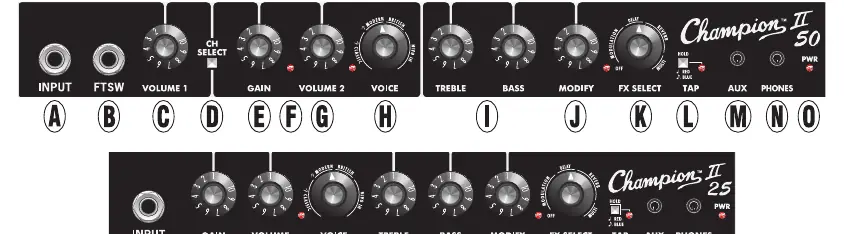
- Voice Control: Choose from 12 different amp types across Fender Classic, Fender Modern, British, and Hi Gain categories, each paired with a cabinet simulation.
- Effects Selection: A built-in selection of 12 effects including modulation, filter, delay, reverb, and multi-category effects.
- Modify Knob: Allows you to adjust specific parameters for the selected effect.
- Tap Button: Easily set the tempo for time-based effects like delay and tremolo to match your song.
- Auxiliary Input: Connect external devices for backing tracks.
- Headphone Output: Enables private practice by muting the main speaker.
Setup and Operation
To get started, connect your instrument to the INPUT jack. Use the VOICE knob to select your desired amplifier type and the FX SELECT knob to choose an effect. Adjust the GAIN and VOLUME controls to shape your distortion and overall output level. For time-based effects, tap the TAP button at the desired speed. The amplifier also features a rear-panel USB port for firmware updates.
Maintenance and Support
The Champion II is built for reliability. Ensure the amplifier is connected to a properly grounded outlet. For troubleshooting or technical questions, contact a Fender specialist using the contact information provided in the manual. Keep the amplifier clean and store it in a dry environment to maintain its performance over time.
Manufacturer information
Fender Musical Instruments Corporation
Practical help
Common problems
No sound from amplifier
Check that the power is on, the volume is turned up, the instrument cable is connected, and the guitar volume is up.
Effect not heard
Ensure the FX SELECT knob is not in the OFF position and the MODIFY knob is turned up to increase the effect amount.
Delay tempo not matching
Use the TAP button to tap in the desired tempo for time-based effects.
Before use
- Ensure the power cord is connected to a grounded outlet.
- Verify the input voltage matches the amplifier's requirements.
- Connect your guitar to the INPUT jack.
- Ensure the volume is turned down before turning the power on.
- Check that the desired amp voice and effect are selected.
Specs in practice
- Power Output
- The maximum wattage the amplifier delivers to the speaker (25W for Champion II 25, 50W for Champion II 50).
- Input Impedance
- The electrical resistance of the input, affecting signal clarity (1MΩ for instrument input).
- THD (Total Harmonic Distortion)
- A measure of the signal purity at the rated power output.
Images and diagrams
- The control panel diagram identifies all knobs and buttons including Input, Gain, Volume, Voice, Treble/Bass, Modify, FX Select, and Tap.
- The rear panel diagram shows the power inlet, power switch, USB port, and firmware update buttons.
Model compatibility
- Supports an optional two-button footswitch (PN 0097298000) for channel selection and effects switching.
- USB-C port is compatible with Mac or PC for firmware updates.

Manual page author
Michael Turner
Technical manual editor
Reviews PDF manuals for structure, safety notes, and practical product details so readers can find the right information quickly.