Electronics / Amplifiers Receivers
Blackstar AMPED 1 100W Amp Pedal User Guide
Quick start guide for the Blackstar AMPED 1 100W amplifier pedal, covering setup, voice selection, Cab Rig integration, and essential safety instructions.
Table of contents
Quick guide from the manual
The Blackstar AMPED 1 is a 100W amplifier pedal designed for versatility. This guide provides the essential steps to connect your equipment, select preamp voices, and utilize advanced features like Cab Rig and MIDI.
Setup
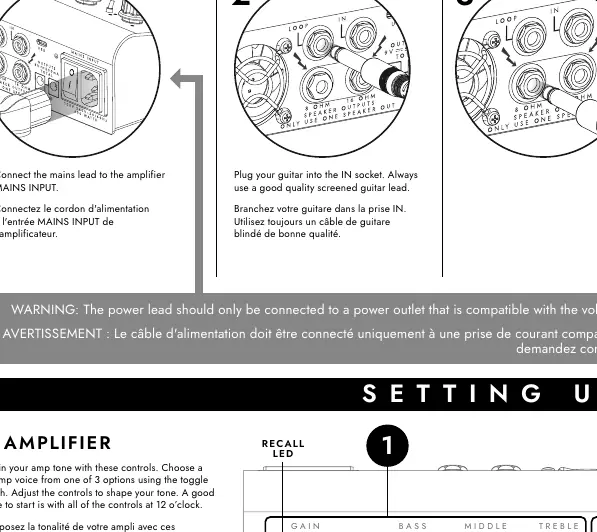
- Connect the mains lead to the MAINS INPUT.
- Plug your guitar into the IN socket using a high-quality screened cable.
- Connect a suitable guitar speaker cabinet (8 Ohms or 16 Ohms) to the SPEAKER OUTPUT. Warning: Do not use both speaker outputs simultaneously as this will damage the amplifier.
- Connect to a computer or full-range active speaker using the Cab Rig outputs if required.
- Switch the amplifier on using the Power Switch.
Amplifier Controls
- Amplifier: Select from 3 preamp voices using the toggle switch and adjust Gain, Bass, Middle, Treble, and Master volume.
- Power Amp: Choose Response (KT88, 6L6, EL34, 6V6, EL84, or Linear) and Power rating (1W, 20W, 100W).
- Reverb: Activate built-in reverb and adjust level. Press and hold the footswitch for a FREEZE effect.
- Preset: Activate stored presets. Hold the footswitch until the RECALL LED lights and the PRESET LED flashes to save new settings.
Advanced Features
- USB and Architect: Connect to a PC or Mac via USB-C to manage presets, deep-edit the Cab Rig DSP, and record high-quality tones directly.
- FX Loop: Connect the supplied TRS signal splitter cable to use the effects loop. Routing (series/parallel, pre/post reverb) is configured via Architect software.
- MIDI: Use the supplied TRS MIDI to 5-pin adaptor to control features. Default is MIDI channel 1.
- DC Output: Power compatible pedals using the 9V DC outputs (maximum combined current of 500mA).
- Cab Rig Outs: Use the stereo LINE OUT for headphones or mixers. The balanced XLR output connects directly to an interface or Front of House.
Safety
The equipment must be used at a maximum ambient temperature of 35°C and at an altitude not exceeding 2000m. Avoid high volume levels for long periods to prevent permanent hearing damage.
Manufacturer information
Blackstar Amplification
Practical help
Common problems
Amplifier damage
Never use both speaker outputs at the same time.
Preset not saving
Hold down the PRESET footswitch until the RECALL LED lights and the PRESET LED flashes.
Hearing damage
Avoid listening at high volume levels for long periods; use ear protection if exposed to high sound pressure levels.
Before use
- Ensure the power outlet is compatible with the voltage, power, and frequency requirements.
- Use a good quality screened guitar lead.
- Use a good quality speaker cable for the cabinet connection.
- Check that the speaker cabinet impedance matches the output (8 Ohms or 16 Ohms).
- Allow the unit to reach room temperature before switching on if moved from a cold environment.
Specs in practice
- Power Rating (1W, 20W, 100W)
- Adjusts the output power level of the amplifier.
- Response (KT88, 6L6, EL34, 6V6, EL84, Linear)
- Simulates the response characteristics of different power tube types.
- DC Output (9V)
- Provides power to external pedals, limited to a combined total of 500mA.
Images and diagrams
- The connection guide illustrates the signal path from guitar to pedal, and from pedal to computer, MIDI devices, headphones, and speaker cabinets.
- The top panel diagram identifies the location of the Gain, EQ, Reverb, Preset, and Power controls.
Model compatibility
- Compatible with PC and Mac via USB-C for Architect software.
- Speaker outputs support 8 Ohm or 16 Ohm cabinets.
- DC outputs support 9V pedals up to 500mA total.

Manual page author
Emily Carter
User documentation editor
Prepares concise manual descriptions and highlights the most useful setup, operation, and maintenance information for readers.