Electronics / Headphones Earbuds
JBL EON 700 Series 1300W Power Amplifier User Guide
Quickstart guide for the JBL EON 700 Series 1300W power amplifier, covering power-up, input connection, channel setup, Bluetooth audio pairing, and control panel navigation.
Table of contents
Quick guide from the manual
This document provides essential steps for the initial setup and operation of the JBL EON 700 Series 1300W power amplifier. It covers powering the unit, connecting audio sources, adjusting channel gains, and configuring Bluetooth audio streaming.
Powering on the unit
- Connect the power cord to the AC Power Connector (F).
- Press and hold the Power Button (B) for 0.5 seconds to engage the power.
Connecting inputs
- Turn the Channel Gain knobs (J) fully to the left (minimum) before connecting any inputs.
- Connect your audio devices to the Input Jacks (G, H, I).
Setting up channels
- Insert your input source into the desired channel.
- Slowly turn the Main Volume (C) knob to increase the master volume.
- Adjust the individual Channel Gain knobs until the desired volume level is achieved.
Bluetooth audio pairing
The device supports Bluetooth audio streaming. To connect your device:
- Press the Main/Menu knob (C) and navigate to the Settings field.
- Select BT Audio Pairing.
- Locate the EON700 Speaker on your mobile device's Bluetooth menu.
- Download the JBL Pro Connect app from the App Store or Google Play to manage your speaker and ensure the firmware is up to date.
Control panel overview
The rear panel features the following controls:
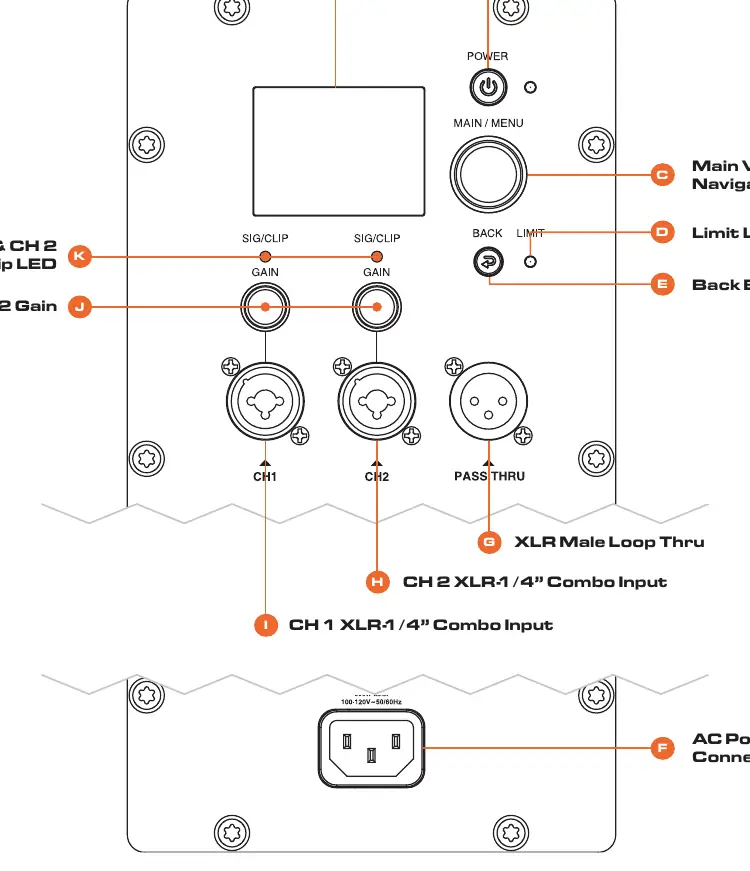
- LCD Panel (A): Displays system settings and menu options.
- Main Volume/Menu Navigation (C): Used to adjust volume and navigate the LCD menu.
- Channel Gain (J): Controls the input level for channels 1 and 2.
- Signal Clip LED (K): Indicates if the signal is clipping.
- Limit LED (D): Indicates when the internal limiter is active.
- Back Button (E): Used to navigate back in the LCD menu.
For complete documentation, visit http://www.jblpro.com/eon700.
Official resources from the manual
Manufacturer information
JBL
Practical help
Common problems
Audio signal is distorted or clipping
Check the Signal Clip LED (K). If lit, reduce the Channel Gain (J) or the output level of your source device.
Cannot find speaker in Bluetooth list
Ensure you have navigated to the 'BT Audio Pairing' option within the Settings menu on the speaker's LCD display.
Before use
- Ensure the power cord is securely connected to the AC Power Connector.
- Turn all Channel Gain knobs to the left (minimum) before connecting inputs.
- Verify that your audio source is connected to the correct Input Jacks (G, H, or I).
- Download the JBL Pro Connect app to ensure the speaker firmware is up to date.
Specs in practice
- 1300W Power Amp
- The peak power output capability of the integrated amplifier.
- XLR Male Loop Thru
- An output jack that sends the input signal to another speaker or device without modification.
Images and diagrams
- The rear panel diagram identifies the location of the Power button, LCD screen, Main Volume knob, and input/output jacks.
- The diagram highlights the distinction between the combo inputs (CH1/CH2) and the Loop Thru output.
Model compatibility
- Supports Bluetooth audio streaming.
- Compatible with the JBL Pro Connect app available on App Store and Google Play.

Manual page author
Emily Carter
User documentation editor
Prepares concise manual descriptions and highlights the most useful setup, operation, and maintenance information for readers.