Electronics / Amplifiers Receivers
Musway DSP68 8-Channel DSP Processor User Guide
Quick guide for the Musway DSP68 8-channel processor, covering installation, electrical connections, software setup, and technical specifications.
Table of contents
Manual images
Jump to the sectionQuick guide from the manual
The Musway DSP68 is an 8-channel digital signal processor designed for 12V vehicle electrical systems. This guide provides essential information for professional installation and initial setup. Always disconnect the vehicle battery ground before starting any installation work to prevent short circuits and electric shocks.
Mechanical Installation
Choose a location with sufficient air circulation, such as a spare wheel cavity or open trunk space. Avoid mounting the device in sealed spaces, near heat-dispersing components, or on vibrating surfaces like subwoofer boxes. Ensure that mounting screws do not damage vehicle components like fuel lines or wiring.
Electrical Interconnection
Use a wiring kit with at least 2.5 mm diameter cables. Connect the +12V terminal to the battery positive pole with an in-line fuse located within 30 cm of the battery. Connect the GND terminal to a clean, unpainted metallic point on the vehicle chassis. Ensure all connections are tight and polarity is correct.
Initial System Start-up
Download the Musway DSP software from www.musway.de/dsp. Connect the device to a PC via the included USB cable with the ignition in ACC or ON position. The device is operational when the top logo lights up orange. Use the software to configure speaker systems, input settings, and audio adjustments.
Operation and Inputs
- USB: For PC connection and software management.
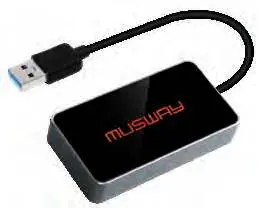
- BT: For external Bluetooth dongles (streaming/app control).
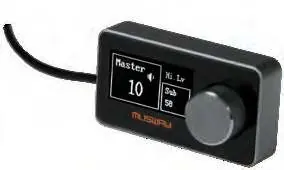
- DRC: For external Musway digital remote controller.
- OPT IN: Optical input for PCM stereo signals (up to 96 kHz/24 bit).
- High Level Input: For amplified speaker outputs from the head unit.
- Line Input/Output: RCA connections for low-level signals.
- AUX IN: For external stereo pre-amplifier sources.
Safety Warnings
Do not cover cooling vents. Do not open the device, as this voids the warranty. If a malfunction occurs, refer to the troubleshooting section or contact an authorized retailer. Ensure all cables are protected from sharp edges and moving parts.
Official resources from the manual
Practical help
Common problems
CLIP LED lights up red
The input signal is overdriven. Reduce the input sensitivity using the corresponding controller until the LED turns off.
Device does not turn on
Check the POW ON SEL switch position (SPK or REM) and ensure the remote signal or high-level input signal is present.
Audio interference
Ensure audio cables and power supply wires are installed on opposite sides of the vehicle. Check that the ground connection is secure and on a clean metallic point.
Before use
- Disconnect the vehicle battery ground connection.
- Ensure the vehicle electrical system is 12V.
- Download and install the Musway DSP software.
- Verify that the crossover and speaker configurations are correct to prevent damage.
- Wait 8 seconds after applying power before turning the device on.
Specs in practice
- High Level Input
- Accepts amplified speaker signals from a head unit (3V - 21V RMS).
- Low Level Input
- Accepts RCA pre-amplifier signals (1V - 5V RMS).
- Operating Temperature
- The device must operate within 0 - 55 °C.
Images and diagrams
- The device features a 12-pole connector for high-level inputs and a separate power terminal block.
- The front panel includes USB, Bluetooth, and DRC ports for external control and accessories.
- Input sensitivity controllers are located on the rear panel for fine-tuning analog inputs.
Model compatibility
- Requires Microsoft Windows (XP, Vista, 7, 8, or 10).
- Optical input supports PCM stereo signals only (up to 96 kHz/24 bit).
- Do not use High Level Input and Line Input simultaneously.

Manual page author
Michael Turner
Technical manual editor
Reviews PDF manuals for structure, safety notes, and practical product details so readers can find the right information quickly.