Power / Batteries & Chargers
User Manual for Festool CXS 12 and TXS 12 Cordless Drill
Quick guide for the Festool CXS 12 and TXS 12 cordless drill. Includes setup, operation, torque settings, maintenance, and troubleshooting.
Table of contents
Manual images
Click an image to enlargeQuick guide from the manual
The Festool CXS 12 and TXS 12 are cordless drills designed for drilling in metal, wood, and plastics, as well as for driving screws. Always ensure the tool is switched off before performing any adjustments or maintenance. Use only original Festool BP 12 battery packs.
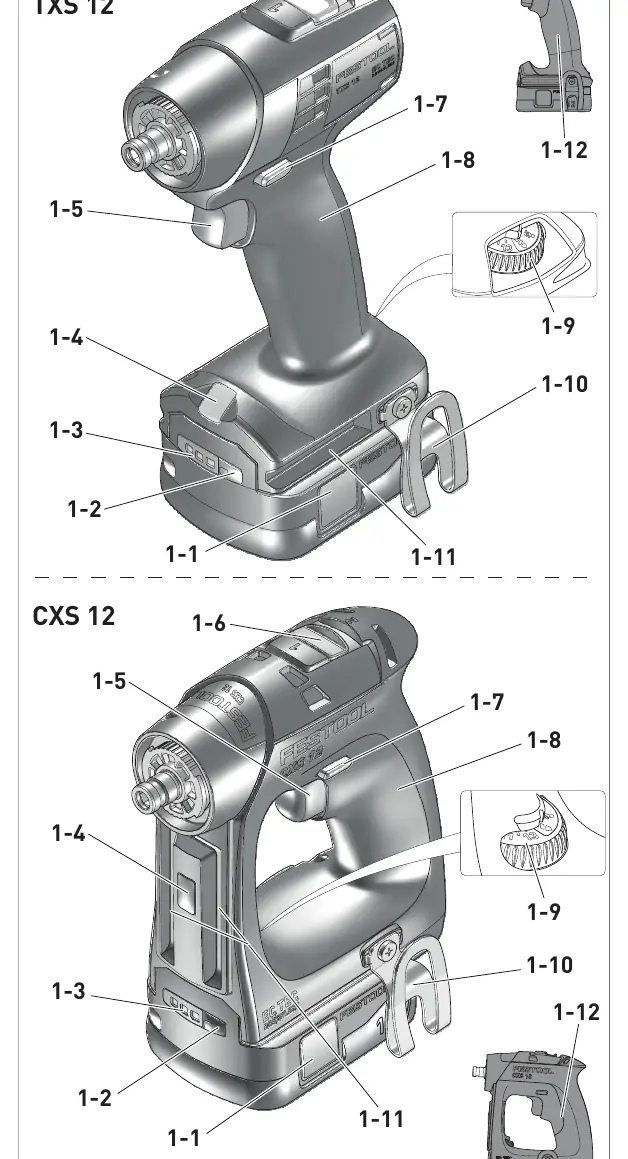
Device description
The device features a gear switch, rotational direction switch, torque adjustment thumbwheel, LED light, and a belt clip. The tool holder supports CENTROTEC attachments and standard chucks.
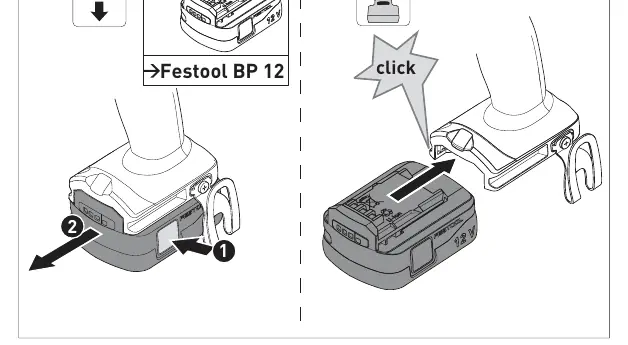
Commissioning
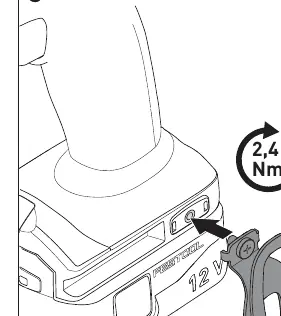
Belt clip: The belt clip allows the tool to be attached to work attire. It can be mounted on either the right or left side of the tool using the provided screw.
Settings
- Rotation direction: Use the switch [1-7] to select clockwise or counterclockwise rotation.
- Gear change: Use the gear switch [1-6] to toggle between 1st and 2nd gear while the tool is off.
- Torque adjustment: Use the thumbwheel [1-9] to set the torque (1-13). Position 1 is low torque, 13 is high torque.
- Lighting: Configure lighting via the thumbwheel [1-9]. Options include automatic, permanent on, or permanent off.
Tool holders and attachments
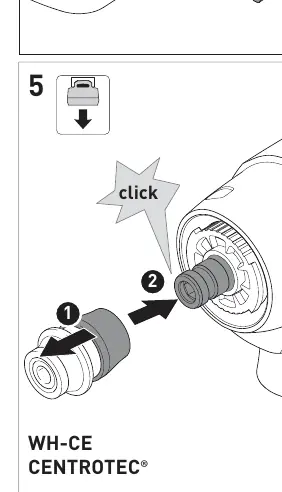
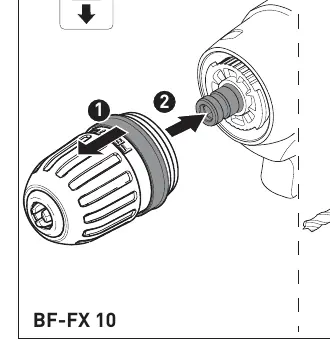
- CENTROTEC tool chuck: Allows for fast tool changes. Only use CENTROTEC tools with this chuck.
- Chuck: Used for standard drill bits and bits with a max shaft diameter of 10 mm.
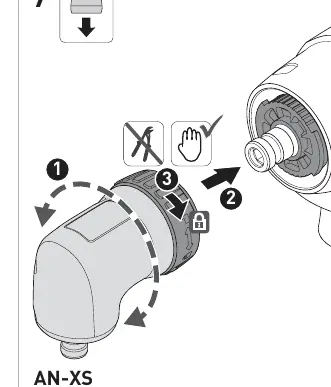
- Angle attachment: Allows drilling and screwdriving at a right angle to the tool.
Working with the tool
Always position the tool on the screw only when it is switched off. Secure the workpiece to prevent movement during operation. Keep hands away from rotating tools.
Warning signals
The tool will switch off and emit signals in the following states:
- Beeps once: Battery empty/incompatible or tool overloaded.
- Beeps twice: Preset torque reached.
- Beeps continuously: Tool is faulty.
Maintenance and care
Always remove the battery pack before maintenance. Keep cooling air openings clean to ensure air circulation. Do not clean the tool with compressed air. Keep contacts on the tool, charger, and battery pack clean.
Manufacturer information
Festool
Practical help
Common problems
Tool beeps once
Battery is empty/incompatible or tool is overloaded. Charge/replace battery or reduce load.
Tool beeps twice
Preset torque reached. This is normal operation.
Tool beeps continuously
Tool is faulty. Contact the manufacturer.
Before use
- Check battery interface for cleanliness
- Apply multipurpose grease to the drill spindle before first use
- Ensure tool is switched off before changing settings
- Verify torque setting for the material
Specs in practice
- Torque settings
- 1-13 range; 1 is lowest torque, 13 is highest
Images and diagrams
- Page 3: Overview of device parts [1-1] to [1-12]
- Page 4: Battery insertion and belt clip mounting
- Page 5: CENTROTEC and standard chuck installation
Model compatibility
- Compatible with Festool BP 12 battery pack
- Supports CENTROTEC system tools

Manual page author
Michael Turner
Technical manual editor
Reviews PDF manuals for structure, safety notes, and practical product details so readers can find the right information quickly.