General / Mounts Stands
AV:Link 129.165UK Fixed Wall Mount Installation Guide
Quick installation guide for the AV:Link 129.165UK fixed wall mount. Includes mounting steps for solid walls and stud walls, hardware compatibility, and safety instructions.
Table of contents
Quick guide from the manual
This document provides installation instructions for the AV:Link 129.165UK fixed wall mount. It is designed for professional installation only. Ensure the wall structure can support the combined weight of the mount and the TV. The mount is compatible with VESA patterns up to 600x400 and supports a maximum weight of 35kg (77lbs).
Safety and Maintenance
- Always use safety gear and appropriate tools.
- Do not overtighten mounting screws.
- Keep small parts away from children to avoid choking hazards.
- Check that the bracket is secure and safe to use at regular intervals (at least every three months).
Installation
The installation process is divided into wall plate mounting and TV bracket attachment.
Wall Plate Mounting
Depending on your wall type, follow the specific drilling instructions:
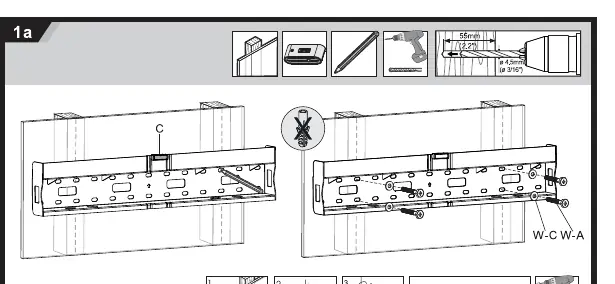
- Solid Walls: Use a 10mm drill bit to a depth of 60mm. Secure the wall plate using the provided wall plugs (W-B) and screws (W-A/W-C).
- Stud Walls: Use a 4.5mm drill bit to a depth of 55mm. Secure the wall plate directly into the studs using the provided screws (W-A/W-C).
Attaching Brackets to TV
Select the appropriate screws (M6x30, M8x30, or M8x50) based on your TV's requirements. Use the provided spacers (M-D, M-E, M-F) to ensure a secure fit between the brackets and the back of the TV.
Final Assembly
Once the wall plate is secured and the brackets are attached to the TV, hook the TV onto the wall plate. Secure the TV in place by tightening the safety screws located at the bottom of the brackets.
Practical help
Common problems
Mount feels unstable after installation.
Ensure all mounting screws are tightened correctly and the wall structure is capable of supporting the total weight.
Difficulty choosing the right screw size.
Test the provided M6 and M8 screws against your TV's mounting holes. Use spacers if the screws are too long to ensure a tight fit.
Before use
- Verify the wall type (solid or stud) before drilling.
- Ensure the TV weight does not exceed 35kg.
- Check that the VESA pattern is within the 200x200 to 600x400 range.
- Use a spirit level to ensure the wall plate is perfectly horizontal.
- Confirm all necessary hardware (screws, spacers, wall plugs) is present.
Specs in practice
- Max Weight Capacity
- 35kg (77lbs) - Do not exceed this limit to prevent structural failure.
- VESA Compatibility
- Supports 200x200, 300x300, 400x200, 400x400, and 600x400 patterns.
Images and diagrams
- Step 1a: Drilling and mounting the wall plate on solid walls.
- Step 1b: Drilling and mounting the wall plate on stud walls.
- Step 2: Attaching the vertical brackets to the back of the TV using appropriate spacers.
- Step 4: Securing the TV to the wall plate and tightening the safety screws.
Model compatibility
- Designed for professional installation only.
- Suitable for solid walls and stud walls.

Manual page author
Emily Carter
User documentation editor
Prepares concise manual descriptions and highlights the most useful setup, operation, and maintenance information for readers.