Home Appliances / Microwaves
User Manual for Flama 1846FL Microwave Oven
Quick guide for the Flama 1846FL microwave oven. Includes installation, safety, operation, cleaning, and troubleshooting instructions.
Quick answers from the manual
Quick answer
- The Flama 1846FL is a microwave oven for domestic use. It is operated using a power level selector and a 35-minute timer. p. 1, 12, 36
Key actions
- To cook: Place food on the rotating plate, close the door, set the power level, and turn the timer to the desired time. p. 37
- To interrupt cooking: Open the door or turn the timer knob to zero. p. 37
First start
- Remove all packaging, place on a level surface with proper ventilation, and plug into a grounded socket. p. 35
Problems and fixes
Microwave cannot be turned on
Check power cable, fuse, or circuit breaker.
p. 38
Microwave doesn't heat up
Close the door well.
p. 38Maintenance and reset
- Clean the interior regularly with a damp cloth. Remove odors by heating a cup of water with lemon juice and rind for 5 minutes. p. 33
Technical specifications
| Parameter | Value | Meaning | Pages |
|---|---|---|---|
| Timer | 35 minutes | Maximum cooking time per session. | p. 37 |
Where to find it in the PDF
- Safety Instructions p. 28, 29, 30, 31
- Description p. 32
- Cleaning and Maintenance p. 33
- Utensils p. 34, 35
- Installation p. 35
- Operation p. 36, 37
- Troubleshooting p. 38
Table of contents
Manual images
Click an image to enlargeQuick guide from the manual
The Flama 1846FL is a microwave oven designed for domestic use. This guide covers essential safety, installation, and operation procedures. Always ensure the appliance is placed on a level surface with adequate ventilation (30 cm above, 20 cm behind and on sides). Do not operate the microwave empty, as this can damage the magnetron.
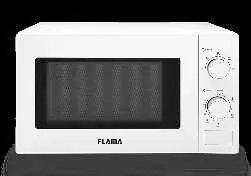
Description of the appliance
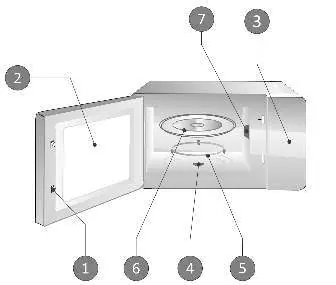
- Door latch with safety system
- Viewing window
- Control panel
- Rotating plate mechanism
- Rotating plate support
- Rotating plate
- Mica plate (do not remove)
Installation
Remove all packaging materials and inspect for damage. The minimum installation height is 85 cm. Ensure the rear surface faces a wall. Keep the microwave away from radios and televisions to avoid interference. Plug into a grounded wall socket.
Operation
Power level selector: Allows selection of cooking power levels: 17% (Low), 33% (Defrost), 55% (Medium), 77% (High), and Maximum power.
Timer: Allows setting the cooking time up to 35 minutes. To cook, place food on the rotating plate, close the door, select the power level, and turn the timer to the desired time. To interrupt cooking, open the door or turn the timer to zero.
Cleaning and Maintenance
Turn off and unplug the appliance before cleaning. Keep the interior clean by wiping splatters with a damp cloth. Do not use harsh sprays or abrasive cleaners. The rotating plate and support can be washed in warm water with mild detergent or in a dishwasher. If the light bulb needs replacement, contact an authorized Flama Technical Assistance Service.
Utensils
Safe to use: Microwave-safe crockery, glass jars (without lids), heat-resistant glass, parchment paper, and microwave-safe plastic.
Do not use: Aluminum trays, paper boxes with metal handles, metallic utensils, metallic ties, paper bags, plastic foam, or wood.
Troubleshooting
If the microwave does not turn on, check the power cable, fuse, or circuit breaker. If it does not heat, ensure the door is closed properly. If the rotating plate is noisy, clean the support and base.
Manufacturer information
FLAMA, SA
Practical help
Common problems
Microwave cannot be turned on
Check if the power cable is connected, or if a fuse/breaker has tripped.
Microwave does not heat up
Ensure the door is closed properly.
Glass rotating plate makes noise
Clean the rotating support and the base of the microwave.
Before use
- Remove all packaging material and accessories.
- Inspect the microwave for damage, such as dents or a broken door.
- Select a level surface with sufficient space for ventilation.
- Ensure a minimum installation height of 85 cm.
- Maintain at least 30 cm clearance above and 20 cm on the sides/back.
- Do not remove the mica plate located inside.
Specs in practice
- Power Levels
- 17% (Low), 33% (Defrost), 55% (Medium), 77% (High), Maximum power.
Images and diagrams
- The diagram identifies the door latch, viewing window, control panel, rotating plate mechanism, rotating plate support, rotating plate, and the mica plate.
Model compatibility
- Do not use metal utensils, aluminum trays, or paper bags with metal handles as they can cause electrical arcing.
- Plastic containers must be labeled 'Microwave-safe'.

Manual page author
Emily Carter
User documentation editor
Prepares concise manual descriptions and highlights the most useful setup, operation, and maintenance information for readers.