Home Appliances / Space Heaters
User Manual for Flama 2386FL Convector Heater
Quick guide for the Flama 2386FL convector heater. Includes assembly instructions, operation, thermostat settings, safety precautions, and troubleshooting.
PDF source: Français · summary: English
Quick answers from the manual
Quick answer
- The Flama 2386FL is a convector heater with two power settings (1000W/2000W) and an adjustable thermostat. It requires feet assembly before use. p. 5, 17
Key actions
- Assemble the feet p. 5, 17
- Set thermostat to MAX before turning on p. 6, 18
First start
- Assemble feet, place on flat surface, set knob to 0, plug in, set thermostat to MAX, select power mode (I or II). p. 5, 17
Show 4 more answers Show less
Problems and fixes
Appliance stops working
Thermal overload protection activated. Unplug and wait 15 minutes.
p. 6, 18Maintenance and reset
- Unplug the appliance and wait 15 minutes for it to cool down. p. 6, 18
Technical specifications
| Parameter | Value | Meaning | Pages |
|---|---|---|---|
| Max Power | 2000W | High setting (II) | p. 5, 17 |
| Low Power | 1000W | Low setting (I) | p. 5, 17 |
Where to find it in the PDF
- Safety Instructions p. 3, 15
- Operation p. 5, 17
- Cleaning and Maintenance p. 7, 18
Table of contents
Quick guide from the manual
The Flama 2386FL is a convector heater designed for domestic use. Before first use, ensure the feet are properly assembled. The device features two power modes (1000W and 2000W) and an adjustable thermostat. Always place the unit on a solid, flat, and stable surface. Keep a minimum distance of 50 cm from other objects and 1 m from flammable materials like curtains.
Description
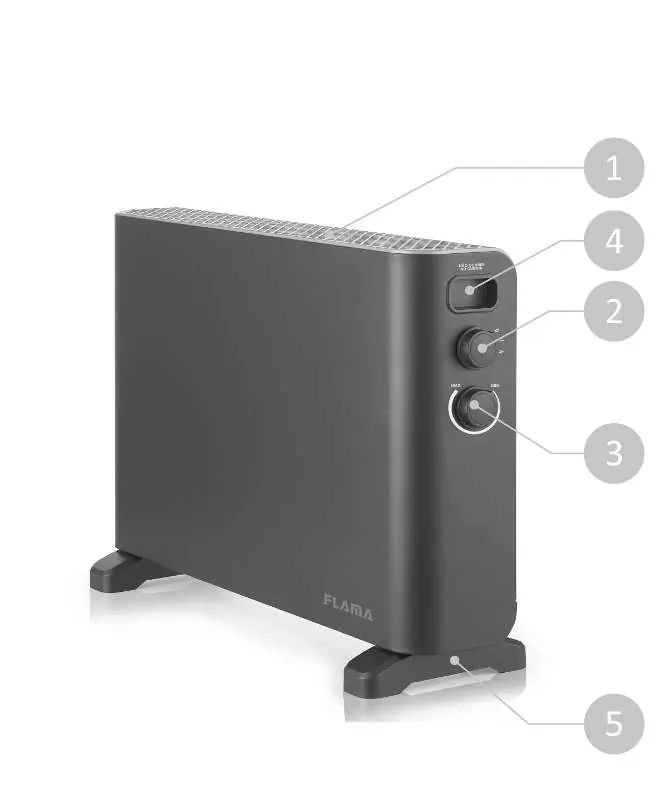
- 1. Grate
- 2. Power & Mode rotary knob
- 3. Thermostat adjustment knob
- 4. Handle
- 5. Feet
Assembly
The appliance must never be operated without the feet properly fitted.
- Carefully remove the convector from the box and packaging.
- Place the feet at the ends of the lower part of the device.
- Align the holes in the feet with the axles on the lower area.
- Secure the feet using the provided screws.
Operation
Ensure the Power & Mode knob is in the off position (0) before plugging the device into a wall outlet. Once plugged in, set the thermostat adjustment knob to the MAX position. Turn the Power & Mode knob to the desired temperature mode:
- ( I ): Low temperature (max. 1000W)
- ( II ): High temperature (max. 2000W)
Thermostat Instructions
Once the room reaches the desired temperature, slowly turn the thermostat knob counterclockwise until you hear a slight sound. Then, turn it clockwise until you hear the sound again. The thermostat will cycle on and off to maintain the set temperature. To turn off the device, set the Power & Mode knob to (0) and unplug it.
Safety Features
The device is equipped with thermal overload protection. If the heater shuts down unexpectedly, it may be due to this safety feature. To reset, unplug the device, wait 15 minutes for it to cool down, and then restart.
Cleaning and Maintenance
Always disconnect the plug before cleaning. Do not immerse the appliance in water. Use a vacuum cleaner with a brush attachment to clean the grate and remove dust from the inside. Clean the exterior with a soft cloth. Do not use gasoline, benzine, thinners, or abrasive cleaners.
Manufacturer information
FLAMA, SA
Practical help
Common problems
Appliance shuts down unexpectedly
Thermal overload protection may have activated. Unplug the device, wait 15 minutes for it to cool down, and then restart.
Appliance does not heat
Ensure the plug is securely connected to a working electrical outlet and check that the thermostat is set correctly.
Before use
- Ensure feet are properly assembled
- Place on a solid, flat, and stable surface
- Check that the power cord and plug are in good condition
- Ensure the Power & Mode knob is in the off (0) position before plugging in
Show more Show less
Images and diagrams
- 2: Power & Mode rotary knob
- 3: Thermostat adjustment knob
Model compatibility
- Intended for domestic use only.
- Do not use in small rooms occupied by persons unable to leave without supervision.
- Keep textiles and curtains at least 1m away from the air outlet.

Manual page author
Emily Carter
User documentation editor