Music / Vocal Effects
User Manual for Flamma FV01 Vocal Pitch Correction Pedal
Quick guide for the Flamma FV01 Vocal Pitch Correction Pedal. Learn how to use pitch correction, reverb, delay, tone modes, and configure output settings.
Table of contents
Manual images
Click an image to enlargeQuick Guide
The Flamma FV01 is a vocal pitch correction pedal that also functions as a microphone amplifier and stompbox. It features built-in reverb, delay, and three vocal tone settings. Ensure you use a 9V DC, 500mA, center-negative power adapter to operate the device.
Device Layout
The pedal features the following controls and connections:
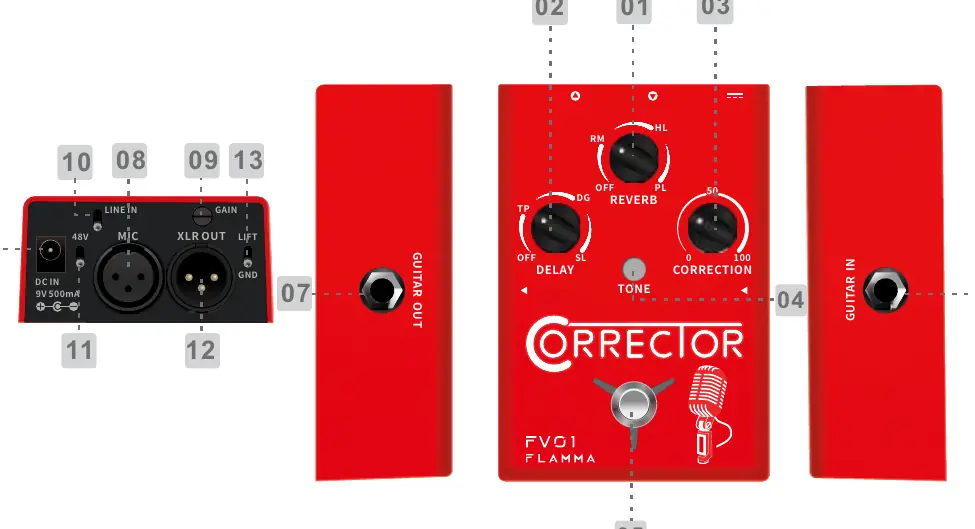
- Reverb Knob: Adjusts the volume level of the selected reverb effect.
- Delay Knob: Adjusts the volume level of the selected delay effect.
- Correction Knob: Adjusts the level of pitch correction.
- Tone Button: Switches between vocal tone modes (Normal, Warm, Bright).
- Footswitch: Toggles effects on/off and accesses the hidden menu.
- Inputs/Outputs: Includes Guitar In/Out, Mic In, and XLR Out.
- 48V Switch: Toggles 48V phantom power for condenser microphones.
- Lift/GND Switch: Grounding switch to reduce noise.
Effects and Tone
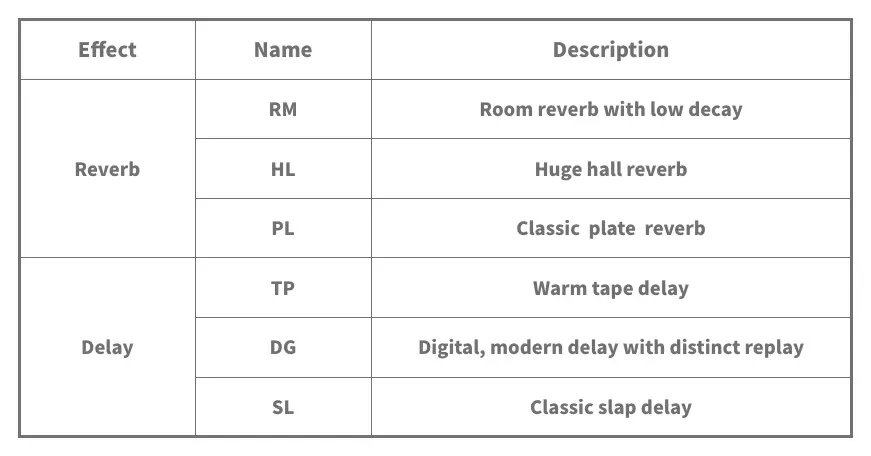
Reverb and Delay: The pedal offers three classic reverb effects (Room, Hall, Plate) and three delay effects (Tape, Digital, Slap). Use the respective knobs to adjust volume. Access the hidden menu by pressing and holding the footswitch to adjust specific parameters like guitar reverb or delay feedback.
Vocal Tone Modes: Press the TONE button to cycle through modes. The LED color indicates the selection: LED off (Normal), Red (Warm), Blue (Bright).
Operations
Footswitch Control: Press to turn on Vocal Tone, Correction, Reverb, and Delay effects (LED turns green). Press again to turn off Correction (LED turns red). Press twice quickly to turn off all effects.
Hidden Menu: Press and hold the footswitch while the effect is on to enter the hidden menu. Press and hold again to exit.
Output Modes
The FV01 supports two output modes:
- Individual Mode: Guitar signal goes to GUITAR OUT; microphone signal goes to XLR OUT.
- Mixed Mode: Both signals are mixed and sent to both outputs.
To change output mode: Power off the device. Press and hold the footswitch while powering on. Blinking Blue indicates Individual mode; blinking Red indicates Mixed mode.
Specifications
The device requires a 9V DC power supply with 500mA current draw. It features 1/4" mono audio jacks for guitar and XLR balanced jacks for microphone input and output. Dimensions are 86.6 x 125 x 60 mm, with a weight of 0.371 kg.
Practical help
Common problems
No sound output
Verify the power supply is 9V DC, 500mA, center negative. Check cable connections and ensure the correct output mode is selected.
Effects are not active
Check the footswitch LED. If it is off or red, the effects may be bypassed. Press the footswitch to activate.
Need to change output mode
Power off the pedal. Press and hold the footswitch while turning the power on. Observe the LED color (Blue for Individual, Red for Mixed).
Before use
- Ensure power adapter is 9V DC, 500mA, center negative.
- Connect microphone to MIC IN.
- Connect guitar to GUITAR IN.
- Check if 48V phantom power is required for your microphone.
- Set the desired output mode (Individual or Mixed) before performance.
Specs in practice
- Power Requirements
- Requires 9V DC, 500mA, center negative adapter.
- Frequency Response
- 20 Hz - 20K Hz, covering the full audible range.
- Impedance (Guitar In)
- 1M ohms, suitable for standard electric guitar pickups.
Images and diagrams
- The layout diagram identifies all input/output ports including MIC IN, XLR OUT, GUITAR IN/OUT, and DC IN.
- The diagram highlights the control knobs for Reverb, Delay, and Correction, as well as the Tone button and Footswitch.
Model compatibility
- Supports 48V phantom power for condenser microphones.
- Can function as a microphone amplifier or a traditional stompbox.

Manual page author
Michael Turner
Technical manual editor
Reviews PDF manuals for structure, safety notes, and practical product details so readers can find the right information quickly.