Music / Guitar Effects
User Manual for Flamma FS05 Multi-Effects Modulation Pedal
Quick guide for the Flamma FS05 Multi-Effects Modulation Pedal. Learn how to use presets, adjust effects, perform a factory reset, and understand power requirements.
Table of contents
Manual images
Click an image to enlargeQuick guide from the manual
The Flamma FS05 is a multi-effects modulation pedal designed for guitarists. Key features include 11 high-quality stereo modulation effects, 7 preset slots for saving settings, and true bypass functionality. Important: The device requires a 9V DC, 300mA, center-negative power supply. Ensure the polarity is correct before connecting.
Safety Precautions
- Use only the designated power adapter (9V DC, 300mA, center negative).
- Unplug the adapter during electrical storms or when not in use.
- Do not use the apparatus near water.
- Clean only with a dry cloth.
- Do not install near heat sources like radiators or stoves.
- Protect the power cord from being walked on or pinched.
Device Layout and Controls
The pedal features several controls for sound shaping:
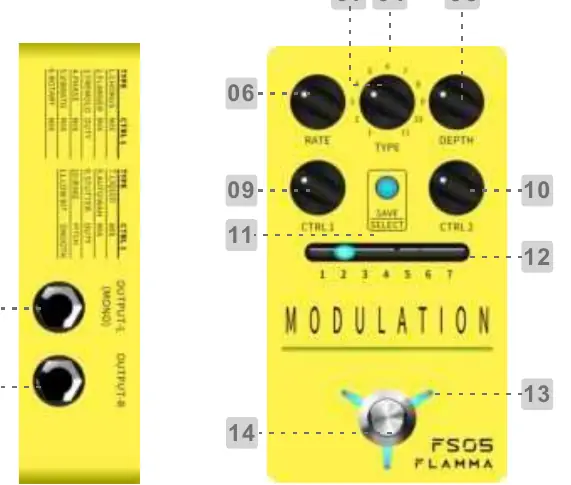
- Rate: Adjusts the speed of the effect.
- Type: Switches between the 11 different modulation effects.
- Depth: Adjusts the intensity of the effect.
- CTRL 1 & CTRL 2: Adjust specific parameters for the selected effect.
- SAVE/PRESET: Press to switch between 7 preset patches. Press and hold to store the current settings.
- Footswitch: Toggles the pedal on/off.
- Inputs/Outputs: Includes 1/4" mono jacks for input and output. Use the L (MONO) jack for mono connections.
Operating Instructions
Switching Presets
Press the SAVE/SELECT button to cycle through the 7 different preset patches. The LED indicator shows the currently selected preset.
Saving Presets
If you change a parameter, the LED indicator will blink slowly, indicating the change is unsaved. Press and hold the SAVE button to store the current settings. The LED will blink quickly to confirm the save was successful.
Factory Reset
- Power off the pedal.
- Press and hold the SAVE button.
- Power on the pedal while holding the button.
- The 7 LED indicators will blink. Release the SAVE button and wait for the indicators to stop blinking to complete the reset.
Effect List
The FS05 offers 11 modulation effects. Each effect uses the CTRL 1 and CTRL 2 knobs for specific adjustments:
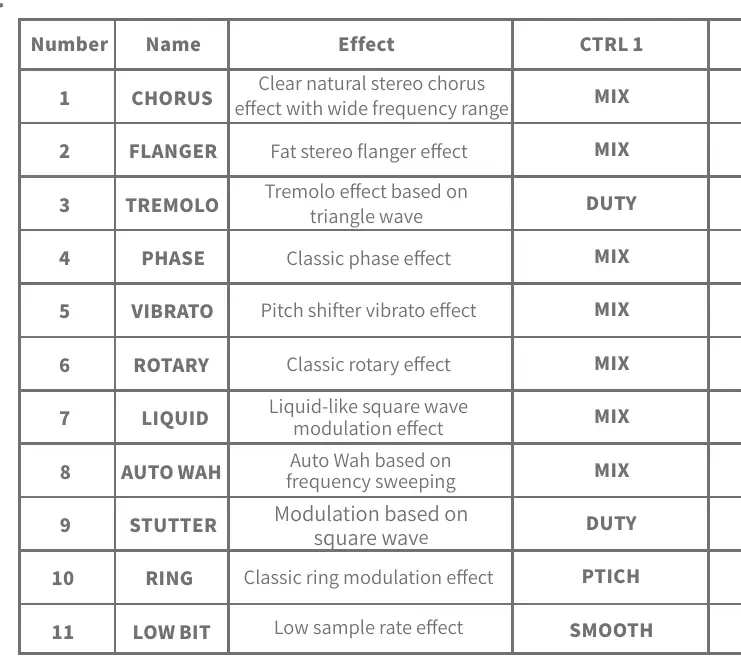
- 1. CHORUS: Mix / Tone
- 2. FLANGER: Mix / Feedback
- 3. TREMOLO: Duty / Tone
- 4. PHASE: Mix / Tone
- 5. VIBRATO: Mix / Tone
- 6. ROTARY: Mix / Tone
- 7. LIQUID: Mix / Tone
- 8. AUTO WAH: Mix / Tone
- 9. STUTTER: Duty / Tone
- 10. RING: Pitch / Tone
- 11. LOW BIT: Smooth / Bit Rate
Specifications
- Input: 2 x 1/4" mono audio jack (Impedance: 4.7M ohms)
- Output: 2 x 1/4" mono audio jack (Impedance: 100 ohms)
- Power Supply: 9V DC (Center negative)
- Current Draw: 300mA
- Dimensions: 69.82 x 121.5 x 50.65 mm
- Weight: 0.298 kg
Practical help
Common problems
LED indicator blinks slowly
This indicates that a parameter has been changed but not saved. Press and hold the SAVE button to store your current settings.
Pedal does not power on
Verify that you are using a 9V DC, 300mA, center-negative power supply. Ensure the polarity is correct.
Before use
- Ensure the power supply is 9V DC, 300mA, center negative.
- Connect your guitar to the INPUT L (MONO) jack for mono operation.
- Connect the output to your amplifier using a 1/4" mono cable.
- Check that the power supply voltage is exactly 9V.
Specs in practice
- Input Impedance (4.7M ohms)
- High input impedance is ideal for guitar pickups to maintain signal clarity.
- Power Supply (9V DC, Center Negative)
- Standard pedal power requirement. Using the wrong polarity or voltage can damage the device.
- Current Draw (300mA)
- Ensure your power supply can provide at least 300mA of current.
Images and diagrams
- The layout diagram identifies the top-mounted knobs (Rate, Type, Depth, CTRL 1, CTRL 2) and the footswitch.
- Side panels show the location of the Input L/R and Output L/R jacks.
Model compatibility
- Designed for guitar tones.
- Supports both mono and stereo connections via 1/4" jacks.

Manual page author
Michael Turner
Technical manual editor
Reviews PDF manuals for structure, safety notes, and practical product details so readers can find the right information quickly.