Music / Guitar Effects
User Manual for Flamma FC15 Analog Flanger Pedal
Quick guide for the Flamma FC15 Analog Flanger Pedal. Learn about power requirements, control layout, effect modes, and technical specifications.
Table of contents
Quick Guide
The Flamma FC15 is a compact analog flanger pedal designed for guitarists. To begin using the device, ensure you have a 9V DC center-negative power supply. Connect your instrument to the INPUT jack and your amplifier to the OUTPUT jack. Use the footswitch to engage or bypass the effect, and use the Mode Toggle to switch between Normal and Filter modes.
Precautions and Power Supply
Power Supply: Connect only to a 9V DC, center-negative power adapter. Using an incorrect power supply may damage the unit. Always unplug the adapter when the pedal is not in use or during electrical storms.
Safety Instructions:
- Do not use the apparatus near water.
- Clean only with a dry cloth.
- Do not install near heat sources such as radiators, stoves, or amplifiers.
- Ensure the power cord is protected from being walked on or pinched.
Features
- Classic Analog Flanger: Features filter and oscillator effects.
- Effect Modes: Includes Normal and Filter modes.
- Design: Compact size with a durable metal shell.
- True Bypass: Ensures signal integrity when the effect is off.
Layout and Controls
The pedal features the following controls and connections:
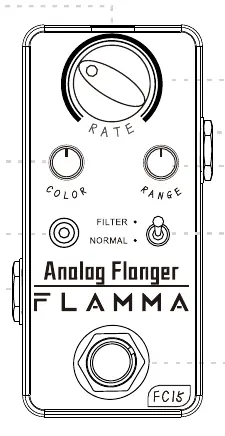
- 01 Footswitch: Press to turn the pedal on or off.
- 02 LED Indicator: Indicates the On or Off status of the pedal.
- 03 DC IN: Connection for the 9V DC power supply.
- 04 INPUT: 1/4 inch mono audio jack for instrument input.
- 05 OUTPUT: 1/4 inch mono audio jack for amplifier output.
- 06 Mode Toggle: Switches between different effect modes (Normal/Filter).
- 07 COLOR: Rotates to adjust the feedback of the flanger.
- 08 RANGE: Adjusts the limit range of the sweeping scope in Normal mode; adjusts the filter matrix in Filter mode.
- 09 RATE: Adjusts the speed of the flanger in Normal mode (not functional in Filter mode).
Specifications
- Power Requirements: 9V DC (center negative)
- Current Draw: 10mA
- Input Impedance: 1M ohms
- Output Impedance: 510 ohms
- Dimensions: 47mm (D) x 83mm (W) x 52mm (H)
- Weight: 160g
Practical help
Common problems
Pedal does not turn on
Verify that the power supply is 9V DC, center negative, and properly connected.
No sound output
Check that both input and output cables are securely connected and the pedal is engaged (LED indicator is on).
Effect sounds incorrect or unresponsive
Ensure the Mode Toggle is set correctly. Note that the RATE knob does not function when in Filter mode.
Before use
- Ensure you have a 9V DC center-negative power adapter.
- Use 1/4 inch mono audio cables for input and output.
- Place the pedal on a stable surface away from water and heat sources.
- Check that the pedal is in the desired mode (Normal or Filter) before playing.
Specs in practice
- Power Requirements
- Requires 9V DC, center negative. Using incorrect voltage may damage the unit.
- Current Draw
- 10mA. Ensure your power supply can handle this load.
- Input Impedance
- 1M ohms, standard for guitar instrument signals.
- Output Impedance
- 510 ohms.
Images and diagrams
- The layout diagram identifies the footswitch, LED indicator, power input, audio jacks, and the three control knobs (COLOR, RANGE, RATE) along with the mode toggle switch.
Model compatibility
- Requires 9V DC center negative power adapter.
- Compatible with standard 1/4 inch mono instrument cables.

Manual page author
Emily Carter
User documentation editor
Prepares concise manual descriptions and highlights the most useful setup, operation, and maintenance information for readers.