Home Appliances / Small Kitchen Appliances
User Manual for George Foreman Mix & Go PRO Blender
Comprehensive user guide for the George Foreman Mix & Go PRO blender (model 21820AU). Includes setup instructions, operating procedures for the jug and bottle, cleaning tips, safety precautions, and troubleshooting.
Quick answers from the manual
Quick answer
- The George Foreman Mix & Go PRO is a blender for domestic use. It features a jug and a portable bottle, both with blade assemblies. It includes a Smoothie function and three speed settings. p. 4, 7
Key actions
- Cleaning the jug p. 9
- Using the Smoothie function p. 7
First start
- Dismantle and wash all parts before first use. Ensure the jug or bottle is correctly seated on the motor unit before starting. p. 5
Show 4 more answers Show less
Problems and fixes
LED blinking quickly
Unit must be reset. Let unit cool for at least 20 minutes.
p. 9
Unit stops/goes into standby mode
Re-select appropriate speed.
p. 9Maintenance and reset
- If the unit overheats, let it cool for at least 20 minutes. p. 9
Technical specifications
| Parameter | Value | Meaning | Pages |
|---|---|---|---|
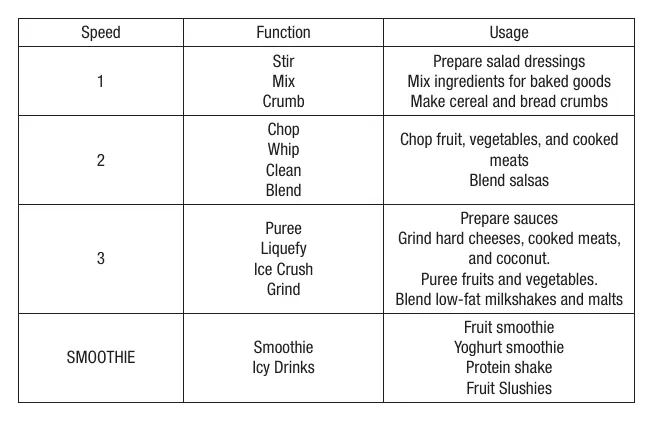
| Speed 1 | Stir, Mix, Crumb | Prepare salad dressings, mix ingredients for baked goods, make cereal and bread crumbs | p. 9 |
| Speed 2 | Chop, Whip, Clean, Blend | Chop fruit, vegetables, and cooked meats, blend salsas | p. 9 |
| Speed 3 | Puree, Liquefy, Ice Crush, Grind | Prepare sauces, grind hard cheeses, cooked meats, and coconut, puree fruits and vegetables, blend low-fat milkshakes and malts | p. 9 |
Where to find it in the PDF
- Parts Identification p. 4
- Troubleshooting p. 9
Table of contents
Important Information
The George Foreman Mix & Go PRO is designed for domestic use only. Before using the appliance for the first time, read the instruction book carefully. Always ensure the jug or bottle is correctly seated on the motor unit before starting. Do not process ingredients above 40°C. Do not fill the jug past 1250mL or the bottle past 600mL. Do not run the motor for longer than 1 minute; allow it to cool for at least 2 minutes between cycles.
Parts Identification
The blender consists of the following components: Cap, Lid, Jug, Handle, Blade assembly, Jug base, Motor unit, Control panel, Power on/off LED light, Blender/Drink bottle, Bottle blade assembly, and Drink bottle lid.
Before First Use
Remove all packaging material and stickers. Dismantle and clean all parts as instructed in the Care and Cleaning section. Ensure all items have been unpacked before disposing of packaging.
Preparing the Blender Jug
With the lid removed, turn the jug upside down. Place the blade assembly into the bottom opening, place the jug base over it, and screw clockwise until tight. Turn the jug right side up. Place the assembled jug onto the motor unit, ensuring tabs align with recesses. Place ingredients (solids first, then liquids) into the jug. Place the lid on firmly and lock the measuring cap in place. Press the Power on/off button to enter standby mode, then select the desired speed.
Preparing the Bottle
Place the bottle on a flat surface. Add ingredients (solids first, then liquids). Fasten the blade assembly onto the open end and turn clockwise until tight. Turn the bottle upside down and place it on the motor unit, ensuring it is correctly seated. Press the Power on/off button and select the desired speed.
Smoothie Function
The 'Smoothie' function automatically cycles through different speed settings for optimal results. Press the 'SMOOTHIE' button to start the 30-second program. It can be stopped at any time by pressing the Pulse/Stop button.
Blending Tips and Techniques
For pureeing solid ingredients, start with small portions. Always put solids in first. If the motor stalls, turn the device off immediately, unplug, and let it cool for at least 15 minutes. Use the Pulse function for short bursts, not exceeding 30 seconds continuously. Always hold the lid or bottle steady when starting the motor.
Care and Cleaning
This product contains no user-serviceable parts. Do not use harsh abrasive or alkaline cleaning agents. For a quick clean of the jug, half-fill with warm water and a drop of dishwashing liquid, fit the lid, and run the motor for 30 seconds. For a thorough clean, disassemble the jug and wash parts in warm soapy water or the dishwasher (top rack only for lid/cap). Do not immerse the motor unit in liquid; wipe with a damp cloth.
Troubleshooting
If the LED blinks quickly (100 msec/time), it indicates an overheat warning or a button held longer than 30 seconds; the unit must be reset and allowed to cool for at least 20 minutes. If the unit stops or goes into standby mode, the work time has exceeded 150 seconds; re-select the appropriate speed.
Safety Safeguards
Do not immerse the cord, plug, or motor unit in water. Do not use outdoors or in the bathroom. Do not operate with a damaged cord or plug. Cutting blades are very sharp; handle with extreme care. Do not operate the appliance with an empty jug or bottle. Keep the appliance and power cord away from edges of benches and heat sources.
Practical help
Common problems
LED blinking quickly (100 msec/time)
Overheat warning or button held longer than 30 seconds. Reset unit and let cool for at least 20 minutes.
Unit stops or goes into standby mode
Work time exceeded 150 seconds (2.5 minutes). Re-select appropriate speed.
Before use
- Remove all packaging material and stickers
- Dismantle and clean all parts
- Ensure jug/bottle is seated correctly on motor unit
- Check that ingredients are below 40°C
- Ensure the lid is securely in place
Show more Show less
Specs in practice
- Smoothie Function
- Automatic cycle for smoothies and icy drinks
Images and diagrams
- 5. Blade assembly
- 7. Motor unit
- 8. Control panel
- 9. Power on/off LED light
- 10. Blender / Drink bottle
Model compatibility
- Domestic use only
- Do not process ingredients above 40°C
- Do not fill jug past 1250mL
- Do not fill bottle past 600mL

Manual page author
Emily Carter
User documentation editor