Home Appliances / Cooktops Hobs
Instruction Manual for Rommelsbacher CG 2308/TC Ceran® Grill
Comprehensive user guide for the Rommelsbacher CG 2308/TC Ceran® Grill. Includes setup instructions, temperature control settings, cleaning procedures, safety warnings, and troubleshooting for error codes.
PDF source: Deutsch · summary: English
Quick answers from the manual
Quick answer
- The Rommelsbacher CG 2308/TC is an electric Ceran® grill. To operate, plug it in, press the main switch, and use the '+' or '-' touch keys to set the temperature between 80 °C and 280 °C. Always unplug after use. p. 3, 7, 16, 20
Key actions
- Switching on p. 7, 20
- Setting temperature p. 8, 20
- Cleaning p. 11, 23
First start
- Wipe all surfaces with a damp cloth and dry carefully. p. 7, 20
- Ensure the fat-collecting channel is inserted. p. 7, 20
Show 4 more answers Show less
Problems and fixes
Error code E06
Sensor error. Unplug, wait, and restart. Contact service if it persists.
p. 9, 21Error codes
| Code | Meaning | Action | Pages |
|---|---|---|---|
| E06 | Sensor error (temperature ≤ 10 °C or ≥ 320 °C) | Unplug, wait, and restart. Contact service if it persists. | p. 9, 21 |
Technical specifications
| Parameter | Value | Meaning | Pages |
|---|---|---|---|
| Nominal voltage | 230 V~ 50 Hz | Power supply requirement | p. 4, 17 |
| Nominal power | 2000 W | Power consumption | p. 4, 17 |
| Grill surface | 36 x 27 cm | Main cooking area | p. 4, 17 |
| Keep-warm surface | 7.5 x 27 cm | Secondary warming area | p. 4, 17 |
Where to find it in the PDF
- Control panel and display p. 3, 16
- Initial use and grilling p. 7, 20
- Cleaning and maintenance p. 11, 23
Table of contents
Manual images
Click an image to enlargeQuick guide from the manual
The Rommelsbacher CG 2308/TC is a Ceran® glass ceramic grill featuring touch controls. To start, plug in the device, press the main switch, and use the '+' or '-' sensors to set the temperature (80 °C to 280 °C). The device features a keep-warm zone and a lift-up foot for low-fat grilling. Always unplug the device after use and allow it to cool completely before cleaning.
Description
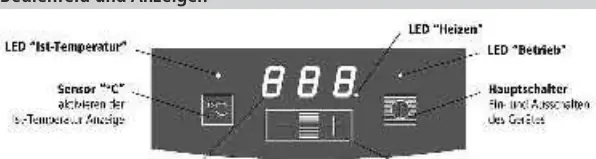
This model is equipped with touch control sensors for easy operation. It features a 3-digit display, a heating LED, and an operation LED. The grill surface is made of Ceran® glass ceramic, which is durable and easy to clean. It includes a lateral fat-collecting channel and a lift-up foot for angled grilling.
Setup and Installation
- Place the appliance on a heat-resistant, stable, and even surface.
- Ensure a ventilation distance of at least 10 cm on all sides and 1 m above the unit.
- Do not operate near heat sources (ovens, gas flames) or in explosive environments.
- Ensure the fat-collecting channel is properly inserted before use.
- Wipe all surfaces with a damp cloth and dry thoroughly before the first use.
Operation
Switching on: Plug in the device. The 'Operation' LED flashes. Touch the main switch until a signal sounds; the LED will glow permanently. The display shows '0' (or the current temperature if warm).
Setting temperature: Press '+' or '-' in standby mode to enter setting mode. The default is 180 °C. Adjust in 10 °C steps. The 'Heating' LED indicates the heating process. A signal sounds when the target temperature is reached.
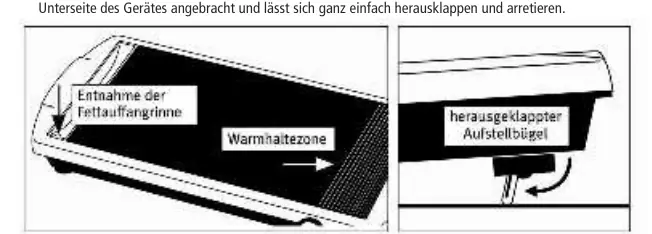
Keep-warm zone: Located on the right side, marked with lines. It maintains approximately half the temperature of the main grill surface.
Low-fat grilling: Use the lift-up foot located underneath the appliance to create a slant towards the fat-collecting channel.
Cleaning and Maintenance
- Always unplug and let the device cool down before cleaning.
- Use the provided cleaning scraper to push food residues into the fat-collecting channel while the grill is still warm.
- Remove the fat-collecting channel by pressing the round spot in front of it.
- Clean the cold grill surface with dishwater. For stubborn stains, use a specialized Ceran® surface cleaner.
- Never immerse the appliance in water or use steam jet cleaners.
- Do not use abrasive cleaners, steel wool, or sharp objects.
Safety
- Keep children under 8 years away from the appliance.
- Do not use external timers or remote control systems.
- Do not use plastic, enamel, porcelain, or aluminum foil vessels on the grill.
- Do not use sharp objects (knives, forks) on the Ceran® surface.
- Overheated fats and oils can ignite; never leave unattended.
- If plastic or sugar melts on the surface, remove immediately with the scraper while hot.
Troubleshooting
If the display shows 'lo', the ambient temperature is too low (< 10 °C). If the display shows 'E06', the sensor has detected an inadmissible value (≤ 10 °C or ≥ 320 °C). Unplug the device, wait a short time, and restart. If 'E06' persists, contact the service center.
Manufacturer information
Rommelsbacher ElektroHausgeräte GmbH
Practical help
Common problems
Display shows 'E06'
Sensor error. Unplug the appliance, wait a short time, and restart. If it persists, contact technical service.
Display shows 'lo'
Ambient temperature is too low (< 10 °C). It should disappear after a few seconds of operation.
Food sticking or burnt on
Use the provided scraper while warm to push residues into the fat channel. For stubborn stains, use a specialized Ceran® cleaner.
Before use
- Wipe surfaces with a damp cloth and dry.
- Ensure the fat-collecting channel is inserted.
- Place on a heat-resistant, stable, level surface.
- Ensure 10 cm ventilation clearance on all sides.
- Plug into a properly installed Schuko socket.
Show more Show less
Specs in practice
- Temperature Range
- 80 °C to 280 °C, adjustable in 10 °C steps.
- Grill Surface
- 36 x 27 cm main grilling area.
- Keep-warm Surface
- 7.5 x 27 cm area for keeping food warm.
Images and diagrams
- Control panel: Features touch keys for temperature adjustment, main switch, and display.
- Lift-up foot: Located underneath to tilt the grill for low-fat cooking.
- Fat-collecting channel: Removable tray for grease and food residues.
Model compatibility
- Do not use plastic, inferior enamel, porcelain, or aluminum foil vessels on the grill.
- Not suitable for commercial use.
- Not suitable for installation into worktops.

Manual page author
David Miller
Documentation analyst