Electronics / Amplifiers Receivers
User Manual for Glemm PAA 180TMZP P.A. System Amplifier
Quick guide for the Glemm PAA 180TMZP P.A. system amplifier. Learn about speaker connections (impedance and constant voltage), panel controls, media player operation, and troubleshooting.
Table of contents
Manual images
Click an image to enlargeQuick Guide
The Glemm PAA 180TMZP is a professional P.A. system amplifier designed for installations in offices, schools, churches, and commercial spaces. It features 3 microphone inputs, 2 AUX inputs, and 1 AUX output. It supports both low-impedance (4-8-16 Ohm) and constant voltage (70V/100V) speaker systems.
Safety Precautions
- Power: Operates on 230V mains power. Ensure the power source frequency and voltage match the device specifications.
- Grounding: It is mandatory to connect the product to a grounded power system.
- Installation: Intended for professional, indoor use only. Ensure the device is placed in a well-ventilated area and the cooling fan is not obstructed.
- Maintenance: Always disconnect from the power source before cleaning, maintenance, or fuse inspection. Allow the unit to cool down before handling.
- Handling: Do not open the device. Repairs must be performed by authorized personnel.
Product Overview
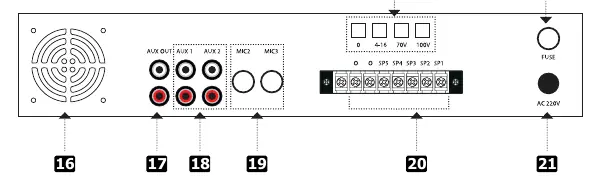
The amplifier is designed for rack mounting (2U). It includes protection systems against short circuits, overheating, and overloads. The rear panel provides terminals for speaker connections and various audio inputs/outputs.
Speaker Connections
The amplifier supports two main types of speaker configurations:
- Impedance Connection (4-8-16 Ohm): Used for standard speaker setups. The total impedance of the speakers must be compatible with the amplifier's output. Impedance values add up or divide depending on whether the connection is in series or parallel.
- Constant Voltage Connection (70V/100V): Ideal for uniform sound diffusion in large areas. Connect one wire to the "COM" terminal and the other to the "100V" terminal. The sum of the maximum power of the speakers must be equal to or less than the amplifier's maximum power.
Front Panel Controls
The front panel allows for direct control of the amplifier:
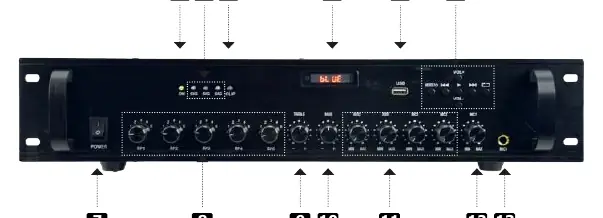
- Power Switch: Turns the unit on/off.
- Volume Controls: Individual controls for zones and input sources (Mic, AUX).
- Tone Controls: Adjust Bass and Treble levels.
- Media Player: Includes a USB socket for MP3 playback, a display, and navigation buttons (Mode, Fast Forward/Backward, Play/Pause, Repeat, Volume +/-).
- Indicators: LED indicators for Power, Signal, and Clip (overload).
Troubleshooting
- Unit not powered: Check the power cord, fuse, and power supply.
- No audio: Verify speaker connections, impedance/voltage compatibility, and that cables are connected to the correct terminals.
- MP3 files not recognized: Ensure the USB drive is formatted to FAT32 and files are in MP3 format.
- Intermittent operation: The unit may be overheating. Ensure the cooling fan is not obstructed and the unit is in a ventilated position.
Technical Specifications
- Max Power: 180W
- RMS Power: 90W
- Power Supply: 220V-50Hz
- Output Impedance: 4-8-16 Ohm
- Constant Voltage Output: 70V/100V
- Inputs: 3 Mic, 2 AUX
- Dimensions: 482 x 100 x 350 mm
- Weight: 8.1 kg
Manufacturer information
Glemm
Practical help
Common problems
Unit does not power on
Check the power cord, verify the power supply, and inspect the fuse for damage.
Speakers do not emit audio
Verify that cables are connected to the correct terminals and that speaker impedance/voltage is compatible.
MP3 files are not recognized
Ensure the USB flash drive is formatted to FAT32 and that the files are in MP3 format.
Unit runs intermittently
The unit may be overheating. Ensure the cooling fan is not obstructed and the unit is in a well-ventilated area.
Before use
- Ensure the device is unplugged before making any connections.
- Verify that the power source frequency and voltage match the device requirements.
- Ensure the amplifier is connected to a grounded power system.
- Check that the total speaker power does not exceed the amplifier's maximum power capacity.
- Ensure the cooling fan is free from obstructions.
Specs in practice
- RMS Power (90W)
- The continuous power output the amplifier can handle safely.
- Output Impedance (4-8-16 Ohm)
- The range of speaker impedance loads the amplifier can drive in low-impedance mode.
- Constant Voltage (70V/100V)
- Output mode for long-distance speaker lines, requiring speakers with matching transformers.
Images and diagrams
- Front panel features volume knobs for zones and inputs, tone controls, and media player interface.
- Rear panel contains input/output terminals, cooling fan, and power input.
- Wiring diagrams illustrate series, parallel, and mixed speaker connections for impedance matching.
Model compatibility
- Supports 4-8-16 Ohm low-impedance speakers.
- Supports 70V/100V constant voltage speaker systems.
- Mic 1 input features a priority function.

Manual page author
Michael Turner
Technical manual editor
Reviews PDF manuals for structure, safety notes, and practical product details so readers can find the right information quickly.