Electronics / Amplifiers Receivers
Sonance Cinema Series SUB 10-250D & 12-500D Amplifiers
Comprehensive instruction manual for Sonance Cinema Series digital subwoofer amplifiers, covering installation, safety, calibration, and technical specifications.
Table of contents
Manual images
Jump to the sectionProduct Overview
The Sonance Cinema SUB 10-250D and SUB 12-500D are high-performance digital power amplifiers designed to provide exceptional home entertainment audio. These units are engineered for reliability and precision, offering advanced features to ensure the best possible bass performance in any home theater setup.
Safety Information
Important: Read all instructions before installation. To prevent electric shock or fire, do not expose the unit to rain or moisture. Ensure the amplifier is placed on a level surface with at least four inches of clearance on the top and all sides to allow for proper ventilation. Never operate the unit on carpeted surfaces or in enclosed spaces without adequate airflow. Always disconnect the power cord before making any connections to the subwoofer output terminals, as these can produce up to 60 volts.
Installation and Setup
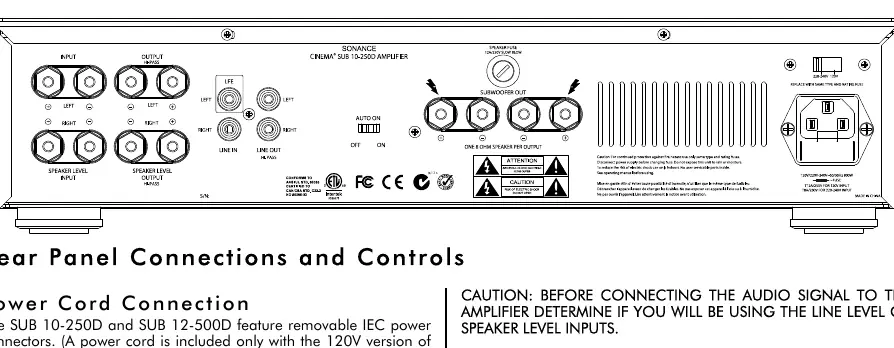
The amplifiers feature a removable IEC power cord. Connect the female end to the rear panel and the male end to a grounded 20-amp wall outlet. Do not plug the amplifier into a convenience outlet on other audio components. For audio input, use either the LFE line input or the speaker-level inputs, but never both simultaneously. If using speaker-level inputs, ensure correct polarity (+ to + and - to -) to maintain proper phase.
Calibration and Controls
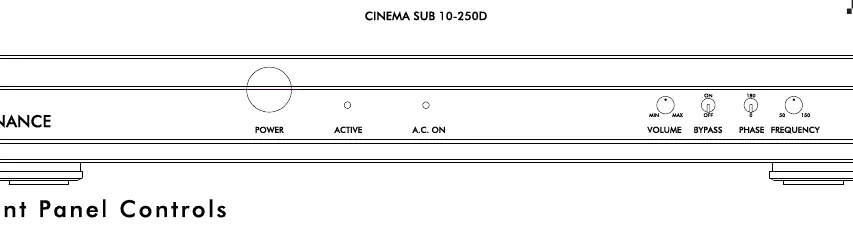
The front panel includes controls for volume, phase (0 or 180 degrees), and frequency. The bypass switch should be set to ON if your receiver or processor has a built-in subwoofer crossover. If using an external crossover, set the bypass switch to OFF to enable the amplifier's internal frequency and volume controls. For optimal performance, use an SPL meter to calibrate the subwoofer levels with your main speakers.
Maintenance and Troubleshooting
The unit should be cleaned only as recommended by the manufacturer. If the active light flashes red, the amplifier has entered protect mode, likely due to a short circuit, overheating, or an internal fault. Turn the unit off immediately and investigate the cause. If the amplifier fails to operate, check the A.C. fuse and the speaker fuse on the rear panel, replacing them only with the exact same type and rating.
Practical help
Common problems
Active light flashing red
Indicates protect mode due to short, overheating, or internal fault. Turn off immediately and check connections.
Hum or noise
Move the unit away from other sensitive components or use nylon washers when rack-mounting to prevent ground loops.
No sound
Check power connection, verify input signal, and ensure the correct input type (Line vs Speaker) is selected.
Before use
- Ensure 4 inches of clearance on all sides.
- Verify the power source matches the unit requirements.
- Check that the bypass switch is set correctly for your system.
- Confirm speaker wire polarity is correct.
- Ensure the unit is on a level, hard surface.
- Verify all system connections before plugging into the wall.
Specs in practice
- Output Power RMS
- The continuous power output capability of the amplifier.
- Low-Pass Crossover
- Determines the frequency range the subwoofer handles.
- Signal-to-Noise Ratio
- Indicates the clarity of the audio signal relative to background noise.
- Rack Space Requirement
- The amount of vertical rack space (2U) needed for installation.
Images and diagrams
- Rear panel contains power input, fuse holders, line/speaker inputs, and outputs.
- Front panel features power switch, status lights, and adjustment knobs for volume, phase, and frequency.
- Speaker output terminals are connected in parallel; only one driver per terminal pair.
Model compatibility
- Compatible with surround receivers having LFE or line-level subwoofer outputs.
- Can be used with standard stereo systems via speaker-level inputs.
- Requires 20-amp grounded wall outlet.
- Not compatible with bridged receiver outputs.

Manual page author
Emily Carter
User documentation editor
Prepares concise manual descriptions and highlights the most useful setup, operation, and maintenance information for readers.