Lighting / Fixtures
Installation Guide for Globe 2-Light Flush Mount 61181
Complete installation and maintenance guide for the Globe 2-Light Flush Mount (model 61181). Includes step-by-step assembly instructions, electrical safety precautions, and bulb requirements.
Quick answers from the manual
Quick answer
- This manual provides instructions for installing the Globe 2-Light Flush Mount (61181). It covers safety precautions, electrical connection, assembly, and maintenance. p. 1, 2, 3, 4
Key actions
- Turn off power at the breaker or fuse box before installation p. 3
- Install E26 bulbs (max 60W) p. 4, 6
First start
- Ensure power is off, mount the bracket, connect wires, secure the fixture, install bulbs, and attach the shade. p. 5, 6, 7
Problems and fixes
Loose fixture
Tighten screws every 90 days
p. 2Technical specifications
| Parameter | Value | Meaning | Pages |
|---|---|---|---|
| Bulb Base | E26 | Standard medium base | p. 4 |
| Max Wattage | 60W | Maximum power per bulb | p. 4 |
Where to find it in the PDF
- Safety and Maintenance p. 2
- Electrical Installation p. 3
- Parts List p. 4
- Assembly Steps p. 5, 6, 7
Table of contents
Manual images
Click an image to enlargeQuick Guide
This guide provides instructions for the installation and maintenance of the Globe 2-Light Flush Mount (model 61181). Before beginning, ensure you have all components and that the power is disconnected at the breaker or fuse box. Always consult a qualified electrician if you are unsure about the branch circuit conductor.
Components
Ensure the package contains the following items:
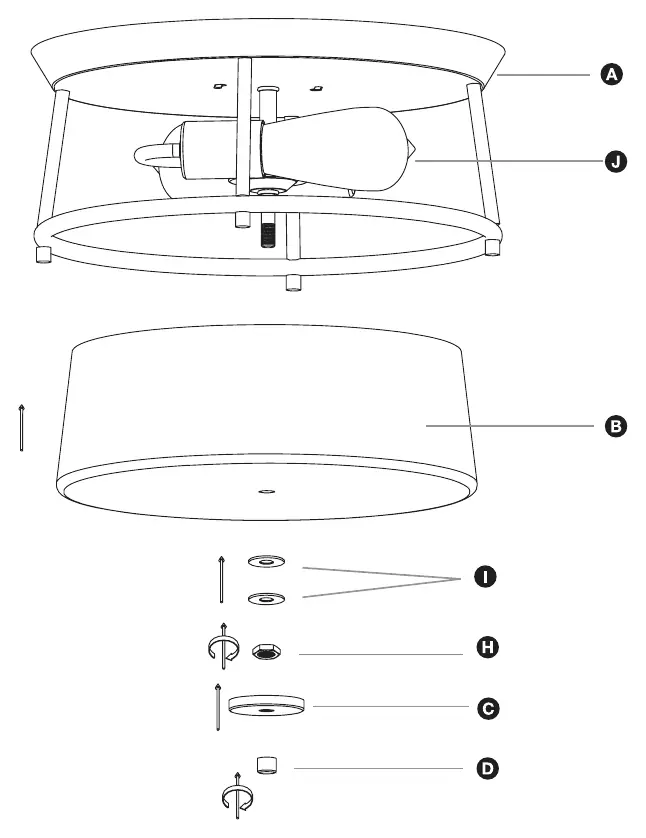
- A: Fixture body
- B: Shade
- C: Decorative cap
- D: Finial
- E: Mounting bracket
- F: Wire connectors
- G: Mounting screws
- H: Nut
- I: Washers
- J: E26 bulbs (2x)
Electrical Installation
Warning: Risk of electric shock. Disconnect power before starting.
- Place the wall switch to the "OFF" position.
- Turn off the main power at the breaker panel or unscrew the specific fuse providing power to the installation area.
- Verify power is off before proceeding.
Assembly Steps
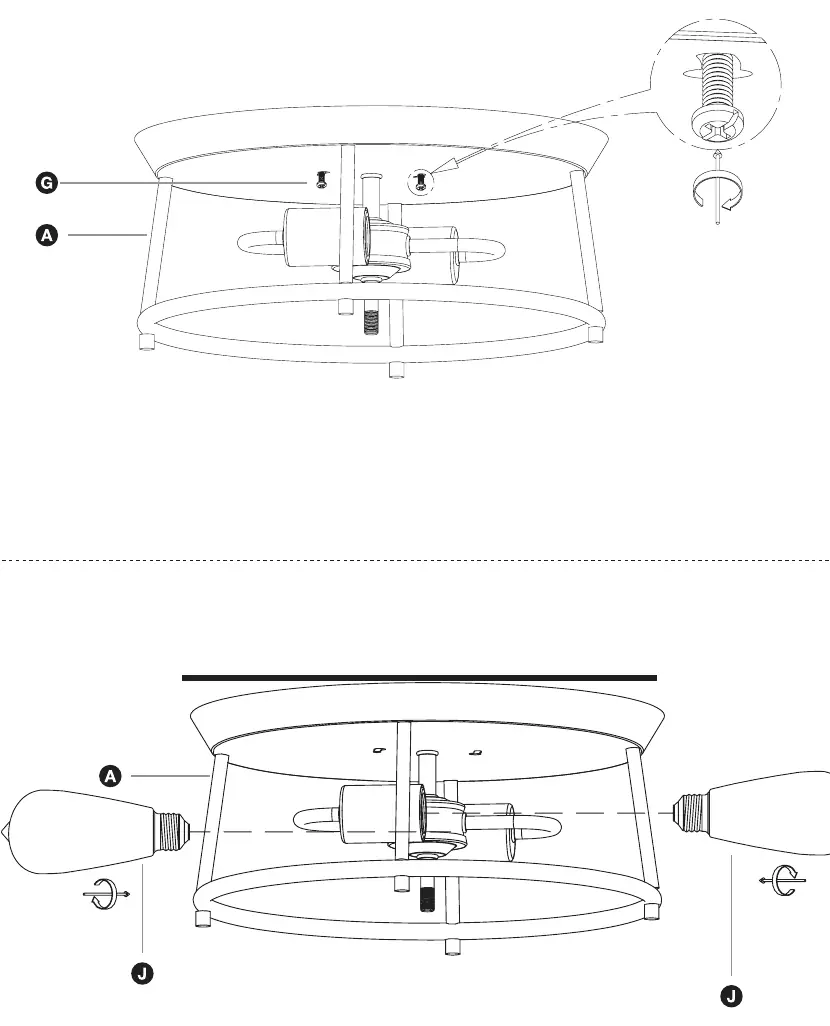
- Mounting: Attach the mounting bracket (E) to the junction box using the provided screws (G).
- Wiring: Connect the fixture wires to the house supply wires using the wire connectors (F).
- Fixture Attachment: Secure the fixture body (A) to the mounting bracket (E).
- Bulb Installation: Screw the E26 bulbs (J) into the sockets. Do not exceed 60 watts per bulb.
- Shade Installation: Place the shade (B) over the fixture, secure with washers (I), nut (H), decorative cap (C), and finial (D).
Cleaning & Maintenance
- Keep the product away from direct heat and sunlight to prevent fading or melting.
- Regularly vacuum or lightly brush the fabric shade to remove dust.
- Periodically (every 90 days) check that all screws are fully tightened.
Lamp Care
Always switch off, unplug, and allow the bulb to cool before cleaning or replacing. Use a soft, clean, dry cloth for cleaning. Only use the recommended bulb type (E26) and do not exceed the maximum wattage to avoid fire hazards.
Manufacturer information
Globe Electric
Practical help
Common problems
Fixture is unstable
Ensure all screws are fully tightened. Check every 90 days.
Risk of electric shock
Always disconnect power at the breaker or fuse box before assembly or cleaning.
Before use
- Verify all components (A-J) are present
- Turn off power at the wall switch and breaker/fuse box
- Ensure the assembly area is clean and level
- Confirm bulb type is E26 (max 60W)
Images and diagrams
- Step 1: Mounting bracket installation
- Step 2: Wiring connections
- Step 3: Fixture body attachment
- Step 4: Bulb installation
- Step 5: Shade and hardware assembly
Model compatibility
- Requires standard junction box
- Not for use with bulbs exceeding 60W

Manual page author
Emily Carter
User documentation editor
Prepares concise manual descriptions and highlights the most useful setup, operation, and maintenance information for readers.