Power / Batteries Chargers
Goal Zero Boulder 100BC Solar Panel User Guide
Comprehensive user guide for the Goal Zero Boulder 100BC solar panel, covering setup, chaining, technical specifications, and maintenance.
Table of contents
Manual images
Jump to the sectionProduct Overview
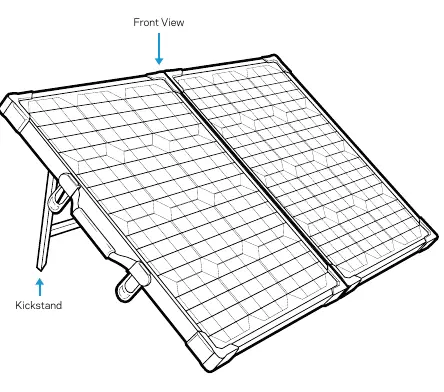
The Goal Zero Boulder 100BC is a portable, high-efficiency monocrystalline solar panel designed for outdoor power needs. Its briefcase-style, foldable design makes it highly portable, while the integrated kickstand allows for easy angling toward the sun to maximize solar intake. The panel is built to withstand various weather conditions, making it suitable for both permanent and semi-permanent installations.
Getting Started
To begin charging, simply unfold the panel and use the attached kickstand to position it directly toward the sun. Connect the 8mm blue-ringed cable into the INPUT port of your compatible Goal Zero Yeti or Sherpa power station. For the best charging performance, it is recommended to reposition the solar panel throughout the day to track the sun's movement.
Chaining Panels
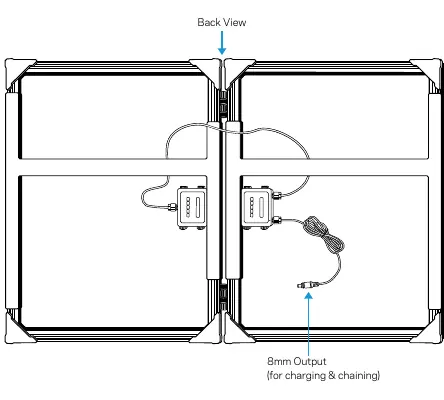
You can increase your power output by chaining multiple Boulder 100BC panels together. For configurations exceeding 150W, you will need to purchase a specific combiner cable from Goal Zero. Please contact customer support to ensure you select the correct cable for your specific setup. When chaining, insert the 8mm blue-ringed connector of one panel into the 8mm input port of another compatible Boulder solar panel.
Safety and Maintenance
While the Boulder 100BC solar panels are weather-resistant and designed to withstand the elements, the devices you are charging (such as power stations or power packs) are not. Always ensure that your connected power stations are kept dry and protected from dust, rain, and snow. The panel itself does not require complex maintenance; simply keep the surface clean from debris to ensure maximum efficiency.
Charging Capabilities
The Boulder 100BC is specifically designed to charge Goal Zero Sherpa power packs and Yeti portable power stations. It is not intended for direct charging of small USB devices like phones or headlamps; for those applications, consider using Goal Zero's foldable Nomad solar panels. The charging time for your power station will vary based on the size of the battery, weather conditions, and temperature.
Manufacturer information
Goal Zero
Practical help
Common problems
Slow charging times
Ensure the panel is angled directly toward the sun and reposition it throughout the day as the sun moves.
Need to chain more than 150W
You must purchase a specific combiner cable from Goal Zero. Contact customer support for assistance.
Charging USB devices directly
The Boulder 100BC is designed for power stations. Use a Nomad solar panel for direct USB device charging.
Before use
- Ensure the solar panel is unfolded completely.
- Check that the kickstand is securely deployed.
- Verify the 8mm blue-ringed cable is free of damage.
- Confirm the target power station is compatible.
- Position the panel in an area with direct sunlight.
Specs in practice
- Open Circuit Voltage
- 18-22V, the voltage range of the panel when not connected to a load.
Images and diagrams
- Front View: Shows the solar cells and the integrated kickstand for positioning.
- Back View: Highlights the 8mm output cable used for charging and chaining.
Model compatibility
- Compatible with Goal Zero Yeti and Sherpa power stations.
- Can be chained with other Boulder panels featuring an 8mm input.
- Not designed for permanent roof mounting; use Boulder 50 or 100 for that purpose.

Manual page author
Michael Turner
Technical manual editor
Reviews PDF manuals for structure, safety notes, and practical product details so readers can find the right information quickly.