Power / Batteries & Chargers
User Manual for Goal Zero Flex 100i Solar Panel
Quick guide for the Goal Zero Flex 100i Solar Panel. Learn how to install, connect, and maintain your 100W flexible solar panel, including compatibility with Yeti power stations.
Table of contents
Manual images
Click an image to enlargeQuick Guide
The Goal Zero Flex 100i is a 100W flexible solar panel designed for various off-grid power applications. To use it, connect the 4mm solar connectors on the front of the panel to your desired device, combiner, or adapter. If connecting to a Goal Zero Yeti power station, you must use an MC4 to HPP adapter (SKU: 98014). Always ensure the panel is secured to a stable surface during use to prevent damage.

In the Box
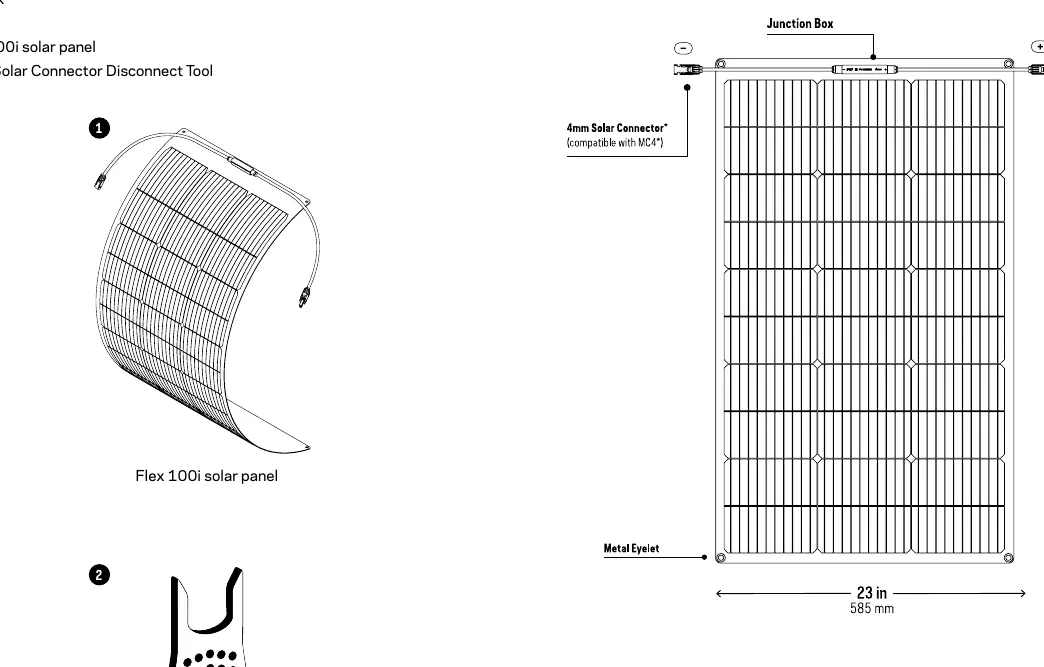
- Flex 100i solar panel
- 4mm Solar Connector Disconnect Tool
Get to Know Your Gear
The panel features a junction box, 4mm solar connectors (compatible with MC4), and metal eyelets at each corner for mounting. The panel is flexible, with a minimum bend radius of 0.4 meters in the lengthwise direction.
Installation and Usage
The Flex 100i includes four mounting holes, one in each corner, for installation in your desired configuration. The panel must be secured or fastened to a stable surface to ensure efficiency and prevent damage over its lifetime. If you have concerns about installation, consult a professional.
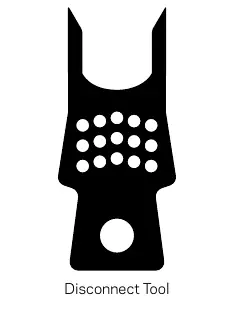
Disconnecting Panels: The included 4mm Solar Connector Disconnect Tool is required to safely disconnect the solar connectors. Push the prongs of the tool onto the connector tabs to release the connection.
Connecting Multiple Panels
When connecting multiple panels, you must consider the voltage input limitations of the device you are charging. The total input is affected by whether you use a series or parallel configuration. Consult the Goal Zero website for information on the optimal setup for your specific device.
Technical Specifications
- Rated Power: 100W
- Cell Type: Monocrystalline
- Operating Voltage: 17.1V
- Ingress Protection: IP67
- Weight: 2.1 kg (4.63 lbs)
- Dimensions: 990 x 585 x 2.5 mm
- Operating Temperature: -40° to 85°C
Frequently Asked Questions
Can I plug the Flex 100i directly into a Goal Zero Yeti? No, you need an MC4 to HPP adapter.
Can I chain my Flex 100i with third-party solar panels? No, the Flex 100i is not guaranteed to work with other manufacturers' products, and doing so may cause damage or fire.
How flexible is the Flex 100i? It is most flexible lengthwise and can bend at a 0.4m radius. Do not force it to bend tighter than this, as it may cause permanent damage.
Manufacturer information
Goal Zero
Practical help
Common problems
Cannot connect to Goal Zero Yeti power station.
You need an MC4 to HPP adapter (SKU: 98014) to connect the Flex 100i to a Yeti.
Cannot disconnect the solar connectors.
Use the provided 4mm Solar Connector Disconnect Tool. Push the prongs onto the connector tabs to release the lock.
Panel is not bending as expected.
The panel is most flexible lengthwise. Do not force it to bend tighter than a 0.4m radius, as this can cause permanent damage.
Before use
- Inspect the panel for any physical damage.
- Ensure you have a stable surface for mounting using the corner eyelets.
- Verify the voltage input limits of the device you intend to charge.
- Check if you require an adapter (like the MC4 to HPP) for your power station.
- Ensure you have the disconnect tool handy for future maintenance.
Specs in practice
- Rated Power (100W)
- The maximum power output of the panel under ideal sunlight conditions.
- Minimum bend radius (0.4m)
- The tightest curve the panel can safely handle without sustaining permanent damage.
Images and diagrams
- The manual provides a diagram showing the location of the junction box, 4mm connectors, and mounting eyelets.
- A workflow diagram illustrates the 'Collect, Store, Power' process, showing the panel connecting to a power station and then to appliances.
- A specific diagram shows how to use the disconnect tool on the connector tabs.
Model compatibility
- Compatible with standard MC4 connectors.
- Requires MC4 to HPP adapter for Goal Zero Yeti power stations.
- Not guaranteed to work with third-party solar panels.

Manual page author
David Miller
Documentation analyst
Organizes user manual content into clear summaries, with attention to model details, product context, and everyday usability.