Power / Batteries & Chargers
User Manual for Goal Zero Sherpa 100PD Power Bank
Quick guide for the Goal Zero Sherpa 100PD Power Bank. Learn how to charge the device, use the USB-C and wireless charging features, and troubleshoot common issues.
Table of contents
Manual images
Click an image to enlargeQuick Start Guide
Ensure your Goal Zero Sherpa 100PD is fully charged before its first use. Keep the unit plugged in when not in use to maintain battery health. The device features a bidirectional USB-C PD port, USB-A ports, and wireless charging capabilities.
Device Overview
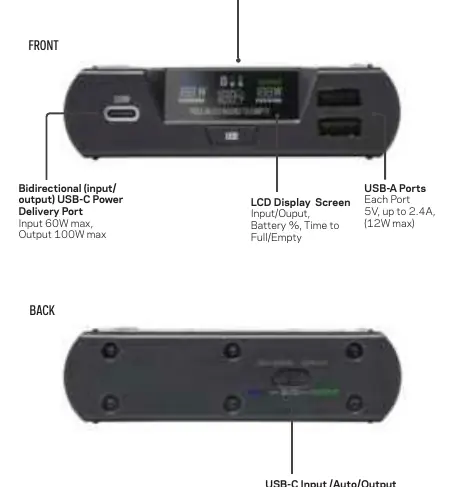
The front of the device contains the bidirectional USB-C Power Delivery port, the wireless charging pad (15W max), the LCD display screen, and two USB-A ports. The back of the device features a selector switch to toggle the USB-C ports between Input, Auto, and Output modes.
Charging the Sherpa
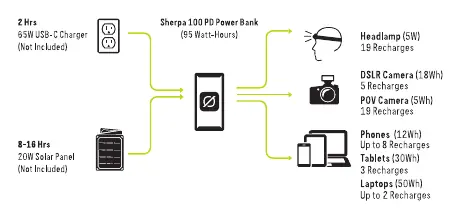
You can charge the Sherpa via USB-C or solar power. For USB charging, connect to a USB-C power source using the included cable. Using a 65W USB-C charger (sold separately) allows for a full recharge in approximately two hours. For solar charging, pair the Sherpa with a Goal Zero Nomad solar panel using a USB-A to USB-C cable.
Using the Sherpa
The device has buttons to control the display, wireless charging, and USB-A ports. The selector switch on the back is critical for USB-C PD functionality: Input mode allows the Sherpa to be charged, while Output mode allows the Sherpa to charge other devices. If you are charging a laptop, ensure the switch is set to 'Output' to prevent the Sherpa from attempting to charge from the laptop's battery.
Passthrough Charging
The Sherpa supports passthrough charging, allowing it to be charged while simultaneously charging other devices. Note that if the output power exceeds the input power, the Sherpa battery will drain.
Troubleshooting
If the port light turns red, an error has occurred; try resetting the port by pressing the corresponding on/off button. If the USB-C port is not charging your device, ensure the selector switch is set to 'Output' rather than 'Auto'. For wireless charging issues, ensure your phone is centered on the pad and capable of 15W wireless charging.
Technical Specifications
- Battery Capacity: 25600mAh @ 3.7V
- USB-C PD Input: 5V-20V up to 3A (60W max)
- USB-C PD Output: 5V-20V up to 5A (100W max)
- USB-A Output: 5V, up to 2.4A (12W max)
- Wireless Output: 15W max
- Operating Temperature: 32-104F (0-40C)
- Weight: 1.5 lbs (680 g)
Manufacturer information
Goal Zero
Practical help
Common problems
100W USB-C port not outputting 100W
Ensure the cable used is capable of 100W; use licensed and certified cables.
Wireless charging not reaching 15W
Ensure the phone is centered on the pad; battery temperature may limit wireless input.
Port light is red
An error has occurred; reset the port by pressing the corresponding on/off button.
USB-C port not charging device
Check the selector switch on the back; move to 'Output' if set to 'Auto'.
Before use
- Fully charge the unit before first use.
- Inspect the unit for dirt, dust, or moisture.
- Ensure proper ventilation during use.
- Use certified cables for optimal performance.
Specs in practice
- USB-C PD Input
- Up to 60W for recharging the power bank.
- USB-C PD Output
- Up to 100W for charging laptops and other devices.
- USB-A Output
- 12W max per port for smaller devices.
- Wireless Output
- 15W max for compatible smartphones.
Images and diagrams
- Front panel: USB-C port, wireless charging pad, LCD screen, and USB-A ports.
- Back panel: USB-C Input/Auto/Output selector switch.
Model compatibility
- USB-C PD ports are bidirectional.
- Wireless charging requires phone compatibility.
- Not chainable.

Manual page author
Michael Turner
Technical manual editor
Reviews PDF manuals for structure, safety notes, and practical product details so readers can find the right information quickly.