Power / Portable Power Stations
User Manual for BougeRV 100W/200W Portable Solar Panel
Quick guide for the BougeRV 100W/200W Portable Solar Panel. Learn how to connect to power stations, set up off-grid systems, and troubleshoot common power output issues.
Table of contents
Manual images
Click an image to enlargeQuick Guide
The BougeRV 100W/200W Portable Solar Panel is designed for portable power generation. It can be used with portable power stations, lead-acid batteries, or lithium batteries. For battery charging, a solar charge controller is required. Ensure the panel is placed in direct sunlight, free from shadows, and angled perpendicular to the sun for optimal performance.
Electrical Parameters
100W Model:
- Maximum Power (Pmax): 100W
- Max. Power Voltage (Vmp): 19.8V
- Open Circuit Voltage (Voc): 23.7V
- Max. Power Current (Imp): 5.05A
- Short Circuit Current (Isc): 5.33A
- Dimensions (Unfolded): 1082x655x35mm
- Weight: 4.59KG
200W Model:
- Maximum Power (Pmax): 200W
- Max. Power Voltage (Vmp): 19.8V
- Open Circuit Voltage (Voc): 23.7V
- Max. Power Current (Imp): 10.1A
- Short Circuit Current (Isc): 10.6A
- Dimensions (Unfolded): 2200x647x35mm
- Weight: 8.23KG
How to Use
Solar Power Station System
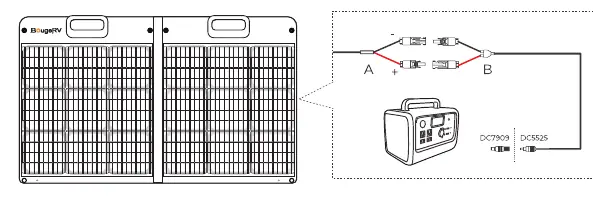
Connect the MC4 connectors of the solar panel to the MC4 to DC7909 cable. This cable can then be connected to various power stations. If your power station uses a different input, ensure your cable is equipped with MC4 connectors to interface with the solar panel.
Solar Off-grid System
To charge batteries (Lead-acid or Lithium):
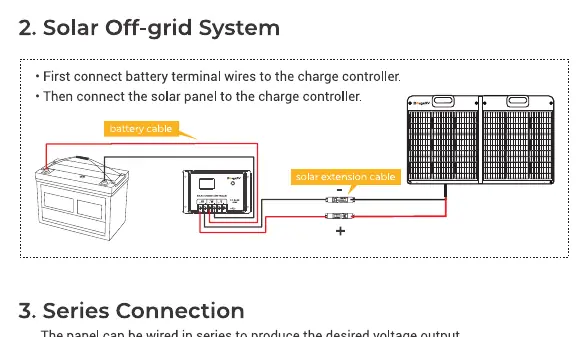
- First, connect the battery terminal wires to the solar charge controller.
- Then, connect the solar panel to the charge controller using a solar extension cable.
Series and Parallel Connections
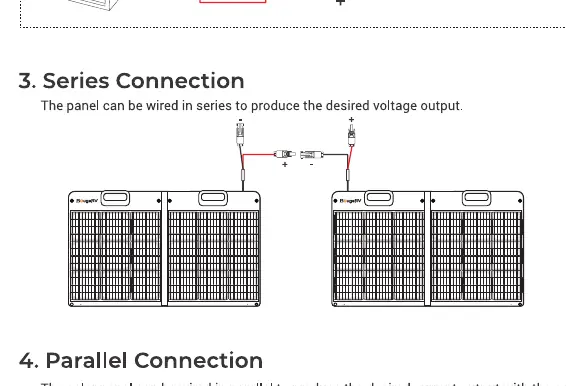
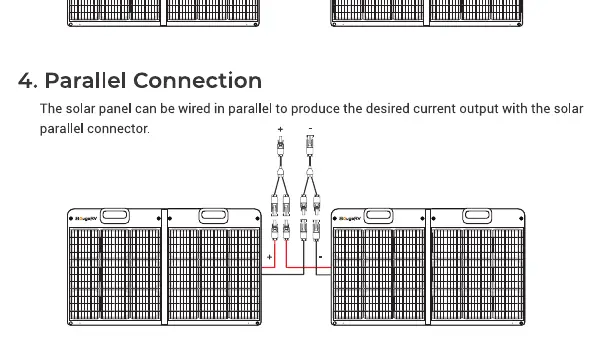
The panels can be wired in series to increase voltage output or in parallel to increase current output. Use appropriate solar parallel connectors for parallel configurations.
Troubleshooting
If you experience low or no output power, check the following:
- Light Intensity: Ensure the panel is in direct sunlight. Latitude, altitude, and sun angle affect performance.
- Installation Angle: The panel works best when perpendicular to the sun.
- Temperature: High surface temperatures (above 77°F/25°C) can decrease output.
- Shadows and Dust: Partial shading or dust accumulation can cause "hot spots" and significantly reduce power. Keep the surface clean.
- Load Limits: Ensure the power station's input parameters (voltage/current) are compatible with the solar panel output.
Warranty
BougeRV provides an 18-month warranty service. To apply for warranty, provide the order number and the serial number (bar code) attached to the front of the solar panel. For support, contact [email protected].
Manufacturer information
BougeRV
Practical help
Common problems
Low or no output power
Check for shadows, dust, or bird droppings on the panel. Ensure the panel is angled correctly toward the sun. Verify that the power station's input limits are not restricting the power intake.
Damaged or missing parts upon arrival
Send relevant pictures and your order number to [email protected] immediately.
Before use
- Ensure the solar panel surface is clean and free of debris.
- Verify that the power station or battery input parameters match the solar panel output.
- Ensure all cables have compatible MC4 connectors.
- Check that the solar charge controller is used when charging batteries.
Specs in practice
- Vmp (Max. Power Voltage)
- The voltage at which the solar panel produces maximum power.
- Voc (Open Circuit Voltage)
- The maximum voltage the panel can output when not connected to a load.
- Imp (Max. Power Current)
- The current at which the solar panel produces maximum power.
- Isc (Short Circuit Current)
- The maximum current the panel can output when the terminals are shorted.
Images and diagrams
- Connection to power station using MC4 to DC7909 cable.
- Off-grid system setup connecting battery to charge controller, then panel to controller.
- Series connection diagram for increasing voltage.
- Parallel connection diagram for increasing current.
Model compatibility
- Compatible with power stations that accept MC4 connector inputs.
- Lead-acid and Lithium batteries require a solar charge controller to be used with these panels.

Manual page author
David Miller
Documentation analyst
Organizes user manual content into clear summaries, with attention to model details, product context, and everyday usability.